KnowledgeDemon
- By
- Addons
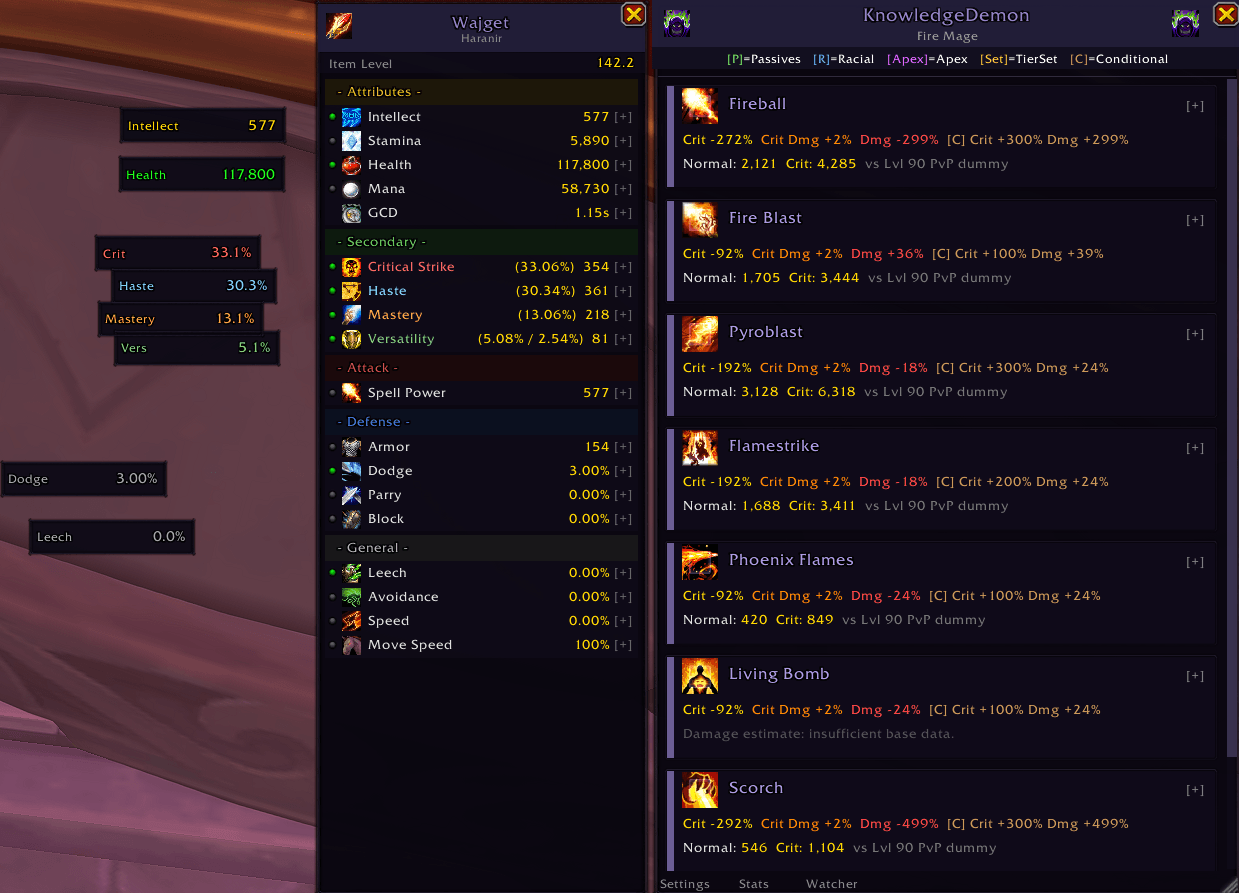
KnowledgeDemon analyzes your active talent loadout, gear, class, and race to show you exactly how your chosen talents, passives, and stats modify each of your spells.
Screenshot 2026-03-18 111900.png
Screenshot 2026-03-20 032839.png
Screenshot 2026-03-18 112723.png
Screenshot 2026-03-18 112814.png
Description
KnowledgeDemon analyzes your active talent loadout, gear, class, and race to show you exactly how your chosen talents, passives, and stats modify each of your spells.
Detailed list with /kd. Customizeable with /kd settings
For each tracked spell it calculates:
• Total Crit Chance bonus (%)
• Total Crit Damage bonus (%)
• Total Damage bonus (%)
• Total Heal bonus (%)
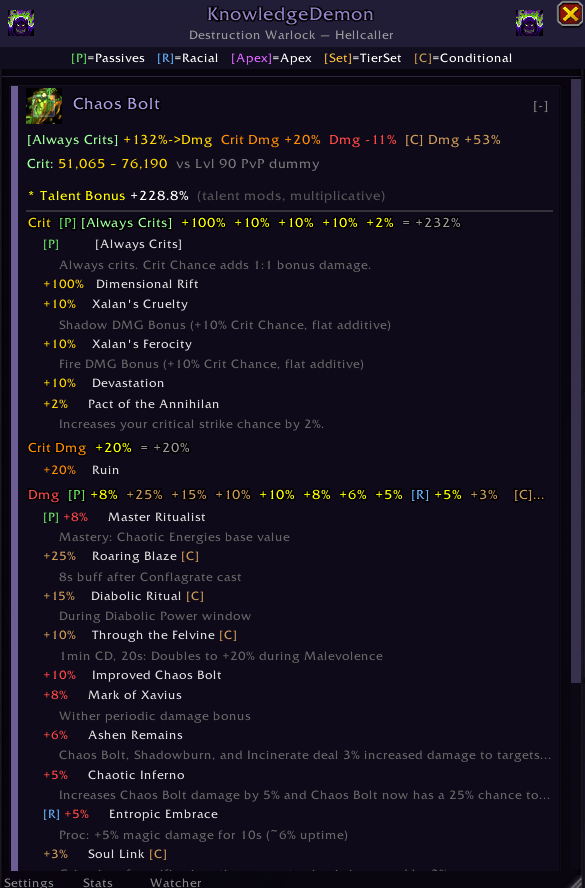
• Per-talent source breakdown for every modifier
• Expected Dmg Range against Lvl 90 Training Dummy (SimC model)
• Conditional modifiers shown separately (amber [C] tags)
• Modifier sources: talents, spec passives, racials, hero talents, apex talents, tier sets
All 13 classes, all playable races, and 40 specializations supported.
Tracked spells across 4 categories (damage, heal, utility, buff).
KD v1.5: Performance Overhaul
• Near-zero combat overhead when KD windows are closed (a few boolean checks, no API calls or timers)
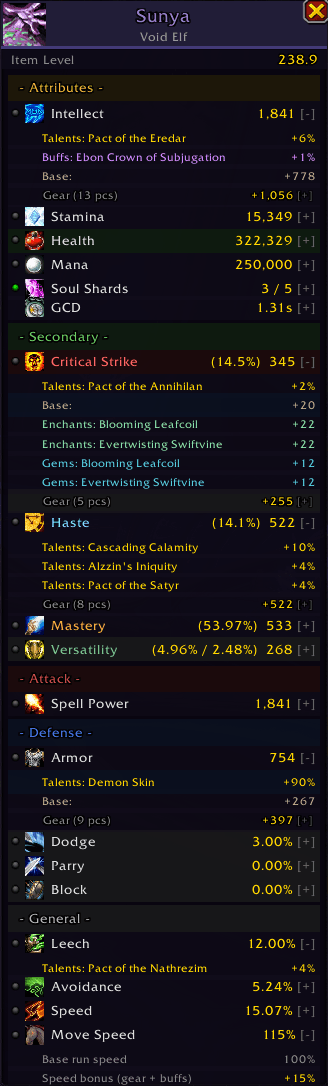
• Full stat source panel: see exactly where every point of Crit, Haste, Mastery, and Versatility comes from broken down by gear, enchants, gems, talents, racials, buffs, and base stats
• Draggable stat watcher overlays for any stat (Crit %, Mana, Spell Power, etc.)
• Class resource bar: Soul Shards, Holy Power, Chi, Combo Points, Runic Power, Fury, Essence, and more toggle from the stat panel or /kd resource
• Drag-to-reorder spell cards
• Category filter bar (damage / heal / utility / buff / all)
• Buff/utility spells shown as reference cards with spell descriptions
• Class buff reminders ("Acedia" system) for missing consumables and self-buffs
• Debug mode greatly enhanced (/kd debug)
KD v1.4: Broad Class Support
• Expanded from Destruction Warlock to all 13 classes / 39 specs
• Stat source tracking and watcher overlays added
• Buff/consumable reminders (Acedia)
• General cosmetic, performance, and UI enhancements
Extremely customizeable
Spellbar Tooltips, Talent Tree Tooltips, Stat Watcher, Resource Bar, and all settings are adjustable.
Disable features or partially disable. IE, no modifier tooltips on spells, only talent tree.
(Bug fix for partial incoming)
Please use /kd help if you have any bugs or issues. Debug reports help me fix problems faster.
Future updates: (KnowledgeDemon is being rebuilt as a All-in-one Addon. If you have issues with the current one that need to be resolved please comment / visit Discord and I will assist)
----------------------------------------------------------------
SLASH COMMANDS
----------------------------------------------------------------
/kd Toggle the main KnowledgeDemon analysis window.
/kd settings Open the settings panel (also accessible from the main window).
/kd stats Toggle the character stat panel (gear sources, stat breakdowns).
/kd resource Toggle the class resource bar (Soul Shards, Holy Power, etc.)
/kd watcher Toggle buff/consumable alerts (Acedia system).
/kd watch <stat> Toggle a stat watcher overlay (e.g. /kd watch crit, /kd watch mana).
/kd tooltip Toggle spell tooltip injection on/off.
/kd refresh Force a full re-scan of talents and recalculate all modifiers.
/kd resetorder Reset spell card order to default.
/kd help Print command reference to chat.
Debug / Diagnostic
/kd debug Toggle debug mode. Prints full state dump (talents, modifiers, stats).
/kd sources Stat source diagnostic: gear vs API comparison, unknown enchants/gems.
/kd perf Show performance and memory stats.
/kd dump Export raw talent data for current spec.
These can all be toggled from the settings menu except for debug commands.
----------------------------------------------------------------
MAIN WINDOW
----------------------------------------------------------------
Open with /kd. The window is:
• Draggable: click and drag the title bar
• Resizable: drag the bottom-right resize grip
• Scrollable: mouse wheel
• Persistent: position, size, and card order saved between sessions
Each spell appears as a card showing:
• Spell icon and name
• Compact summary row: Crit +15% Crit Dmg +30% Damage +18%
Click a card header (or [+]) to expand. Expanded view shows:
• Per-modifier-type breakdown with inline sources
e.g. Crit Dmg +20 Ruin +10 Chaos Incarnate = +30%
• Indented per-talent lines with condition notes
e.g. +10 Eradication (10s buff after Chaos Bolt)
• Estimated damage range (SimC model: base × talents × vers × crit × armor)
Hold and drag cards to reorder them. Order is saved per character.
Filter bar at top: All / Damage / Heal / Utility / Buff.
Color coding:
Gold: Crit Chance
Orange: Crit Damage
Red: Damage / Heal bonus
Amber: Conditional modifier [C]
----------------------------------------------------------------
CHARACTER STAT PANEL
----------------------------------------------------------------
Toggle with /kd stats or the button on the main window.
Shows all character stats organized by section:
• Attributes: Primary stat, Stamina, Health, Mana, Class Resource, GCD
• Secondary: Crit, Haste, Mastery, Versatility (rating + %)
• Attack: Attack Power, Attack Speed, Spell Power
• Defense: Armor, Dodge, Parry, Block
• General: Leech, Avoidance, Speed, Move Speed
Click any stat row to expand a full source breakdown:
See where each point comes from. Gear, enchants, gems, talents, racials, buffs, and base stats.
Click the dot next to any stat to open a floating Watcher overlay.
Watchers are draggable, persist across sessions, and update live.
Right-click a watcher to dismiss it.
Click the Soul Shards / Holy Power / etc row to toggle the class resource bar.
----------------------------------------------------------------
SPELL TOOLTIP INTEGRATION
----------------------------------------------------------------
Hover any tracked spell in your spellbook, on an action bar, or in a macro tooltip.
KnowledgeDemon appends a section showing:
Crit +15% +10 Devastation +5 Chaos Incarnate
Crit Dmg +30% +20 Ruin +10 Chaos Incarnate
Damage +18% +10 Eradication +8 Burn to Ashes
Only modifiers from your currently active talent loadout appear.
If no talents modify the spell, a brief note says so.
----------------------------------------------------------------
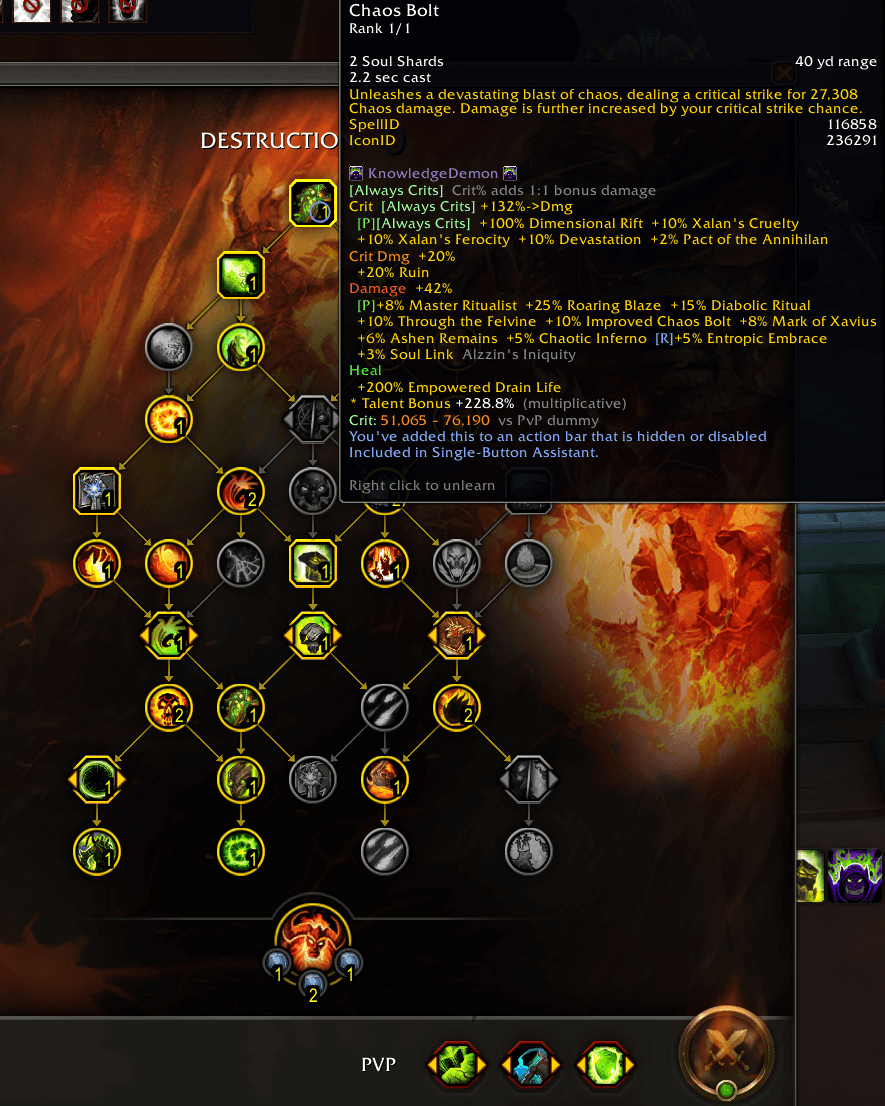
TALENT TOOLTIP INTEGRATION
----------------------------------------------------------------
Hover a talent node in the talent tree. KnowledgeDemon appends a section showing which tracked spells this talent affects:
Chaos Bolt Crit Dmg +20% Damage +10%
Incinerate Crit +8%
Matching spell cards in the main window glow gold so you can see impact at a glance.
----------------------------------------------------------------
TALENT TREE OVERLAY
----------------------------------------------------------------
When hovering a talent node, a floating panel appears near your cursor listing every affected spell and its modifiers. Auto-hides when you move away.
This app was built originally for Destruction Warlock and I've added broad support for other classes.
Future updates will add functionality as I have time/play. Please see included .txt for troubleshooting.
If commenting please be detailed. Thanks!
(For LUA Errors or for quicker troubleshooting please download the Belphegor add-on and join the discord - https://discord.gg/hU2cnNU)
The KnowledgeDemon Team