iRC: Guild Connect - Guild Manager & Professions (Roster, Challenge, Layer, Server Leaderboard, Race Locked, Guild Found)
- By
iRC connects WoW Classic guilds with shared rules, member verification, Guild Found support, guild leaderboards, a live guild map, guild-bank snapshots, and profession and recipe sharing.
Description
iRC: Guild Connect
I would appreciate it if you left a comment on CurseForge with your feedback, questions, issues, or suggestions.
Join the Discord for support and discussion.
🍺 Buy me a Beer!
iRC is a guild-management, community, and progression addon built specifically for World of Warcraft Forever.
It supports normal raiding, leveling, social, and community guilds, as well as Race-Locked, Self-Found, Class-Locked and Guild-Found challenge guilds.
iRC also provides a server-wide Guild Leaderboard where players can discover participating guilds, inspect their activity, and view published guild information.
Main Features
Guild Overview
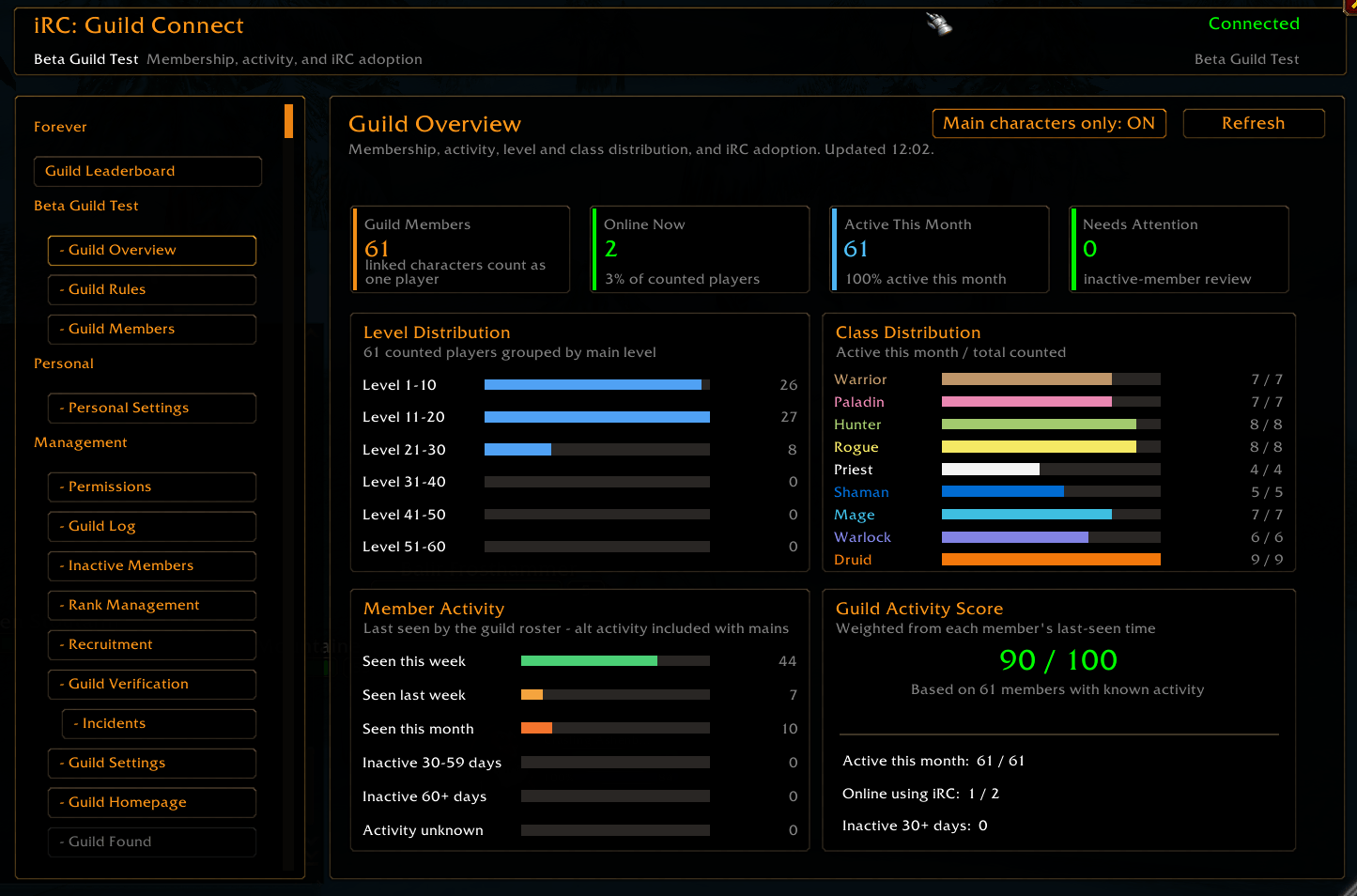
The Guild Overview gives members and officers a clear picture of their current guild.
It includes:
- Total guild members
- Players currently online
- Active members during the last 30 days
- Level distribution
- Class distribution
- Recent member activity
- iRC verification coverage
- Members requiring attention
- Guild activity score
Linked Mains and Alts can be counted as one player. If somebody is logged in on an Alt, their Main is still considered active and online.
Guild Members
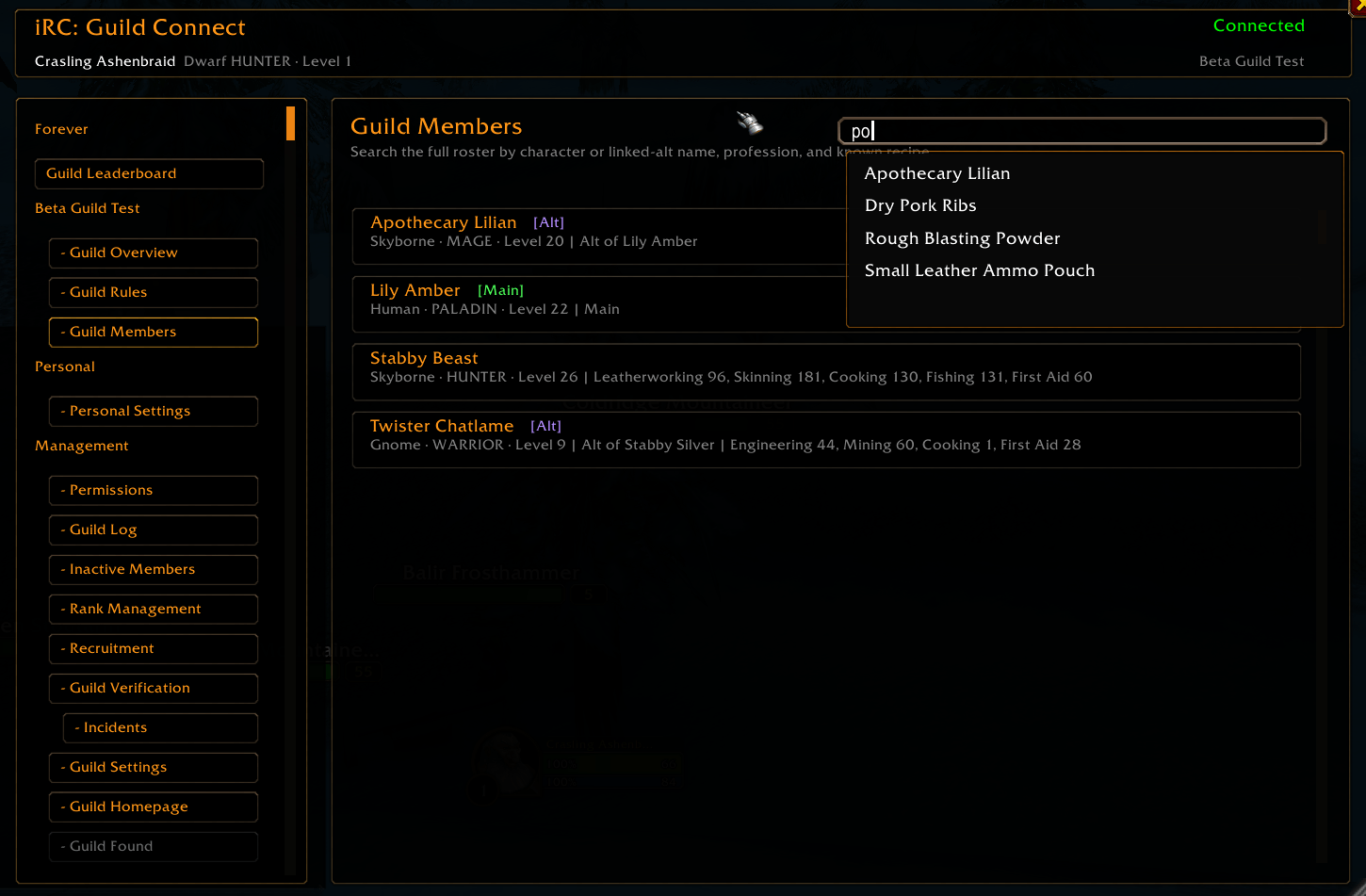
Browse and search the complete guild roster.
Search by:
- Character name
- Linked Main or Alt
- Personal Bank Alt
- Profession
- Known recipe
Member cards show online state, level, class, guild rank, progression status, and identity tags.
Open a detailed member profile to review:
- Guild rank and roster information
- Main, Alt, and Personal Bank relationships
- Join and rank history
- Last known activity
- Notes and tags
- Profession levels
- Recent guild events
Main, Alt & Personal Bank Characters
iRC can maintain a synchronized guild identity system.
Characters can be marked as:
- Main
- Alt
- Personal Bank Alt
Same-account characters can confirm automatically when both characters belong to the same guild. Characters on separate accounts use relayed confirmation requests so another player cannot silently claim somebody else’s character.
Personal Bank Alts are supported by Guild-Found rules without creating a shared guild-wide bank snapshot.
Shared Professions & Recipes
Guild members automatically share profession information and known recipes through iRC.
This makes it easy to search the roster for the correct crafter without repeatedly asking in Guild Chat.
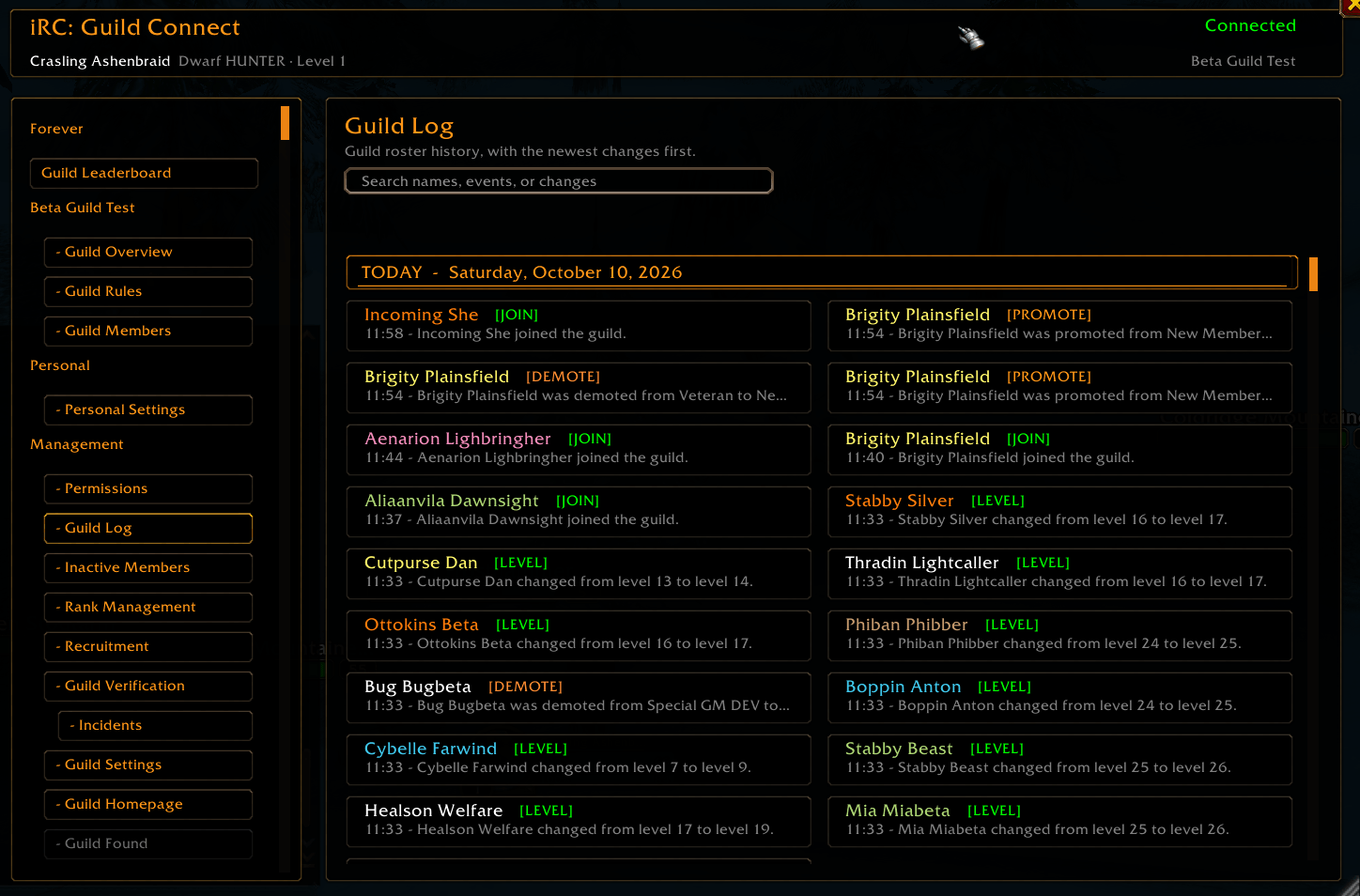
Guild Activity Log
The searchable Guild Log records important roster activity, including:
- Joins and rejoins
- Leaves and known kicks
- Promotions and demotions
- Level changes
- Name changes
- Note changes
- Members returning after a long absence
Events can include the responsible recruiter or officer when that information is available.
The log is synchronized between authorized guild clients and organized into clear dated sections.
Recruitment Management
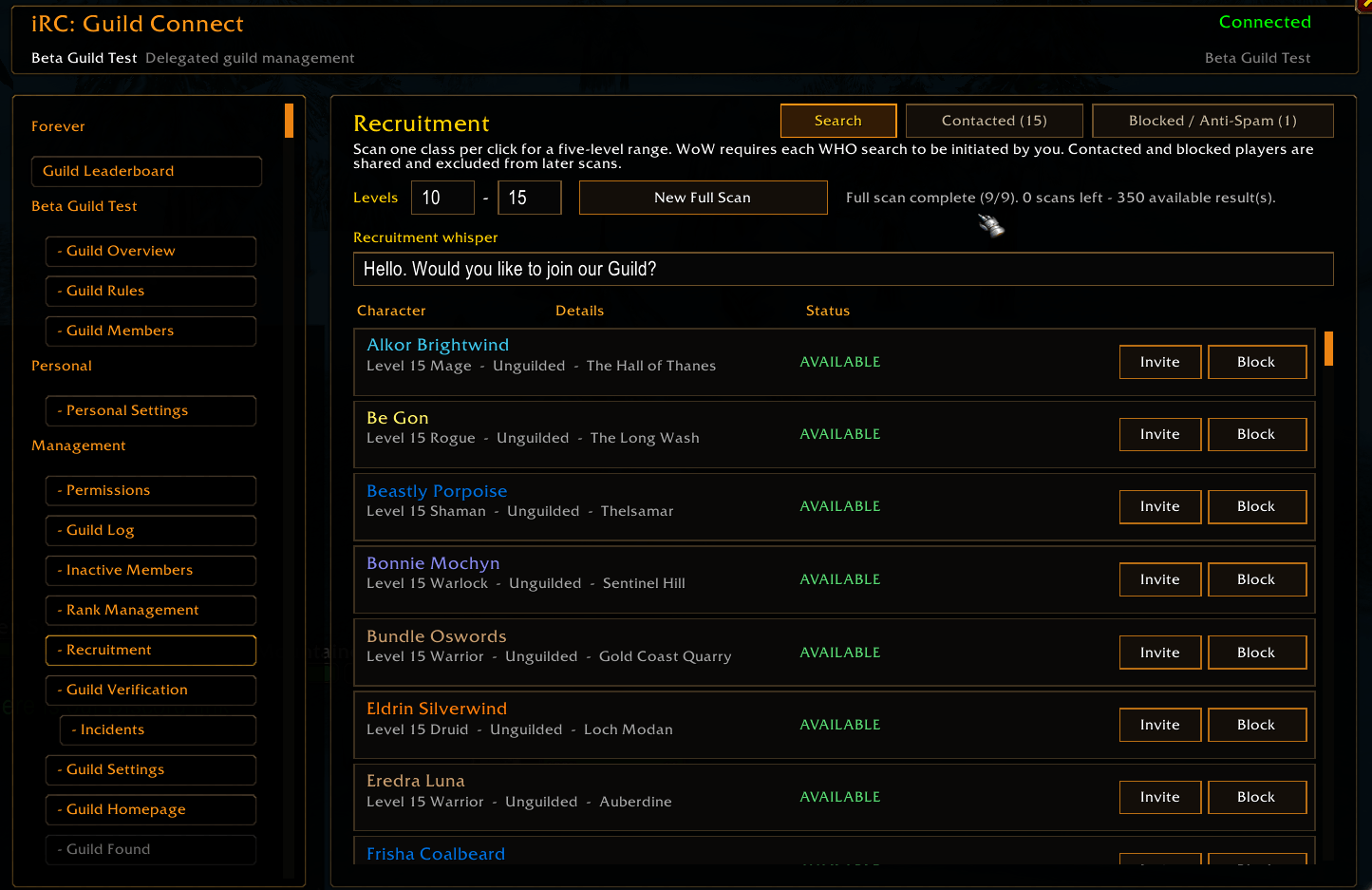
Authorized recruiters can search for potential guild members directly through iRC.
Features include:
- Selectable minimum and maximum levels
- One protected WHO search per class and click
- Completed and remaining scan counters
- Automatic filtering of already-guilded characters
- Detection of players who block guild invitations
- Customizable recruitment whispers
- One-click whisper and guild invitation
- Shared Contacted, Pending, Blocked, and Anti-Spam lists
- Accepted and declined invitation tracking
- Recruiter name and contact history
- Optional customizable welcome message after your invitation is accepted
Because WHO searches and guild actions are protected by WoW, every search or invitation must be initiated by the player.
Inactive Member Management
Authorized officers can review inactive guild members using a configurable offline threshold.
The review can:
- Exclude selected high-authority ranks
- Exclude linked Alts
- Show the member’s rank and approximate offline time
- Remove one confirmed member at a time
- Prepare a selectable removal queue
Every removal still requires a protected player click and remains subject to WoW’s native guild permissions.
Guild Rank Management
Authorized officers can review members by their current guild rank and move them toward another eligible rank.
Features include:
- Current-rank member counts
- Individual or selectable batch actions
- Multi-rank targets
- Verified one-rank-at-a-time promotion and demotion
- Automatic roster confirmation after every step
- Protection against changing equal-or-higher-ranked members
WoW does not allow addons to call the direct rank API safely. iRC therefore uses native protected promotion and demotion commands, requiring one player click for every rank step.
Guild Homepage
Guilds can publish their own profile inside iRC.
A Guild Homepage can include:
- Custom guild description
- Guild icon
- Active guild rules
- Invite contacts
- Selected leaderboard presentation
- Class breakdown settings
Invite contacts can be opened directly for whispering from the guild card.
Server Guild Leaderboard
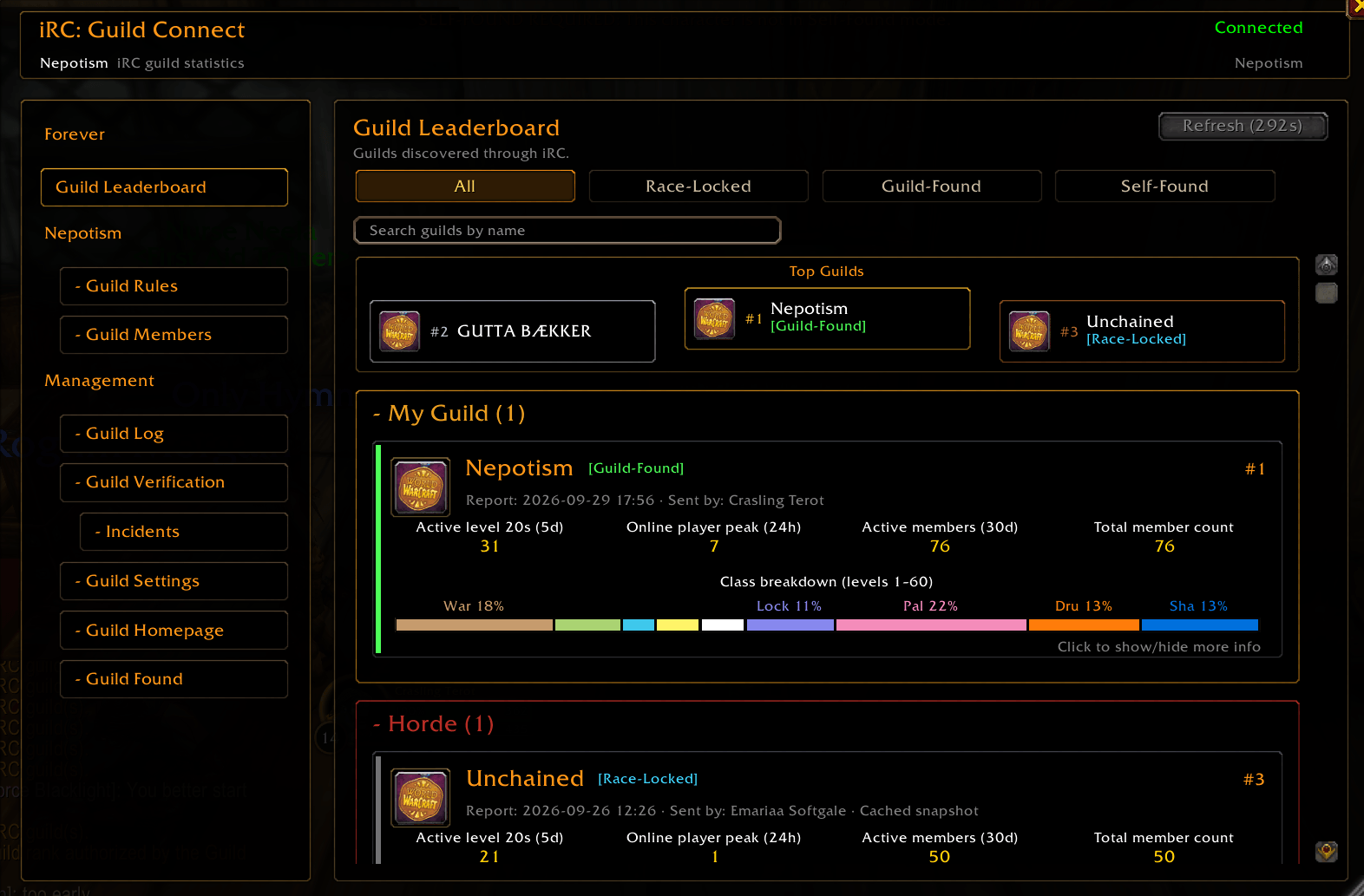
Discover participating guilds directly through iRC.
Guilds can be searched by name and filtered by:
- Normal (PvE / PvP / RP)
- Class-Locked
- Race-Locked
- Self-Found
- Guild-Found
The Leaderboard includes a dedicated My Guild section, followed by collapsible Alliance and Horde sections.
Each guild card can show:
- Active max level characters seen during the last five days
- Highest observed online count during the last 24 hours
- Active members during the last 30 days
- Total guild members
- Class breakdown
- Guild description and icon
- Invite contacts
- Active guild rules
- Report source
- Last update time
Guild reports expire automatically after five days so outdated guilds do not remain visible.
Recent reports can be relayed between iRC clients, allowing guild discovery without requiring the reporting guild to be online at that exact moment.
Guild Verification
Guild Masters and authorized officers can verify the complete guild roster when the active rules require it.
iRC can identify:
- Current iRC responses
- Missing or expired addon responses
- Incorrect character races under Race-Locked rules
- Missing Self-Found status
- Unverified Guild-Found status
- Economy or progression violations
- Offline members
- Members requiring officer attention
Authorized officers can request fresh verification, inspect member reports, contact members, and review recorded incidents.
Self-Found & Guild-Found Support
iRC can verify and enforce the guild’s configured Self-Found or Guild-Found progression rules.
When Guild-Found economy protection applies, iRC can:
- Allow transactions between eligible guild members
- Support confirmed Personal Bank Alts
- Block unauthorized external trades
- Block unauthorized outgoing mail
- Prevent restricted external mail from being collected
- Block Auction House use
- Monitor character money
- Detect reported gold discrepancies
- Record blocked actions for officer review
- Allow configured non-guild trade exceptions
Available exception categories include conjured items, Healthstones, selected quest items, Warlock summons, Mage portals, custom items, and separate incoming or outgoing lockpicking lists.
Optional Guild Rules
Every guild decides how iRC should operate.
A normal guild can use iRC for guild discovery, recruitment, professions, roster activity, member identity, maps, and management without enabling progression restrictions.
Available rules include:
- Require iRC
- Race-Locked progression
- Native racial language
- Self-Found
- Guild-Found
- Self-Found followed by Guild-Found
- Same-race groups
- Guild-only groups
- Configurable minimum levels
- Approved non-guild trade exceptions
- Guild Member Map
- Level and Hardcore death announcements
Only one primary Self-Found or Guild-Found progression mode can be active at once.
Hardcore death status and death announcements are used only on official Hardcore realms.
Guild Member Map
Guild members can optionally share temporary outdoor positions on the World Map.
Features include:
- Personal position-sharing controls
- Personal controls for displaying guild members
- Class-colored markers
- Character name, class, and level
- No position sharing inside instances
- No saved location history
- No map-layer information
The Guild Member Map must first be enabled in the guild’s shared rules.
Welcome Messages & Notifications
Guild Masters and authorized officers can configure shared notifications such as:
- Welcoming new members without a detected iRC response
- Officer Chat verification warnings
- Private warning whispers
- Guild Chat escalation warnings
Needs Attention reminders are personal and can be enabled or disabled independently.
Safe Group Enforcement
When race or guild-group restrictions are enabled, iRC can detect invalid groups and explain the violation.
Safety checks ensure iRC will:
- Never automatically leave during combat
- Never automatically leave inside an instance
- Never automatically leave while travelling by taxi
- Confirm violations with a delayed second check
- Protect existing groups when rules begin applying after login, reload, or level-up
- Clearly display unresolved unsafe groups
- Record confirmed incidents for authorized officers
Officer Tools & Incident Tracking
Eligible officer clients coordinate automatically so several officers do not send the same warning.
iRC can record:
- Missing-addon warnings
- Race-rule violations
- Group-rule violations
- Guild-Found economy blocks
- Approved trade-exception activity
- Gold discrepancies
- Time and location
- Involved characters
When members enter a Needs Attention state, authorized officers can receive combined notifications and periodic reminders.
Delegated Guild Permissions
The Guild Master can independently configure access by guild rank or grant additional access to specific members.
Delegated permissions are available for:
- Verification decisions
- Presence checks and automatic warnings
- Incident history
- Guild-Found trade exceptions
- Welcome notifications
- Guild Homepage management
- Guild Log and member history
- Main and Alt identity management
- Inactive-member review and removal
- Guild rank management
- Recruitment management
Guild Master authority remains controlled by the configured Guild Master rank.
Race Talk
Optional race-specific chat styles add readable roleplay flavor to messages you send.
Currently supported:
- Troll Talk
- Tauren Talk
- Night Elf Talk
- Undead Speak
Secure Guild Synchronization
Guild information such as rules, management settings, character identities, recruitment history, roster history, professions, and verification data is synchronized between participating guild clients.
Synchronization uses guild authority and validation:
- Guild Master data has the highest authority
- Authorized clients can relay established guild information
- First-time setup cannot replace an existing or relayed ruleset
- Conflicting packages are checked against sender identity, guild rank, timestamps, and fingerprints
- Large transfers are queued and processed gradually
- Communication is throttled to avoid unnecessary chat-channel traffic
- Combat-sensitive or secret values are rejected or deferred safely
Extra thanks to the Classic Era guild <WE are FORSAKEN> on EU Soulseeker and <The Fellowship> on Forever Beta for early addon testing.
iRC: Guild Connect - Guild Manager & Professions (Roster, Challenge, Layer, Server Leaderboard, Race Locked, Guild Found) Team