

![InviteSniper [Mage] logo](https://media.forgecdn.net/avatars/thumbnails/1633/660/64/64/639046485154463612.jpg)
InviteSniper [Mage]
- By
Automatic invite service, queue, and profit tracking for mage services. Configured for Mages, in TBC.
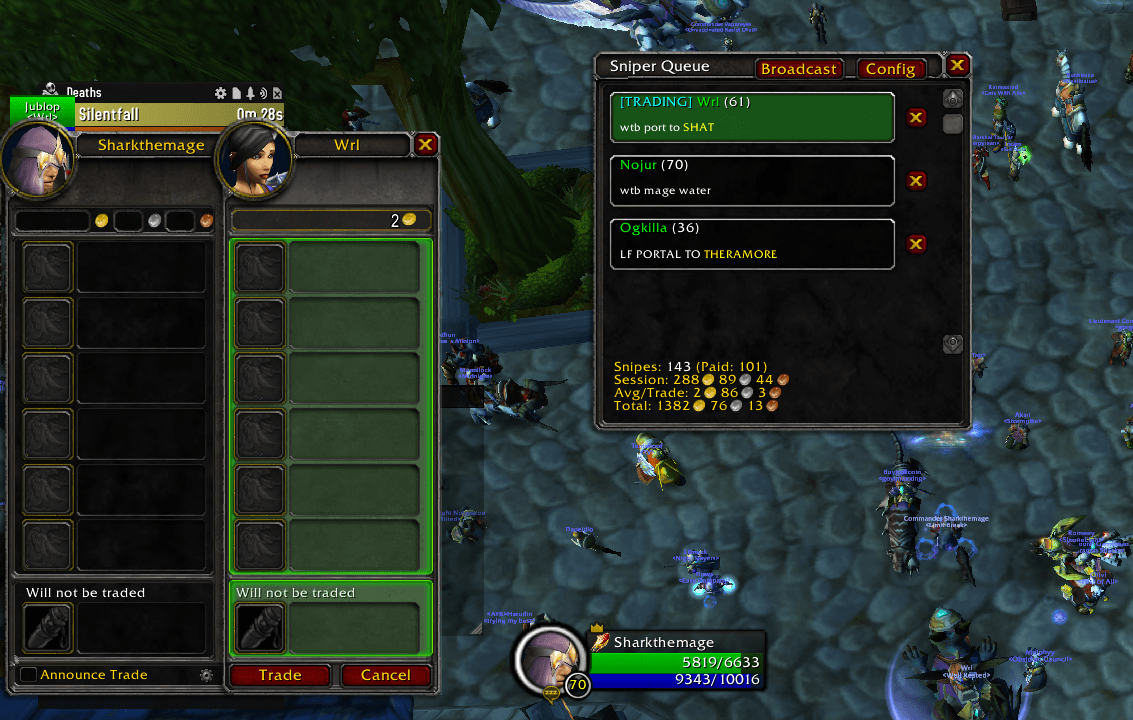
2.png
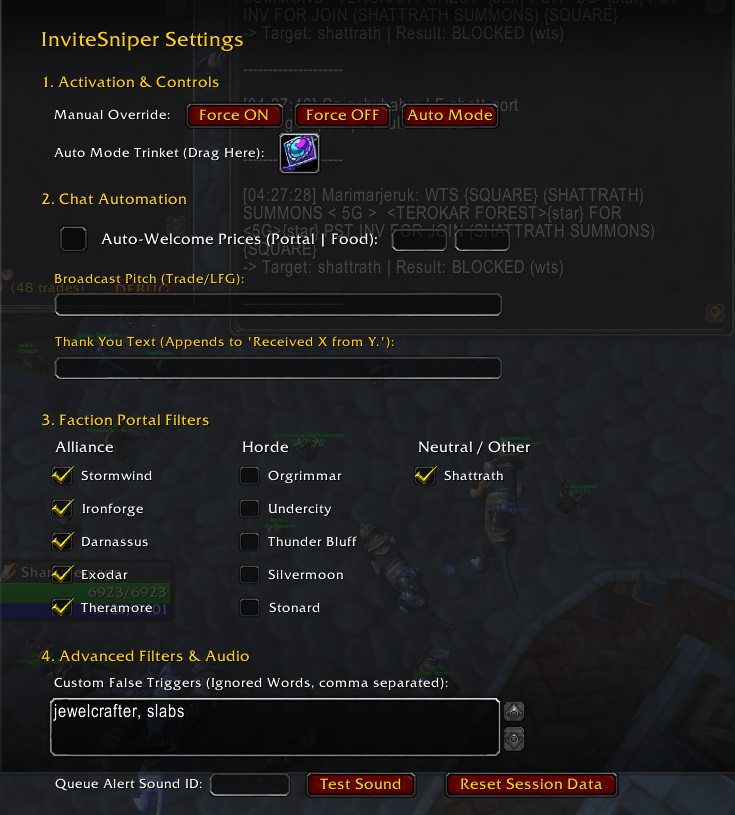
InviteSniperConfigPage.png
Description
InviteSniper v1.4.2 [Mage]
[v1.4.2- Fixes to make addon work properly with latest API code changes from Blizzard, in July/August 2026]
InviteSniper is a high-performance, automated invite tool designed for Mages (Portals/Food/Water). It scans all chat channels for customers, instantly invites them, tracks your profits, and handles your chat advertising automatically.
Optimized to snipe invites before other addons, the other limitation will be your ping.
✨ Key Features
- Target-First Scanning (Strict Word-Boundary): Unlike standard chat scanners, InviteSniper prioritizes targets (e.g., "Shattrath", "Water", "Food") before checking for buying keywords ("WTB", "LF"). We use strict word-boundary matching so words like "Sword" won't accidentally trigger a portal to "SW".
- Dynamic Queue Visuals: City acronyms are automatically capitalized and colored YELLOW. Plus, the queue instantly highlights the specific player you are actively trading with a green tint and a
[TRADING]tag. - One-Click Broadcasting: A dedicated "Broadcast" button on the main UI instantly fires off your customizable sales pitch to Trade/Yell/LFG channels with a single click.
- Smart Chat Automation: Toggle an Auto-Welcome message (with customizable prices) that fires the moment a buyer joins your party. When a trade completes successfully, the addon automatically calculates the profit and posts a hardcoded summary (e.g., "Received 5g 0s 0c from Player.") followed by your own customizable "Thank You" message.
- Join-Confirmed Queue: The addon sends the invite silently. The Sniper Queue Window only pops up after the player actually joins your party. No more clicking buttons for players who decline or ignore you!
- Intelligent Filtering: Features built-in Anti-Spam (ignores "WTS" or guild chat) and Anti-Dungeon logic (pre-loaded with a massive blocklist of Classic, TBC, and WotLK dungeon acronyms). You can also add Custom Negatives directly in the Config menu.
- Reverse Invite Logic: If you invite someone and get the "Player is already in a group" system error, the addon automatically whispers them: "You're already in a group. Whisper 'inv' when you're ready." It also auto-clears pending invites that are ignored after 60 seconds, and will add the saved message back to your queue should they become a member of your party.
- Smart "Trinket Mode": Automatically enables/disables the addon based on your equipped gear (e.g., equipping your PvP trinket turns it ON; swapping to PvE gear turns it OFF).
- Profit Tracking: Automatically tracks your Session Gold (earned since login/reset), Average Per Trade (your gold-per-customer efficiency), and Total Snipes (number of successful invites).
🛠️ How to Use
- Install & Load: Enter the game. The addon defaults to "Auto" mode.
- Open Config: Type
/isor click the "Config" button on the UI to open settings. - Set Up Automation (Recommended): Open your Character pane (C) and drag a specific item (like a PvP trinket) into the "Activation Trinket" slot in the InviteSniper options. Wear Item = ON. Remove Item = OFF.
- Set Your Prices & Messages: Fill out your portal/food prices, customize your Broadcast text, and set your Thank You message.
- Manual Mode: You can force the addon ON/OFF via the options menu or slash commands. Note: Changing gear will reset Manual Mode back to Auto/Trinket Mode.
- Profit Flow: * Click "Broadcast" to advertise.
- The addon detects a buyer and sends an invite instantly.
- Wait for the sound. The Sniper Queue window appears only when they accept.
- Trade the player (their name will highlight in the queue).
- Fullfill the request
- When the trade closes, the addon records your profit and automatically thanks the buyer!
💻 Slash Commands
- /is - Opens the Configuration / Options panel.
- /is show - Manually shows the Queue Window.
- /is hide - Hides the Queue Window.
- /is on - Forces the scanner ON (overrides trinket check until gear change).
- /is off - Forces the scanner OFF.
- /is clear (or /is reset) - Resets your session stats (Gold/Snipes/Averages).
- /is debug - Toggles debug messages (for troubleshooting matching logic).
⚙️ Configuration & Options
The addon includes a built-in configuration panel (found in Interface > Addons > InviteSniper, or via the /is command).
- Manual Controls: Force the addon On/Off immediately.
- Auto-Welcome & Prices: Toggle the welcome message and set your Portal and Food/Water prices.
- Custom Messages: Edit your Broadcast text and the custom Thank You text that appends to the automated profit message.
- Queue Sound ID: Change the alert sound to any WoW Sound ID. Press Enter after typing the ID to save. Use the "Test Sound" button to verify.
- Activation Trinket: Drag and drop an item here to set it as your "On Switch."
- Custom False Triggers: A text box to add your own comma-separated words to ignore (e.g., "layer, boost, mara").
❓ FAQ & Expectations
- Q: Is it counting trade gold correctly? A: Yes! The addon snapshots your money when the trade window opens and compares it when it closes. It only counts the trade if your money increased.
- Q: Why isn't the window popping up? A: The window only pops up if the player accepts your invite. If you sent an invite but see nothing, it means they haven't joined the group yet.
- Q: Why isn't it scanning? A: Check if the addon is ON (Green message in chat). If you are using "Trinket Mode," make sure you have the specific item equipped.
- Q: Will it pick up false positives? A: We have tuned the filters and added strict word-boundary matching to ignore common false flags, but occasionally a complex sentence might trigger the invite. You can simply click the 'X' next to the name in the window to dismiss them, or add that word to your Custom False Triggers list.
Contact & Support If you wish to request additional features or report bugs, send an email to sharkthemagedev@gmail.com
Buy me a coffee:
BTC: 15Q4nh2aTZV2uj7dNGanVSHJA5j3AmwdzR
ETH: 0x6b6DA84dB6AB63b34f2B8b4Ec58E682fd24c6506
The InviteSniper [Mage] Team
