


ForeverStonks
- By
ForeverStonks-tour-preview.png

ForeverStonks-logo-400.png
Description
Buy low, sell high, vendor the rest.
ForeverStonks looks at everything you're carrying, checks the Auction House price, and tells you item by item whether you'll make more by posting it or by selling it to a vendor, after the 5% AH cut. Then it posts the winners and vendors the rest.
Works on Retail and WoW: Forever.
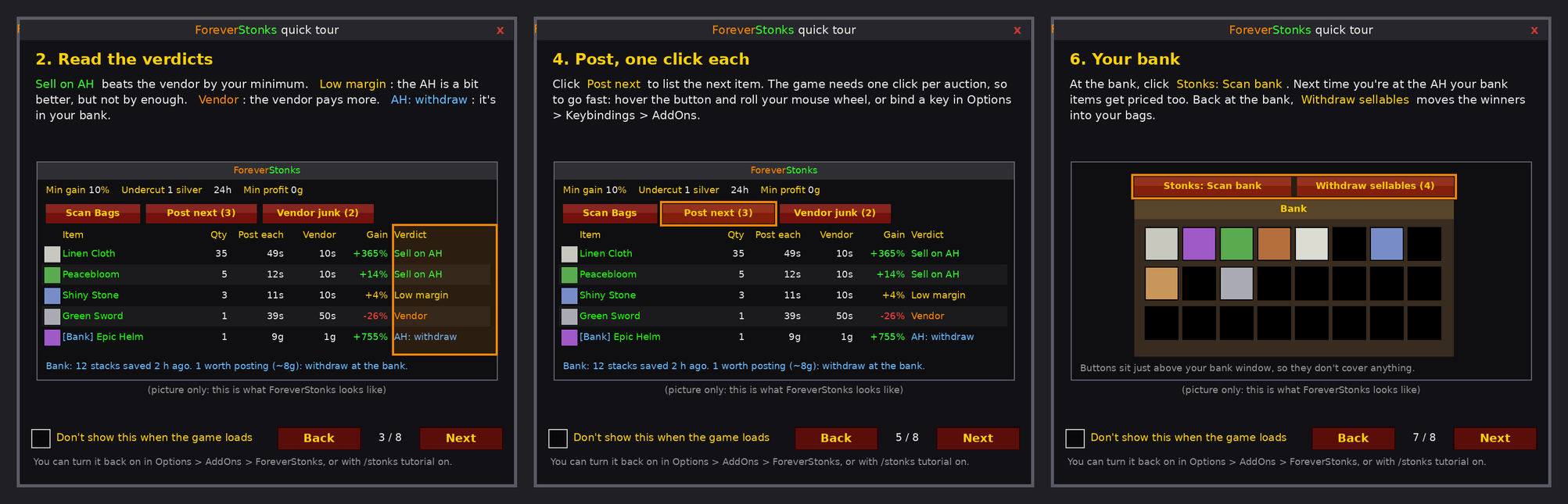
How it works Open the Auction House. ForeverStonks opens next to it and scans your bags on its own. Read the verdicts. Sell on AH: beats the vendor by at least your minimum Low margin: the AH is a bit better, but not by enough Vendor: the vendor pays the same or more No listings: nobody is selling it, so there's no price to go on Post, one click each. Click Post next for each auction, or roll your mouse wheel over the button, or bind a key. Sell junk at any vendor. Vendor junk sells everything marked Vendor, 12 at a time, so all of it stays in your buyback tab. Your rules Min gain %: how much the AH has to beat the vendor (10 = +10%, 1000 = 11x) Undercut: in silver or in % below the cheapest seller Min profit: skip posts that are only worth pennies Duration: 12h, 24h or 48h Bank support
Click Stonks: Scan bank at your bank (a small button above the bank window). Your bank and warband bank get priced with your next AH scan. Back at the bank, Withdraw sellables moves the winners into your bags.
Safety first Your own auctions are ignored when finding the cheapest price Before posting or selling, it checks the slot still holds the exact item it scanned (same item level) Prices older than 30 minutes can't be posted until you rescan Equipment-set items are never posted or vendored Right-click any row to ignore an item for good Quick tour
A short tour with a picture of each step opens the first time you log in. Turn it off on the tour itself or in Options > AddOns > ForeverStonks. Open it any time with the ? button or /stonks tutorial.
Commands Command What it does /stonks Open or close the window
/stonks tutorial Open the quick tour (on / off: show it at login)
/stonks undercut 2% Undercut by 2% (/stonks undercut 1 = 1 silver)
/stonks bank Show your saved bank list (clear to forget it)
/stonks cut 5 Change the AH cut percentage
/stonks reset Clear ignored items and the window position
Notes WoW: Forever beta currently has a client bug where addon settings aren't loaded back after you log out, so settings reset each login there until Blizzard fixes it. Found a bug? Leave a comment with any red error: line ForeverStonks printed in chat.
The ForeverStonks Team
