F-Perl (Forever Perl) Unit Frames
- By
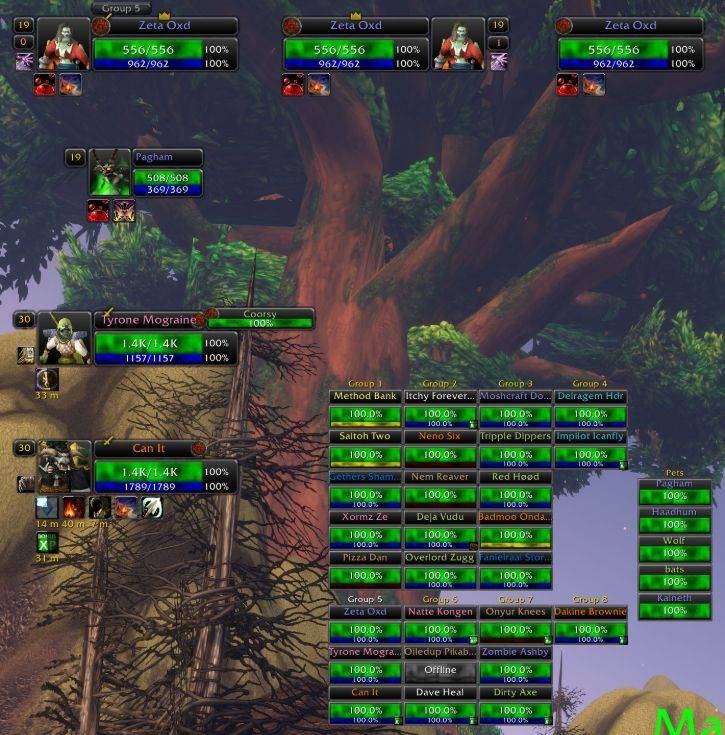
default-layout.jpg
Description
F-Perl
Unit frames for World of Warcraft: Forever: player, pet, target, focus, target of target, party, party pets and raid. F-Perl keeps the look of the classic X-Perl unit frames, rebuilt for the Forever client. Three optional raid tools come with it: Raid Admin, Raid Helper and Raid Monitor.
What F-Perl does differently
- Auras are drawn by the game's own aura display, so buffs and debuffs keep showing in content where the game hides aura details from addons.
- Light on the game: frames update when the game reports a change, not by checking on a timer, and no setting or event redraws every frame when only one part changed.
- A new settings system, built into the game's settings panel: every option in one place, one page per frame group, and changes take effect at once (only switching the Player, Pet or Target frame on or off needs
/reload). - Layouts: named sets of positions and settings, shared by all your characters, switched in the options or with
/fperl layout <name>. - A new unlock mode: unlocking hides the options and shows a small toolbar with an alignment grid and snapping, and a right-click on any frame opens a menu of its common settings. Changing a frame's scale keeps it where it is.
- Automatic range fading: F-Perl picks your longest-range spells from your spellbook, so out-of-range units fade without any setup for your class.
Install
- Download the zip from the latest release on this repository's Releases page.
- Unpack it into
World of Warcraft\_classic_beta_\Interface\AddOns. You get four folders:FPerl,FPerl_RaidAdmin,FPerl_RaidHelperandFPerl_RaidMonitor.FPerlis the unit frames; the other three are the raid tools, which needFPerland can be left out. - Start the game, or restart it if it was running.
Use
- Open the options with
/fperlor a left click on the F-Perl minimap button. They are in the game's settings panel under F-Perl, one page per frame group. - To move frames, unlock them (
/fperl unlock, or General > Frames > Unlock frames), drag them, then lock them again (/fperl lock). - The Player, Pet and Target frames can each be switched off in General > Frames, which leaves Blizzard's own frame in place. The change takes effect after
/reload. - A layout is a named set of positions and settings. Switch layouts in the options or with
/fperl layout <name>. - Right-drag the minimap button to move it; right-click it for a short menu.
Slash commands
F-Perl:
| Command | What it does |
|---|---|
/fperl |
Opens the options (also /fperl menu and /fperl options). |
/fperl unlock |
Unlocks the frames so they can be dragged. |
/fperl lock |
Locks the frames in place. |
/fperl layout |
Lists the layouts and marks the current one. |
/fperl layout <name> |
Switches to that layout. |
Raid Admin:
| Command | What it does |
|---|---|
/rad or /fpadmin |
Opens the Raid Admin window. |
/rad save [name] |
Saves the raid's group arrangement under that name (the game time if no name is given). |
/rad load <name> |
Moves raid members back into the groups of that saved arrangement. |
/rad auto |
Turns on or off showing the Raid Admin window when you are raid leader or assistant. |
/raitem <item> or /fpitem <item> |
Asks the raid who carries that item. |
/radur |
Asks the raid for equipment durability. |
/raresist or /raresists |
Asks the raid for resistances. |
/rareg |
Asks the raid for reagents. |
The /raitem, /radur, /raresist and /rareg checks open the Item Check window; raid members reply when their raid addon answers CT_RaidAssist queries.
Raid Helper:
| Command | What it does |
|---|---|
/fphelper assists |
Opens the assists view. |
/fphelper raid |
Opens the Raid Helper (main tank targets). |
/fphelper alpha raid <value> |
Sets the transparency of the Raid Helper window. |
/fphelper alpha assists <value> |
Sets the transparency of the assists view. |
/fphelper ctra |
Turns on or off the use of CT_RaidAssist main tank targets. |
Subcommands can be shortened: /fphelper as is /fphelper assists. Raid Monitor has no slash command.
Known issues
- The raid tools have not yet been reviewed for Forever.
- Raid Helper: healer mode cannot be turned on.
- Raid Helper: the
/fphelperusage line listsfindandscale, which do nothing. - In a vehicle, a click on the Player frame's name or portrait targets you, not the vehicle.
Reporting bugs
Open an issue at https://github.com/Zeta0xD/FPerl/issues with what you did, what you saw, and the F-Perl version you downloaded. For a Lua error, turn error display on once with /console scriptErrors 1 and copy the full error text into the issue.
Credits and license
F-Perl is by Zeta0xD, built for World of Warcraft: Forever in 2026. It started from the code of X-Perl UnitFrames | Revived, a continuation of Z-Perl and X-Perl, and has been rebuilt since: the settings panel, named layouts, frame arranging and the code's structure and names are new. The earlier versions are the work of Ziliya, Resike, Halfdays, Zek and Nymbia; F-Perl is a modified version of their work.
Released under the GNU General Public License v3 (LICENSE), with no warranty. Source files that carry code from the earlier versions keep their original author and license lines.
F-Perl (Forever Perl) Unit Frames Team