DragonGuildMaster
Gilden Member Dashboard, Gildmaster Addon for handling all Gild Activity, Raid, Loot und Gearcheck
01_dashboard_blur.png
02_members_blur.png
03_raids_blur.png
04_loot_events_blur.png
05_mythicplus_blur.png
Description
Donate help me for more Addons
https://buy.stripe.com/eVq28rdd8af31y76dB8EM00
English
DragonGuildMaster – guild and raid management in one window.
One window for everything a guild and raid leadership deals with: trial periods and inactive members, raid planning and rosters, loot and loot council, ready checks, combat analysis, a drawing board for raid tactics – and all officers stay in sync automatically, without any external server. Works for guilds and for character communities.
Guild
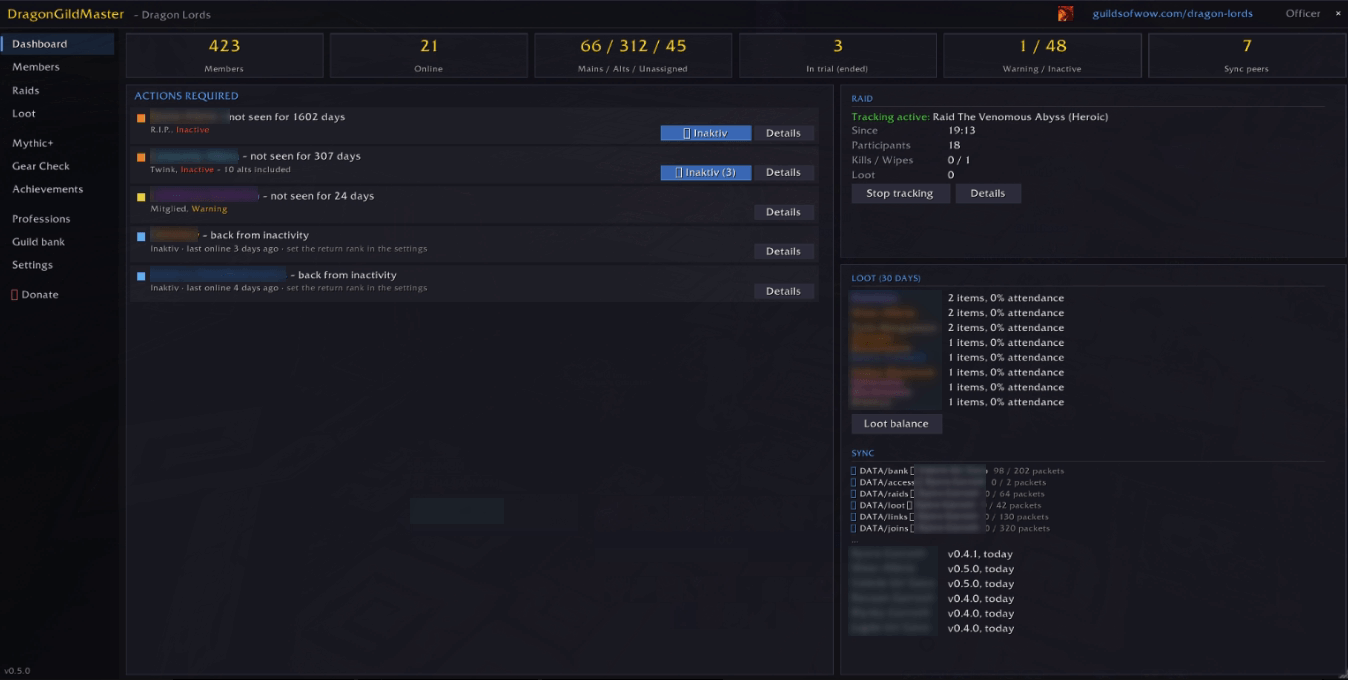
Dashboard – "Actions required"
- Trial periods ending or ended, with officer vote (keep / don't keep / extend, with a note) and a results window showing every officer's vote and who has not voted yet
- Inactive members and members back from inactivity, with one-click rank buttons
- Sign-up reminder: who from the roster has not answered the calendar event of the next 48 hours – whisper them or post one message to guild chat
- Birthdays, anniversaries and welcome messages for new members
Members
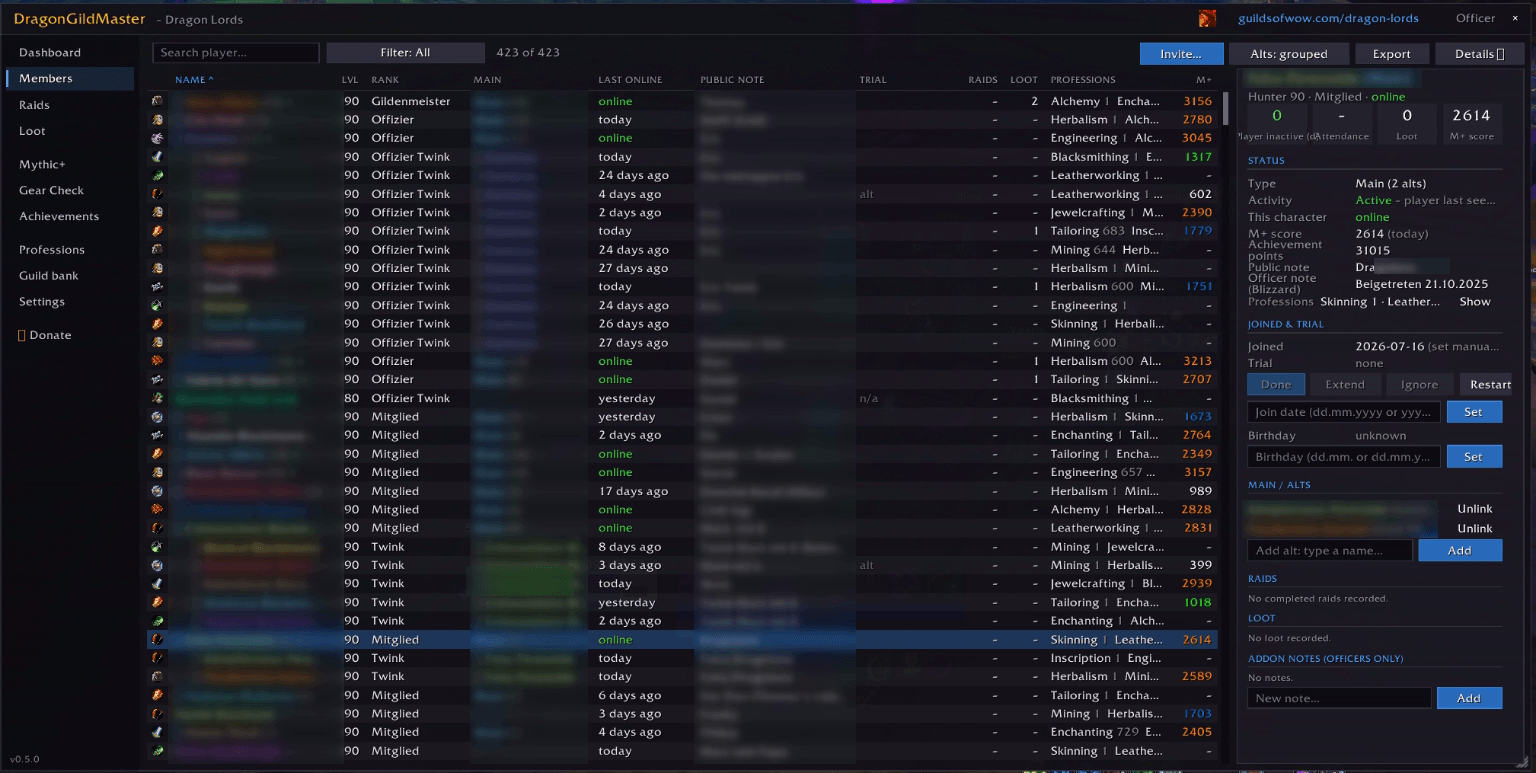
- Roster with main/alt links, zone, rank, last online, notes, member detail page and a guild chat panel
- Inactivity and trials are evaluated per player (main + alts), not per character
This week
- Weekly self-reports: Mythic+ runs, raid bosses of the current season (each boss once, at the highest difficulty), Great Vault slots for M+, raid and world, absences
- Boss table per raid; details on mouse-over
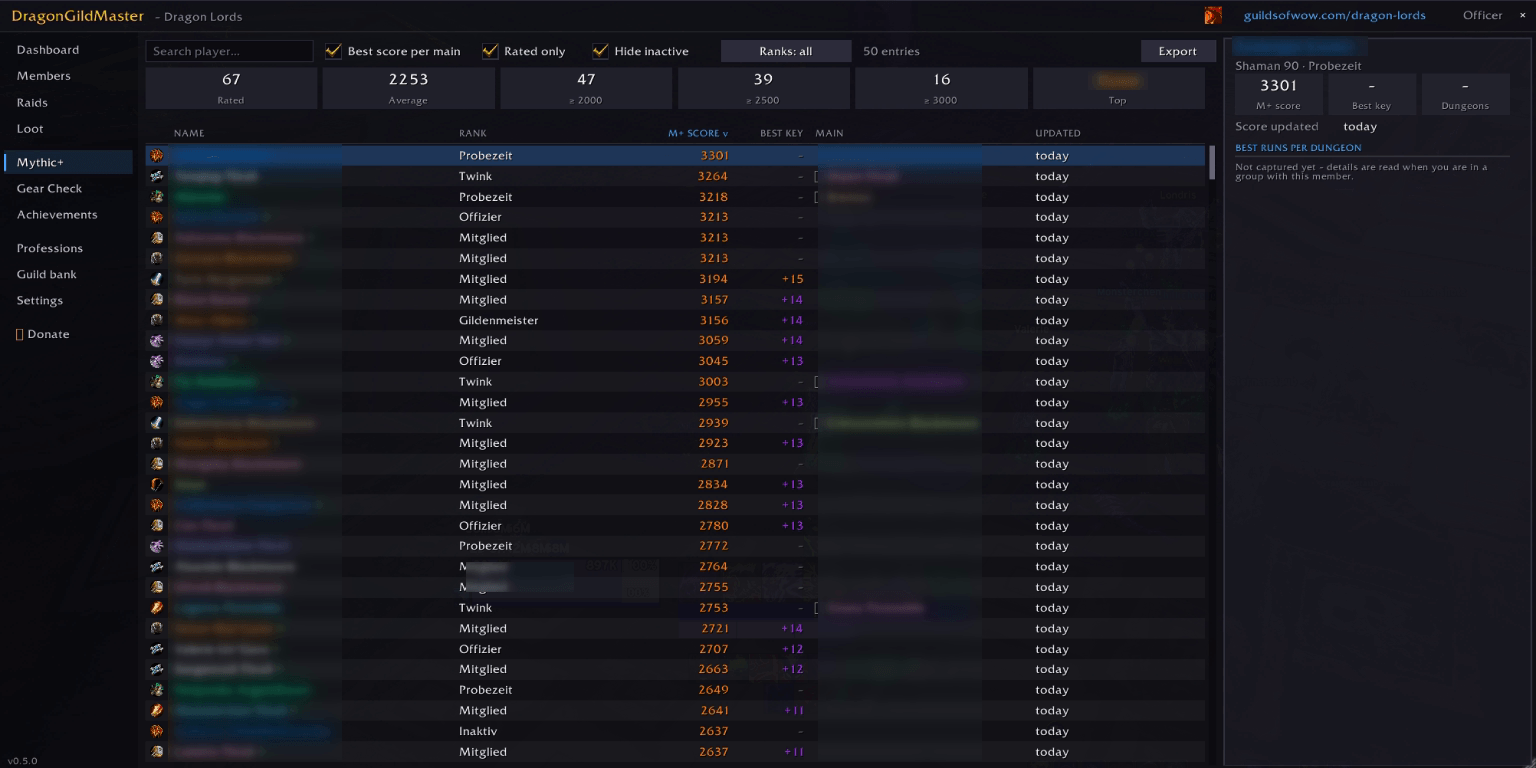
Mythic+ – ratings and keystones of all members (also offline), click a keystone to teleport, group board for guild and community ("looking for a group" / "looking for players")
Professions – guild recipe book: who can craft what, with their main and whether any of the player's characters is online right now
Guild bank and guild log – bank contents and changes; joins, leaves, kicks and rank changes with "invited by" (or "via Browser" for guild finder joins)
Achievements – guild achievements
Raid
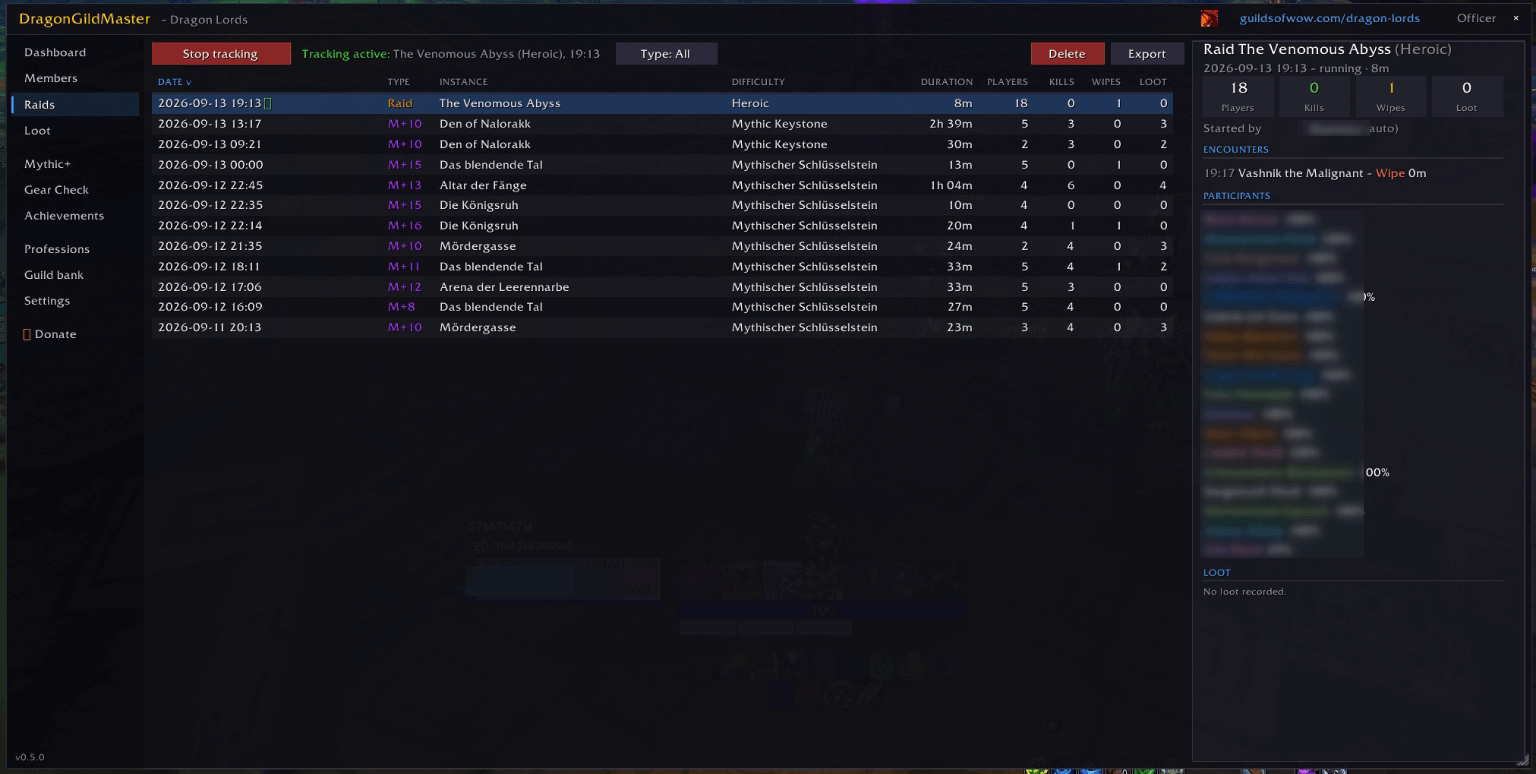
- Raid & Mythic+ tracking with attendance, boss kills and wipes – starts automatically
- Raid planning from the in-game calendar: sign-ups, roles, comments, lock event, Discord poster
- Rosters with fixed raid times, absences and one-click invites
- Raid groups: 2×4 group layout, invites, ready check and pull from a floating raid tool window
- Ready check overview: flask, food, rune with remaining time, repair, healthstones and potions in the bags – reported by each player's own client
- Gear check: item level, enchants, sockets, flask and food of the group
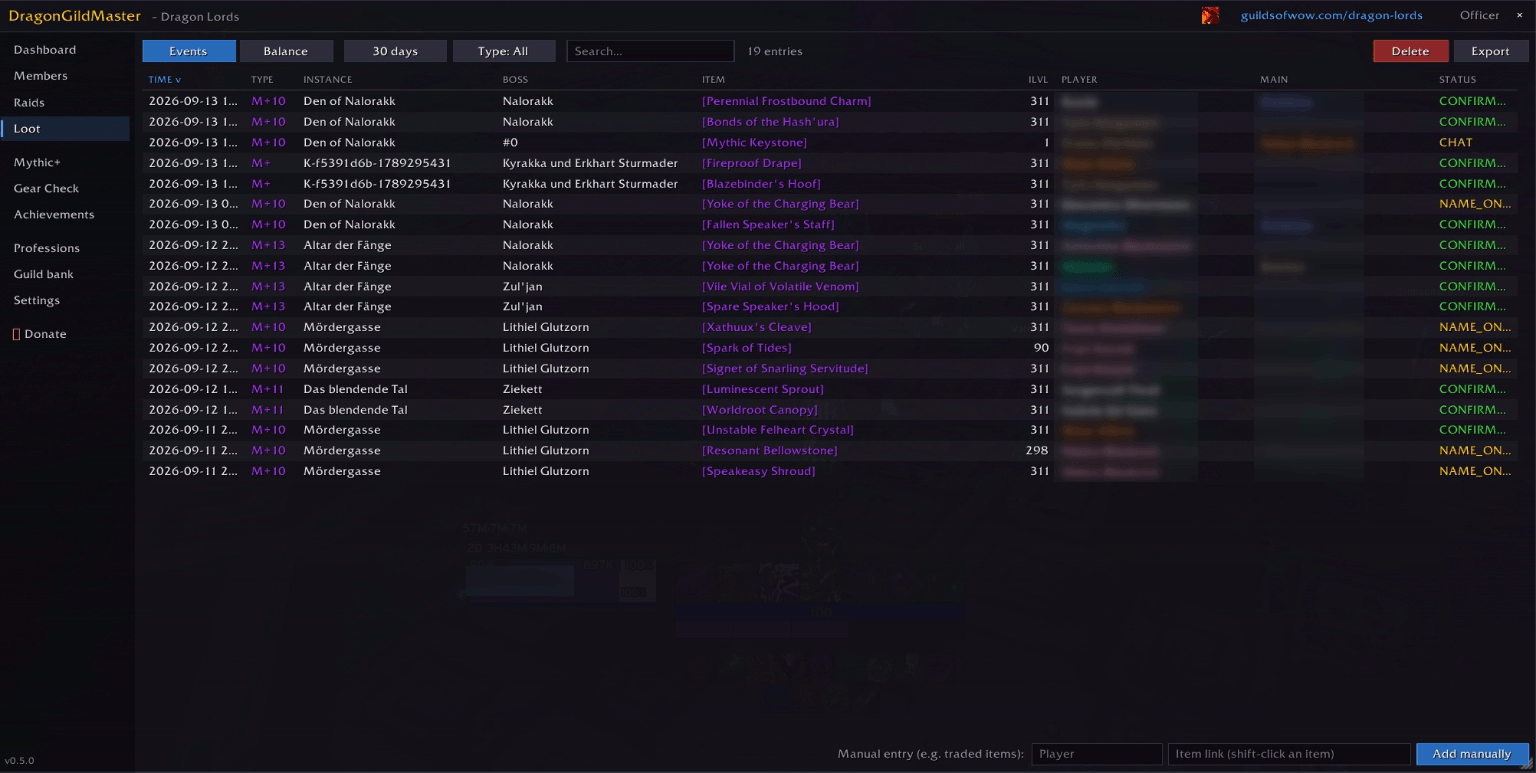
- Loot master (loot council): every raid drop becomes a round with all rolls; compare against equipped gear, usability check, trade assistant. You decide – the addon never decides on its own
- Loot history with balance per player
- Combat log: per boss fight from Blizzard's damage meter – deaths with killing blow, avoidable damage, mechanics ("who stood in what"), consumables, interrupts, dispels. Select several fights to evaluate a whole evening, including an error trend pull by pull
- Tactic board (like Method Raid Tools' drawing note): choose a boss, the raid map loads zoomed to the boss; draw with pen, arrows and raid markers in six colours and four sizes; send it live to the group (about 1–2 seconds delay) or in one go; templates per boss
For the guild master
- Access rules: which rank sees which tab and may do what
- Roll out guild settings to all members (ranks, trial period, inactivity, gear check, loot, M+/raid tracking, guild texts) – everyone can still adjust them for themselves
- Addon versions: see who uses an outdated version and remind them by guild chat or whisper; players get an update notice automatically
Good to know
- No external server. Officers synchronise via addon messages (officer channel, guild channel, whispers). Data stays in your WoW folder.
- The addon flags and suggests – promotions, demotions, kicks, marking and calendar actions always need your own click, as Blizzard requires.
- Limits of WoW 12.x (Midnight): inside instances Blizzard keeps much information secret from addons – other players' buffs, mana and spell casts, positions. Wherever possible each player's own client reports its own data (ready check, consumables, weekly data). For the full picture, everyone in the guild should use the addon in the current version.
- Available in English and German.
Commands
/gm window · /gm lfg group board · /gm tafel tactic board · /gm raid start|stop|status · /gm link <Alt> <Main> · /gm sync now · /gm addons · /gm scale 120 · /gm minimap · /gm help
Deutsch
DragonGuildMaster – Gilden- und Raidverwaltung in einem Fenster.
Ein Fenster für alles, womit eine Gilden- und Raidleitung zu tun hat: Probezeiten und Inaktive, Raidplanung und Kader, Loot und Plündermeister, Ready-Check, Kampfauswertung, eine Zeichentafel für Raidtaktiken – und alle Offiziere bleiben automatisch auf demselben Stand, ganz ohne externen Server. Funktioniert für Gilden und für Charakter-Communities.
Gilde
Dashboard – „Aktionen erforderlich"
- Laufende und abgelaufene Probezeiten mit Offiziers-Abstimmung (übernehmen / nicht übernehmen / verlängern, mit Notiz) und einer Auswertung, die jede Stimme zeigt und wer noch fehlt
- Inaktive und Rückkehrer, mit Rang-Knöpfen per Klick
- Anmelde-Erinnerung: Wer aus dem Kader hat sich für den Termin der nächsten 48 Stunden noch nicht gemeldet – anflüstern oder eine Sammelnachricht in den Gildenchat
- Geburtstage, Jubiläen und Willkommensnachrichten für Neue
Mitglieder
- Liste mit Main/Twink-Verknüpfung, Zone, Rang, zuletzt online, Notizen, Detailseite und Gildenchat-Panel
- Inaktivität und Probezeit werden pro Spieler (Main + Twinks) bewertet, nicht pro Charakter
Diese Woche
- Wochen-Selbstauskünfte: M+-Läufe, Raidbosse der aktuellen Season (jeder Boss einmal, mit der höchsten Schwierigkeit), Große Schatzkammer für M+, Raid und Welt, Abwesenheiten
- Bosstabelle je Raid; Einzelheiten beim Drüberfahren
Mythisch+ – Wertungen und Schlüsselsteine aller Mitglieder (auch offline), Klick auf den Stein = Teleport, Gruppenbörse für Gilde und Community („suche Gruppe" / „suche Spieler")
Berufe – Gilden-Rezeptbuch: Wer kann was herstellen, mit Main und ob gerade irgendein Charakter des Spielers online ist
Gildenbank und Gildenlog – Bestand und Änderungen; Beitritte, Austritte, Kicks und Rangwechsel mit „eingeladen von" (bzw. „über Browser" bei Beitritt über die Gildensuche)
Erfolge – Gildenerfolge
Raid
- Raid- & M+-Tracking mit Anwesenheit, Bosskills und Wipes – startet automatisch
- Raidplanung aus dem Spielkalender: Anmeldungen, Rollen, Kommentare, Termin sperren, Discord-Plakat
- Kader mit festen Raidzeiten, Abwesenheiten und Einladen per Klick
- Raidgruppen: Einteilung 2×4, Einladen, Ready-Check und Pull aus einem schwebenden Raid-Werkzeugfenster
- Ready-Check-Übersicht: Fläschchen, Bufffood, Rune mit Restzeit, Reparatur, Gesundheitssteine und Tränke in den Taschen – gemeldet vom Addon jedes Spielers selbst
- Gear-Check: Itemlevel, Verzauberungen, Sockel, Fläschchen und Bufffood der Gruppe
- Plündermeister (Loot-Rat): Jeder Raid-Drop wird eine Runde mit allen Würfen; Vergleich mit der angelegten Ausrüstung, Nutzbarkeit, Handelsassistent. Du entscheidest – das Addon entscheidet nie selbst
- Loot-Verlauf mit Bilanz je Spieler
- Kampflog: je Bosskampf aus Blizzards Schadensmesser – Tode mit Todesstoß, vermeidbarer Schaden, Mechaniken („wer stand worin"), Verbrauchsgüter, Unterbrechungen, Dispels. Mehrere Kämpfe markieren und einen ganzen Abend auswerten, inklusive Fehler-Trend Pull für Pull
- Taktiktafel (wie die Zeichen-Notiz von Method Raid Tools): Boss wählen, die Raidkarte lädt auf den Boss gezoomt; malen mit Stift, Pfeilen und Raidmarkern in sechs Farben und vier Größen; live an die Gruppe (etwa 1–2 Sekunden Verzögerung) oder auf einmal senden; Vorlagen je Boss
Für den Gildenmeister
- Zugriffsregeln: welcher Rang welchen Reiter sieht und was darf
- Gildeneinstellungen ausrollen an alle Mitglieder (Ränge, Probezeit, Inaktivität, Gear-Check, Loot, M+-/Raid-Tracking, Gildentexte) – jeder kann sie danach für sich anpassen
- Addon-Versionen: sehen, wer eine veraltete Version hat, und per Gildenchat oder Flüstern erinnern; Spieler bekommen automatisch einen Update-Hinweis
Gut zu wissen
- Kein externer Server. Die Offiziere gleichen sich über Addon-Nachrichten ab (Offizierskanal, Gildenkanal, Flüstern). Die Daten bleiben in deinem WoW-Ordner.
- Das Addon markiert und schlägt vor – Beförderungen, Degradierungen, Kicks, Markierungen und Kalender-Aktionen brauchen immer deinen eigenen Klick, so verlangt es Blizzard.
- Grenzen von WoW 12.x (Midnight): In Instanzen hält Blizzard vieles vor Addons geheim – Buffs, Mana und Zauber anderer Spieler, Positionen. Wo immer möglich meldet deshalb das Addon jedes Spielers seine eigenen Daten (Ready-Check, Verbrauchsgüter, Wochendaten). Für das vollständige Bild sollte die ganze Gilde das Addon in aktueller Version nutzen.
- Verfügbar auf Deutsch und Englisch.
Befehle
/gm Fenster · /gm lfg Gruppenbörse · /gm tafel Taktiktafel · /gm raid start|stop|status · /gm link <Twink> <Main> · /gm sync now · /gm addons · /gm scale 120 · /gm minimap · /gm help
DragonGuildMaster Team