


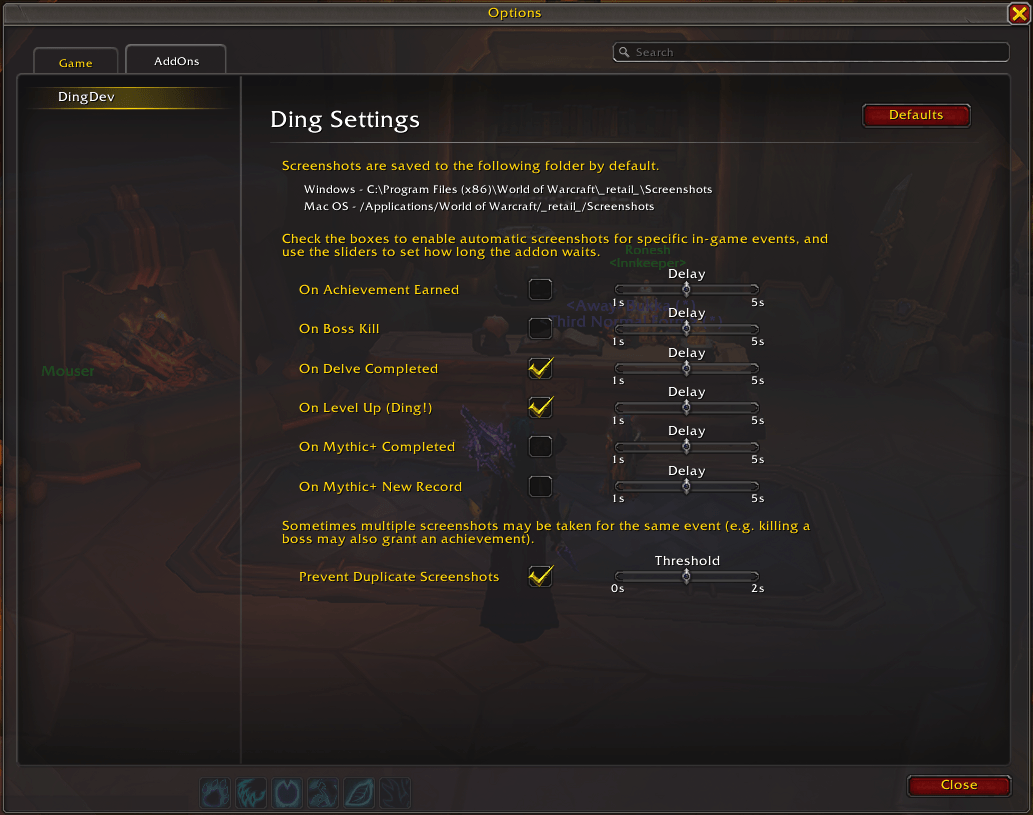
Ding! (UI Settings)
Description
Ding! is a lightweight World of Warcraft addon that captures screenshots when you level up and during key milestone moments. Keep your adventures documented effortlessly, without lifting a paw.
✨ Features
- Automatic screenshots when you:
- Level up
- Earn an achievement
- Kill a boss
- Complete Mythic+ dungeon
- Set a new Mythic+ record time
- Configurable delay before each screenshot (1–5 seconds)
- Screenshot counter when you login (account-wide + per-character)
📦 Installation
- Download and unzip the addon folder.
- Place it into:
.../World of Warcraft/_retail_/Interface/AddOns - Launch WoW or reload your UI.
⚙️ Usage
Open the settings panel in-game with: /ding
From the settings window, you can toggle automatic screenshots for different event types, enabling or disabling them individually based on what you want to capture. Use the sliders to set how long Ding! waits before taking each screenshot, adjusting the delay to your preference.
💖 Support the Project
If Ding! helps your adventures feel a little more magical, consider tossing a coin to fuel future updates and mischief. Every bit of support means the world, but zero pressure — good vibes always come first. ✨
☕ Donate here: https://ko-fi.com/kkaminski93.
🔒 License & Permissions
This code is the property of the author.
- No commercial use is allowed.
- Derivative works or modifications require explicit permission before redistribution or use.
- Personal and educational use is permitted.
The Ding! - Automatic Screenshots Team
