ConsumeHelper
- By
ConsumeHelper gives you movable bars for consumables, keeping them off your main action bars. Organize consumes into custom categories, float categories separately, track cooldowns, and configure layouts per character with easy copy options.
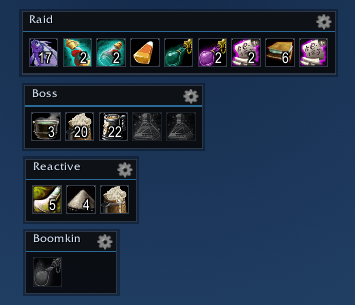
ConsumeHelper gives you dedicated, movable consumable bars so your potions, elixirs, food, oils, bandages, and raid consumes do not have to take up space on your main action bars.
Create custom categories, organize your consumes however you like, and either keep everything in one bar or let each category float in its own movable window.
Features
- Movable consumable bar
- Optional floating windows for each custom category
- Custom consume categories, such as Boss, Raid, Reactive, Food, Potions, etc.
- Rename, delete, and rearrange categories
- Move consumes between categories with a dropdown
- Reorder consumes inside a category
- Horizontal or vertical item layout
- Configurable item wrap length
- Configurable button size
- Shows item cooldowns directly on the consume icons
- Shows item counts
- Desaturates icons when you are out of that item
- Per-character settings
- Copy settings from another character
- Lock or unlock bars
- Minimap button
- Cog icons for quick access to settings
- Drag bag items onto the unlocked bar or category window to add them
- Alt-right-click an item while unlocked to remove it
- Supports grouping by custom order or learned shared cooldowns
Slash Commands
/chor/consumehelper- Open settings/ch config- Open settings/ch lock- Lock the bar/windows/ch unlock- Unlock the bar/windows so they can be moved/ch show- Show the consume bar/windows/ch hide- Hide the consume bar/windows/ch minimap- Show or hide the minimap icon/ch add <itemID>- Add an item by item ID/ch reset- Reset bar position
ConsumeHelper is designed for players who want fast access to their consumes without cluttering their normal action bars.
The ConsumeHelper Team