
Achievement Tracker for Local Zones
Captura de pantalla 2026-08-30 151316.png
Captura de pantalla 2026-08-30 151208.png
Captura de pantalla 2026-08-30 151227.png
Captura de pantalla 2026-08-30 151251.png
Description
Summary
Shows the achievements you can still earn in the zone you're standing in — including their prerequisites — and where to go for them.
Achievement Tracker: Local Zones
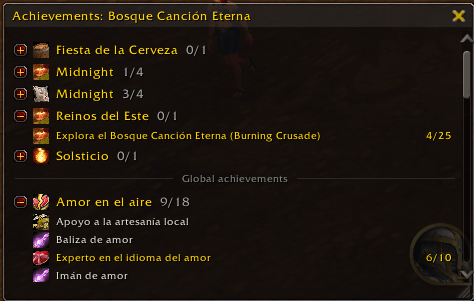
You walk into a zone and you don't remember what achievements you have left there. This addon answers that. It puts a small window on your screen listing the achievements tied to your current zone, what you've started, what you haven't, and — for the ones with a known spot on the map — where to go.
It follows you. Change zones and the list changes with it. Earn a criterion and the row updates. No setup, no import, no account login.
What it does
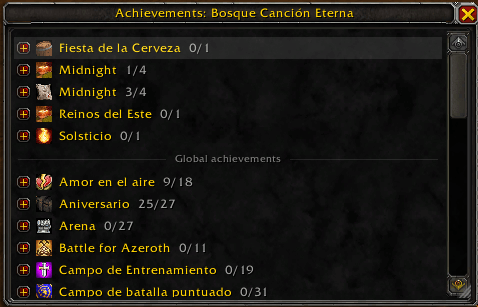
- Per-zone achievement list. A window listing the achievements for your current zone, grouped by category — Exploration, Quests, Dungeons & Raids, Reputation, World Events, and more.
- Progress at a glance. Each row shows whether it's not started or in progress, with its criteria count. Completed achievements are hidden by default; switch them on to see them greyed out.
- Collapsible categories with an icon and a done/total count. A category that's fully finished drops off the list.
- Global achievements (optional). Turn this on to also list Reputation, world-event and PvP achievements that aren't tied to a single zone, under a "Global achievements" divider below the zone list. Those sections start collapsed so they stay out of the way.
- Hover for details. Point at any achievement for Blizzard's full tooltip.
- Click to open. Click a row to jump straight to it in Blizzard's achievement window.
- Shift-click to link. Drop an achievement link into chat.
- Right-click for actions. On a row or on a map icon: place a map pin at the achievement's location, send it to TomTom as a waypoint (when TomTom is installed), or hide it.
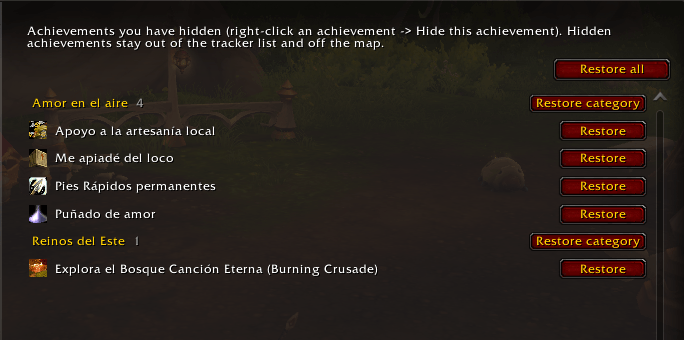
- Hide what you'll never chase. Hidden achievements leave the list and the map. Bring them back from Options → Hidden achievements.
- World map icons. Every incomplete achievement with a known location gets an icon on the world map, so you can see at a glance which zones still have work — and where in a zone the objectives sit. Icons cluster on the continent view.
- Minimap icons. The same markers show on the minimap as you travel near them.
- Flags quests you can't start yet. When an achievement needs a quest that isn't offered until an earlier one is done, the tooltip says so and names the quest to do first — and its map icon is dimmed, so you don't ride out to a marker with nothing there.
- Minimap button. Left-click toggles the window, right-click opens the options.
Languages
The addon follows your World of Warcraft client language. Anything not yet translated falls back to English, so nothing is ever missing.
Translations are community-contributed through CurseForge Localization. If you'd like to see the addon in your language — or fix a string that reads wrong — you can help here: Localization for Achievement Tracker: Local Zones.
French — dagdar_fr. Thank you!
Commands
| Command | Action |
|---|---|
/atlz |
Toggle the tracker window |
/atlz list |
Print the current zone's achievements to chat |
/atlz config |
Open the options |
/atlz reset |
Reset the window position and expand all sections |
Options
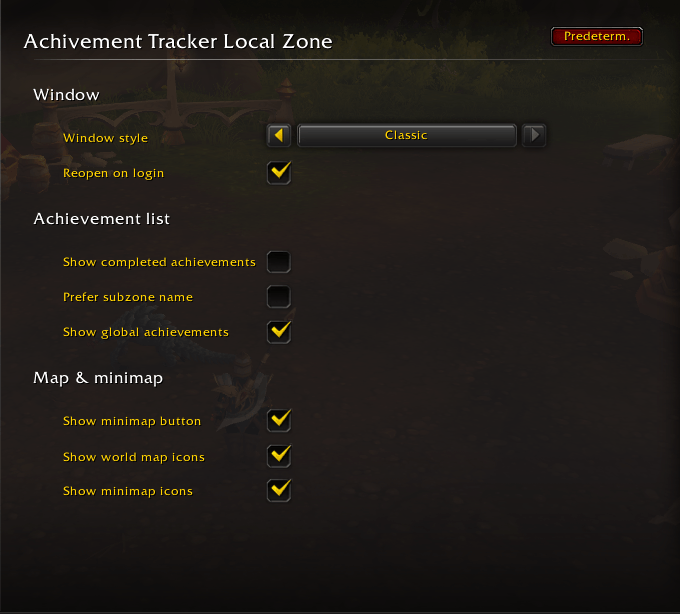
Open with /atlz config, or through Game Menu → Options → AddOns.
Window
- Window style — Classic (Blizzard dialog frame and scrollbar) or Stylized (flat dark panel with minimal controls). Reload your UI after changing it.
- Reopen on login — bring the window back at login if it was open when you logged out.
Achievement list
- Show completed achievements — include earned ones in the list, greyed out.
- Prefer subzone name — track by the current subzone instead of the wider zone.
- Show global achievements — also list Reputation, world-event and PvP achievements with no home zone, under a "Global achievements" divider.
Map & minimap
- Show minimap button
- Show world map icons
- Show minimap icons
Hidden achievements — a sub-page listing everything you've hidden, with a Restore button.
Compatibility
- Built for current retail World of Warcraft.
- TomTom — optional. When it's installed, the right-click menu can send an achievement's location to TomTom as a waypoint. The addon works fine without it.
- Settings are saved per character.
Credits
Bundles the following open libraries: LibStub, CallbackHandler-1.0, AceLocale-3.0, LibDataBroker-1.1, LibDBIcon-1.0, and HereBeDragons-2.0. Thanks to their authors.
Source and bug reports
Found a bug or an achievement in the wrong zone? A few ways to reach me:
- The comments on this CurseForge page, or the CurseForge addon forum.
- @Cestt_Plays on X / socials.
A screenshot and the zone / achievement name help a lot.
Achievement Tracker for Local Zones Team
