

Description

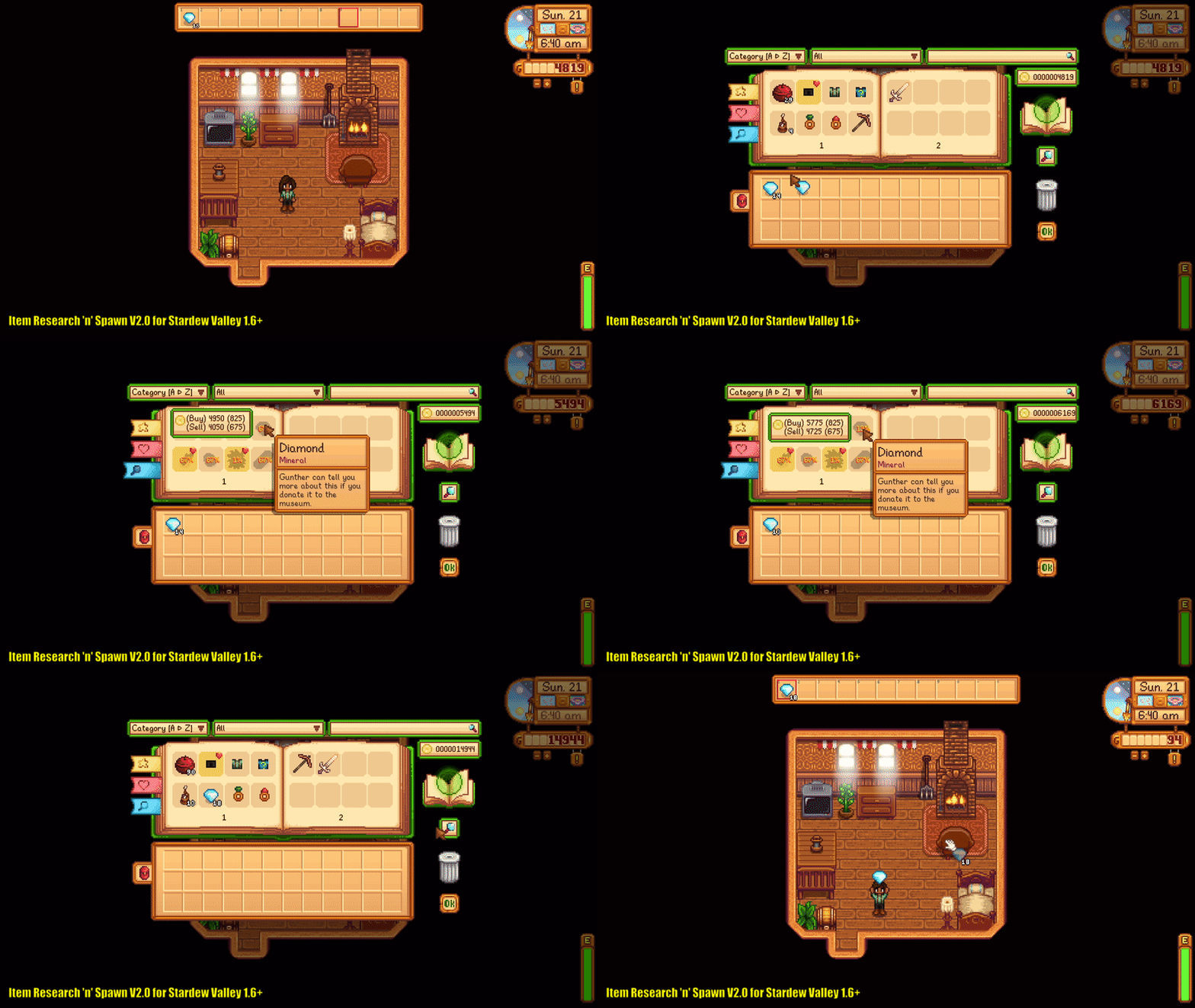
This mod introduces mechanics similar to Terraria's Journey Mode and Minecraft's ProjectE mod, where you can "research" an item and create much more of it (for free or by spending some currency). There are different modes and settings available, allowing you to play the mod the way you like, either game-progression-friendly or straight-up cheaty ;)
There are multiple modes available; see below for more details. Check also the mod configuration, there are a lot of tweaks you can do to flavour the gameplay the way you like (such as money gain balance) :)
My playthrough (more like playtest :D) of SDV 1.6 with this mod - https://www.youtube.com/playlist?list=PLrwHAG5LY6Tajp27_jkPiJDyEk5nCZtKD
Check out the extension for this mod if you want to use this menu after a certain game stage!

2. Place items into the research area (a small animated hungry book).
3. Press the research button (under research area) until the item disappears from the research area.
4. Check the menu, if the amount of items was sufficient, the researched item will appear in the menu and leftovers will be returned to your inventory.
Shortcuts:
Keyboard:
Press [ Left Shift + Left Mouse Button ] to take the full stack of items from the menu.
Press [ Left Shift + Right Mouse Button ] to take half of a stack of items from the menu.
Press [ Left Ctrl + Right Mouse Button ] to take 10 items from the menu.
Press [ Left Alt + Left Mouse Button ] to mark/unmark the item as a favorite.
Press [ Left Ctrl + Left Mouse Button ] to quickly move items to the research area and back. If the item is researched, it will be sold or removed (bypassing the move to the research area).
Press [ Left Ctrl + Left Mouse Button ] on a trash can to remove all researched items from inventory (only for Research and Mr. Qi modes)
Gamepad (Xbox layout):
Press [ LT + A ] to take the full stack of items from the menu.
Press [ LT + X ] to take half of a stack of items from the menu.
Press [ LB + X ] to take 10 items from the menu.
Press [ RB + A ] to mark/unmark the item as a favourite.
Press [ LB + A ] to quickly move items to the research area and back. If the item is researched, it will be sold or removed (bypassing the move to the research area).
Press [ LB + A ] on a trash can to remove all researched items from inventory (only for Research and Mr Qi modes)
For items that have additional state information (meta), like a watering can water level and clothes colour, you can change it by researching the item again (the stack amount does not matter if the item was researched).

2. Download the mod and unzip it into Stardew Valley/Mods/ directory.
3. You also need Generic Mod Config Menu mod to be able to configure the mod.
4. Start the game using SMAPI.
You can uninstall it at any time; it will not affect your saves (also, your progression will not be lost, in case you reinstall it later)

- Stardew Valley 1.6+ (for SDV 1.5 use version 1.0.1 - available at Nexus Mods).
- SMAPI 4.1.10 or latest.
- Windows, Linux*, *MacOS (Linux and MacOS not tested, but should work ok)
- Singleplayer or Multiplayer. For multiplayer, the mod must be installed by the host and optionally installed for other players (if they want to use the menu themselves).
- Items added by other mods should work, but are not guaranteed. Besides that, there is no known mod conflict.

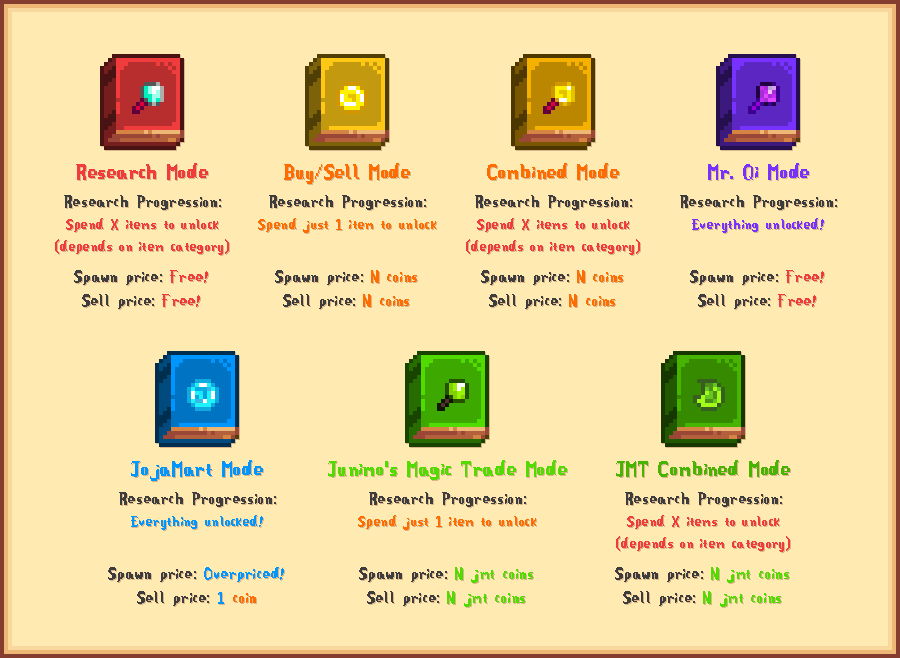
7 different modes to choose from:
- Research mode - each item has its required amount for research, after research completion, you can generate as many items as you want for free
- Buy/Sell mode - you need only 1 of each item for research, giving items will cost in-game money, and you can sell items as well. Also shows the money bar and tooltip for the item price
- Combined mode - researching like in Research mode, after research completion, like in Buy/Sell mode
- Mr. Qi mode - Research mode, but all items already researched/unlocked. Basically CJB Item Spawner functionality
- JojaMart mode - Buy/Sell mode, but all items already researched/unlocked. Items cost a lot, and the selling price is 1. For true JojaMart fans. :)
- Junimo's Magic Trade mode - Buy/Sell mode, but with its own currency
- JMT Combined mode - Combined mode, but with its own currency
Filtering:
- Research progression tracking
- Favorite item filtering
- Item meta saving (colors, enchantments, etc...)
Highly customizable:
- Customizable buy and sell prices (using corresponding modifiers)
- Customizable research amount (using the corresponding modifier)
- Customizable categories, pricelist, and item blacklist (using corresponding .json file in assets/config/ folder)
- Customizable menu density (choose between 16, 30 and 48 items on screen)
- And much more!

There are 7 modes: 1 Journey Mode-like, 2 ProjectE-like, 2 combined ones, 1 for JojaMart fans, and 1 creative.
You can switch modes anytime you like, but they are more intended to be selected at the beginning of your playthrough and never changed later
Try the new JMT Combined mode - by far the most game-friendly one!

First of all, installing the Generic Mod Config Menu is mandatory, as this is the only way to change settings for the started save file. A config.json file is only for the default setting for new farms; do not change it manually!
For each farm, mod stores a dedicated copy a.k.a. local config (for example, in one save you can play in Research mode, in another you can play with Qi mode, and you don't need to go and reconfigure it each time you swap the save file). For new saves, the mod takes whatever is written in global config (i.e. config.json), which you can configure from the title screen. If you reset the local config, it will take info from the global config. If you reset the global config, it will recreate config.json (just like if you installed the mod for the first time)
Some commands are for host players only (in singleplayer, you are the host) and will be synced for all non-host players
Main settings:
" Mod mode " - active mode (research mode, buy/sell mode, etc...) [Host only]
" Open key " - keyboard key to open the menu
" Menu size " - density of menu (choose 16, 30 or 48 items, 16 - is the default value)
Multiplayer settings:
" Commands for host only " - speaks for itself [Host only ;D]
Balancing settings:
" Research amount multiplier " - increase/decrease the amount of required research for all items [Host only]
" Buy price multiplier " - increase/decrease buy/spawn price for all items [Host only]
" Sell price multiplier " - increase/decrease sell price (selling to the menu) for all items [Host only]
Controller settings:
" Show RnS button " - show/hide the RnS button to open the RnS menu (upper-left corner in inventory)
" RnS button X and Y position " - button position offset (in case other mods add something there)
" Remap "craft" key " - maps [ Y ] key on gamepad to open the RnS menu via gamepad
Misc settings:
" Show tooltip in other menus " - show/hide the tooltip outside of the RnS menu
" Enable menu sounds " - speaks for itself
" Show missing items " - to show each "Missing Item" in the menu if there are any
" Research time " - determines how long you need to press the research button (in seconds) [Host only]
" Automatic research " - for those who don't want to hold the button
" Override UI color " - determines if a custom colour should be used instead of the mode's default one
" UI color (red, green, blue) value " - if you use the custom colour, here you specify it as an `RGB` value (0-255)

!rns_help - prints all commands and their description.
!rns_get_key - prints active hotbar item “unique key”. Can be used to tune pricelist and categories.
!rns_unlock_active - completes the research of active hotbar item.
!rns_unlock_all - completes the research of all items.
!rns_dump_progression - saves the progression of all players in .json format. [Host only]
!rns_load_progression - loads progressions back from .json files and replaces whatever is in the mod now. [Host only]
!rns_jmt_rich - adds 10k to your jmt balance
!rns_jmt_broke - voids your jmt balance
The mod core uses ItemRegistry as well as some other code snippets that are based on the (cheat menu) mod that was created by CJBok and maintained by Pathoschild; without their work, I wouldn't be here :) THANK YOU ❤️