Simulation Overhaul
- By
rework of the game's simulation system, which ultimately aims to solve issues of simulation lag, freezes and hanging
111 (1).png
Description
What does this mod actually do?
If you have played The Sims 4 for long enough, you have probably seen this happen: a Sim finishes cooking, washes their hands, flushes the toilet or puts something away, and then, when you ask them to do something else, nothing happens for several seconds.
Sometimes the clock jumps forwards and then snaps back. On busy lots, the problem becomes even more noticeable, and Speed 3 can make the whole game feel as though it is struggling to keep up with itself.
My mod is designed to tackle that side of the game.
This script works inside the simulation itself, with a particular focus on the Python systems that handle autonomy, interactions, queues and other parts of everyday Sim behaviour. When the simulation starts to fall behind, it tries to give it the time and priority it needs to catch up.
In practical terms, Sims should respond more quickly when you tell them what to do, autonomous actions should follow one another more naturally, and the simulation should remain responsive even when there is a lot happening at once.
What you should notice in-game
Sims should spend less time standing around after finishing an interaction. When another autonomous action is ready to be chosen, the next decision can happen much sooner.
On busy lots, household Sims are prioritised over background NPCs who are simply walking through the world. This becomes particularly useful when a lot is crowded and several Sims are competing for simulation time.
This mod also tries to reduce the familiar clock-jumping behaviour that can occur when the simulation falls behind. Speed 3 and fast-forwarding, including sleep, are handled more carefully so that the simulation has more room to catch up instead of simply grinding to a halt.
There are also no XML tuning overrides. The script does not replace the usual tuning resources used by other mods or custom content.
How it works
The Sims 4 is built around a combination of C++ and Python. A large part of the actual simulation work (autonomy, interactions, queues, situations and the systems that determine what Sims are doing) is handled through Python.
My script focuses on six areas of that process.
1. Adaptive time slicing
One of the reasons simulation lag can become so noticeable is that the game can sometimes have more work to process than it can complete in a single update. Once that happens, the simulation begins to fall behind the game clock.
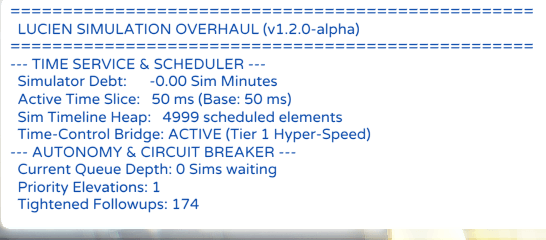
The script keeps track of this difference, which I call Simulator Debt.
When the debt is low, the game can continue much as normal. As the simulation falls further behind, the script can temporarily increase the amount of processing time available to it, giving the simulation a chance to catch up.
The important part is that this extra time is not simply added all the time. The budget increases when the simulation actually needs it, and remains capped so that the game does not spend an unreasonable amount of time processing each frame.
In other words, this system is dynamic rather than relying on one fixed time limit.
2. Autonomy priority
On a crowded lot, there can be a surprising amount of background activity happening at the same time. NPCs walking past, situations updating and other Sims requesting autonomy can all end up competing for the same simulation time.
This mod gives priority to the active Sim and selectable household Sims, while background walkby NPCs are given lower priority.
The idea is simple: the Sims you are actually playing should not have to wait behind NPCs who are merely passing through.
3. Shorter post-action delays
Normally, a Sim can finish an interaction and then spend a short period waiting before the autonomy system checks what they should do next.
When the simulator is healthy, the script reduces this delay considerably, from roughly 1.5–2.5 Sim minutes to around 0.1–0.35 Sim minutes.
That shorter interval is not forced indefinitely, though. If the simulation starts accumulating too much work, the delay can relax again.
This is an important part of how I designed the system: it tries to make Sims feel more responsive without permanently demanding more CPU time than the game can reasonably afford.
4. Faster recovery from blocked routes
A blocked route can sometimes leave a Sim waiting while the game takes its time deciding what to do next.
This script replaces the longer hard idle used during certain derail situations with a very short yield. Instead of leaving the Sim sitting there for a full second, the system can briefly give the simulation room to recover before trying again.
The goal is not to make routing problems disappear. It is to make a small routing problem behave like a small routing problem, rather than turning into a visible freeze.
5. Autonomy anti-thrash circuit breaker
When an autonomous action repeatedly fails (for example, a path to a sink is blocked or an appliance is unreachable), the game often keeps trying to push the exact same action over and over.
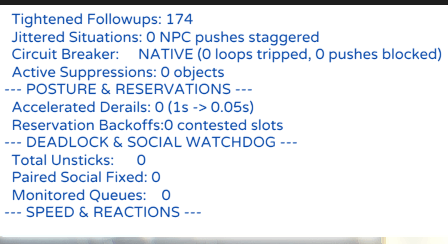
This script keeps an in-memory record of recent autonomous attempts. If a Sim fails the same action on the same object multiple times in a short window, the circuit breaker temporarily suppresses that specific action, allowing the Sim to choose something else.
This operates entirely in memory without writing to disk, scales back off dynamically when the game is under debt, and contains built-in safeguards so that critical survival needs (such as deep red hunger or bladder) are never blocked. If you happen to use another anti-spam script like QueueGuard, my mod will automatically detect it and delegate to avoid duplicate work.
6. Situation micro-jitter
During mass events, like high school class bells ringing, wedding guests finding seats, or festival arrivals, many NPCs receive role commands at the exact same simulation tick, creating synchronous stampedes at doors and stairs.
The script leaves your played household Sims completely untouched (0-second delay), but applies a tiny, natural stagger (a fraction of a second) to background NPCs. This spreads out pathfinding requests across sequential ticks and prevents doorway clustering.
7. Deadlock and paired social watchdog
Sometimes an interaction does not simply take a long time. It gets stuck.
I included a watchdog that monitors interactions while they are transitioning. If an interaction remains trapped for more than 15 Sim seconds, the watchdog can cancel it cleanly and release the posture or transition locks associated with it.
For paired social interactions (like wedding vows, dates, and dances), the watchdog also checks whether the partner Sim is actively walking toward the interaction (such as walking down the aisle). If so, it protects the ceremony from being cancelled, and only steps in if both Sims are genuinely frozen with no movement for an extended period.
The watchdog uses Sim time rather than real time. That means pausing the game, opening menus or entering Build Mode should not cause it to interpret a normal pause as a stuck interaction.
8. Contested seat and desk backoff
When multiple Sims attempt to sit at the exact same desk or chair at the same time, the Sims who lose the reservation often stand idle for several seconds.
The script registers a brief backoff on the contested slot for the losing Sims, encouraging autonomy to look for open alternative chairs or desks on the lot instead. As soon as the contested object becomes free, the backoff clears automatically.
9. Speed 3 and hyper-speed
This script can also work alongside my My time speed mod! mod.
At higher time multipliers, the simulation has considerably more work to process in a shorter amount of real time. The bridge between the two systems allows the simulation time budget to increase appropriately when Tier 2 (14x) or Tier 3 (21x) hyper-speed is being used.
The goal is simply to give the simulation enough room to keep up with the accelerated clock.
Mods that this replaces
Because my script covers several different areas of simulation performance, you should avoid stacking it with older mods that attempt to solve the same problems. This is the first and only mod to offer a dynamic system towards simulation lag which will ideally be more universal.
TurboDriver's Simulation Lag Fix and standalone variants
Those approaches use a much more static method of dealing with the simulation time limit. My script instead adjusts the budget dynamically according to how far behind the simulation is.
Srsly's Simulation Unclogger
Its deadlock-clearing function is replaced by the watchdog built into this mod.
dcyouth / Victor's Simulation Lag Fix
The same general problem is now handled through my adaptive time slicer and priority scheduling.
Simulation Timeline Unclogger
Its role is covered by my derail recovery and autonomy changes.
Manual XML autonomy-delay overrides
My mod changes the delay dynamically through the script instead of relying on a permanent tuning override.
Hyperspeed/more speed mods
Considering how this mod handles simulation time, there might be some problems or issues with syncing when using mods that adds greater speed options (simulation speed), so I recommend using my own 'More Speed' mod which adds more simulation speed tiers, that has compatibility and handling with this mod
Tyjokr's QueueGuard
My mod natively includes its own in-memory autonomy circuit breaker, which handles the same underlying problem of Sims repeatedly spamming failing autonomous actions (such as coffee makers, sinks, or baby checking).
Because of that, you do not need to install a separate anti-spam mod alongside this one. My built-in version runs entirely in memory without writing log files to disk, includes emergency bypasses for critical needs (so starving Sims are never blocked from getting food), and automatically adjusts its thresholds when the game is under simulation debt.
If you already have Tyjokr's QueueGuard installed: You do not have to worry about conflicts. My script automatically checks for QueueGuard at startup. If it detects QueueGuard in your Mods folder, my mod will quietly yield its own circuit-breaker hooks and let QueueGuard handle those checks instead.
This prevents duplicate processing, double cancellations, or any mod collision. You can either safely remove QueueGuard to use my native in-memory system, or keep it in your folder and let the two mods cooperate smoothly.
IMPORTANT NOTES and Logging
This mod is currently an Alpha release, and I have spent a lot of time studying how the game handles simulation, and there might be more improvements I can add. It might not work for everyone depending on your mod setup and dlc combinations, so apologies if you encounter any problems. The mod is pure scripting, so if you encounter issues, just remove the mod, and everything will run the EA way.
I built it around EA's simulation code and included safeguards intended to prevent errors from spreading through the simulation, but this is still an early stage of development where real-world testing matters.
Different computers, save files, DLC combinations and mod folders can behave very differently, so unexpected behaviour is possible.
If something does go wrong, the most useful thing you can provide is information about what the simulator was doing at the time.
Open the cheat console with Ctrl + Shift + C and enter:
sim_perf.status
Take a screenshot or copy the result.
In particular, the following information can be useful when diagnosing a problem:
- Simulator Debt
- active time-slice budget
- queue depth
- watchdog information
It is also worth checking the following files:
Documents/Electronic Arts/The Sims 4/lastException.txt
Documents/Electronic Arts/The Sims 4/sims4.log
When reporting a problem, please include those details along with a description of what happened.
Console commands
Open the cheat console with Ctrl + Shift + C.
sim_perf.status
Shows the current simulation information, including Simulator Debt, the active time-slice budget, timeline heap size, queue depth, derail recoveries and watchdog activity.
sim_perf.clear_debt
Asks the simulator to perform an immediate catch-up and clears the recorded Simulator Debt.
sim_perf.unstick
Releases transition and posture locks across Sims on the current lot.
sim_perf.toggle_log
Turns the live debugging output in sims4.log on or off.
sim_perf.help
Displays the available commands.
Installation
Download and place it in:
Documents/Electronic Arts/The Sims 4/Mods/
The script must not be placed more than one folder deep inside Mods.
Then open the game settings and make sure Script Mods Allowed is enabled under:
Options > Other
Restart the game after installing the mod.
That is all there is to it.
There are no XML files to merge, no tuning resources to replace and no complicated load order to maintain.
I designed this script to stay quietly in the background and intervene only when the simulation needs a little help keeping up.
Simulation Overhaul Team