OASIS
- By
An all-in-one guild hub with member profiles, group finding, raid planning, crafting, and shared guild bank tools.
Description
OASIS - Your guild. Your style. One place.
One window for your whole guild: members, guild chat, chronicle, profiles, community and guild leadership - all in-game.
Quick links: OASIS - Groups & Raids · OASIS - Trade · OASIS - Convenience · Build your guild pack (Oasis Studio) · Website · Discord
OASIS is a guild hub built for WoW Forever. This is the base add-on. It works on its own, and you can add more areas with the optional OASIS add-ons below - install only what your guild needs.
Add-ons for OASIS
| Add-on | What it adds |
|---|---|
| OASIS - Groups & Raids | Group finder, dungeon atlas, raid planner and sign-ups, loot master, soft reserve, raid check, buffs, tactics map, combat ranking, talents, rare spawns |
| OASIS - Trade | Who crafts what, crafting orders, guild market and prices, guild wishlist |
| OASIS - Convenience | Personal helpers: auto repair/sell, quest helpers, item comparison, map extras, game chat, whisper log, upgrade search and more |
Every add-on needs this base add-on. Missing add-ons simply leave their area out - nothing breaks.
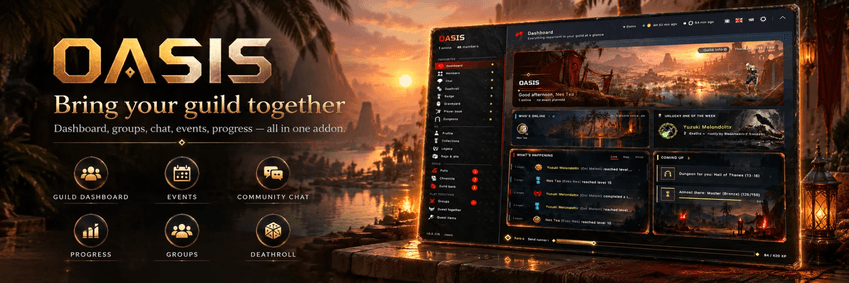
A dashboard full of guild life
See who's online, follow level-ups and loot, check upcoming goals and discover your guild's Hero of the Week. The activity feed and the chronicle keep your guild's story in one place.
Members, profiles & the PlayerBook
- Member directory: roster with ranks, alts, professions and last seen.
- Profiles: character pages with progress, badges, Oasis rank and a personal journey.
- PlayerBook: rate players you met, keep notes and share feedback with your guild - find great teammates again.
Guild chat, emojis & sounds
Give guild conversations their own space: a guild chat with emojis, mentions and a history.
Your own guild pack - emojis & sounds
Make OASIS truly yours with the free Oasis Studio:
- Drop in your own images (PNG, JPG, GIF, WEBP - animated GIFs stay animated) and sounds (MP3, OGG).
- Name them, sort emojis into tabs and lock items to an Oasis rank if you like.
- Download one folder,
Oasis_GuildPack, and share it with your guild. Guildmates install the same pack to see your emojis and hear your sounds. - Already have a pack? Open it in the Studio (ZIP or folder), change it and download the new version.
- Everything happens in your browser - your images and sounds are never uploaded.
Community & fun
- Polls & guild goals: decide together and work toward shared objectives.
- Community: profiles, birthdays, mentors for new members, thank-yous.
- Guildotchi: every member with Oasis has an animal on the guild meadow - feed it, pet it, keep it happy.
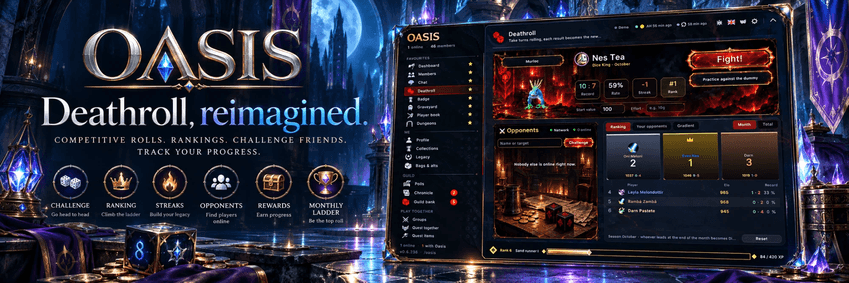
- Deathroll: a classic dice duel with a leaderboard; stakes are off by default.
- Badges, collections & Legacy: celebrate progress and milestones.
- Campfires & deaths: share campfires on the map and remember fallen heroes.
Guild leadership
Recruiting, applicants, inactive members, attendance and announcements - tools for officers with access based on guild rank.
Your guild, your look
Customize OASIS with designs, colors, layouts, fonts and sounds. Pin your favorite pages, reorder the sidebar and style your guild name's logo with a live preview.
Your data, your choice
Optional guild data export lets you work with your own guild website or tools. No OASIS-hosted service is required. Data export is off by default and excludes officer notes, guild chat, whispers, player ratings, the blacklist, applicant data and personal settings.
Available in 12 languages
English, German, French, Spanish, Italian, Portuguese, Russian, Simplified Chinese, Traditional Chinese, Korean, Polish and Japanese. Translations are machine-assisted; feedback is welcome.
Getting started
- Unpack OASIS into your game's Interface/AddOns folder (plus any add-ons you want).
- Restart the game and enable OASIS on the character selection screen.
- Type /oasis or /oa to open the addon.
- Pick your areas, language and look in the start window.
Commands
/oasisor/oa- open or close the window/oa mini- collapse to the slim bar/oa sync- sync guild data now/oa demo- fill Oasis with sample data to try it out (stays on your PC)
Feedback
OASIS is actively developed for WoW Forever; compatibility with other game versions is not claimed. Report bugs, suggest features and share translation feedback through our community channels.
License and credits
Oasis is free software under the GNU General Public License v2 (see LICENSE). Full list of credits: CREDITS.txt in the addon folder.
- Icons: game-icons.net by Lorc and Delapouite, CC BY 3.0.
- Emojis: Twemoji, Copyright Twitter/X and contributors, CC BY 4.0.
- Flags: flag-icons by Panayiotis Lipiridis, MIT license.
- Fonts: Google Fonts, SIL Open Font License 1.1 (details in
Media/fonts/LICENSE-FONTS.txt). - Textures: ambientCG, CC0 1.0.
- Rank crests, profile frames, level badges, logos and artwork: original work by the Oasis author.
World of Warcraft and related names/graphics are trademarks of Blizzard Entertainment.
OASIS Team