Forever Sixty
- By
Your next upgrade, your next talent and your Forever Score, on the game's own frames. No setup, no network, nothing in combat.
One line beside the minimap: the talent to take, the bag item to equip, loot here for you, or what the ready check found missing.
Description
Play your class better, in game
Forever Sixty puts the next thing that makes your character better where you would act on it: on the talent window, the item tooltip, the character panel, the raid frame. There is no window to open and nothing to configure. A new character follows the default build for its spec from the first level; every surface with nothing to say stays out of the way.
It is the in-game half of foreversixty.gg, the planner, simulator and log site for World of Warcraft: Forever. The numbers in the game are the site's numbers: the same simulator, the same stat weights, the same Forever Score.
Install in two minutes
- Install Forever Sixty and Forever Sixty Data (the nightly ratings pack; a required dependency, so the CurseForge and Wago apps install it with the addon). Installing by hand, put both folders in
Interface\AddOns; theForeverSixtyInboxfolder in the same download is for the desktop companion and does nothing on its own. - Log in. There is nothing to set up: a character with no saved build follows the default leveling build for its spec, and the raid build from 60. At level 1 to 9 with no spec yet, the chip offers a path to pick.
- When you want a build of your own, make it in the planner, press "Copy for the game", type
/fsin game and paste.
The chip
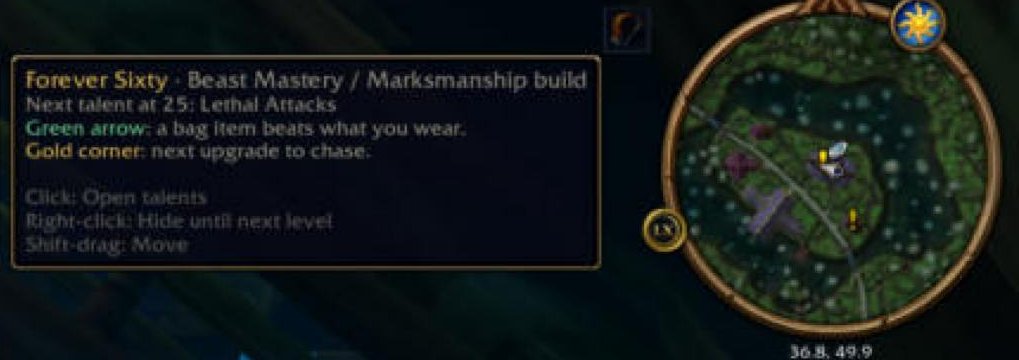
One small icon and line beside the minimap that names your next step: a talent point to spend, an upgrade waiting in your bags, loot in the dungeon you just entered, what a ready check found missing, or last raid night's biggest loss. When there is nothing to say it says nothing.
- Click it to act: equip the bag item, open the talent window, open the group panel.
- Hover it for the legend of the marks the addon draws on your bags and paper doll.
- Right-click it to hide it until your next level;
/fs chipbrings it back or hides it for good. - It fades to 25% in combat (or hides, if you prefer, in Settings) and hides with the rest of the UI. Drag it where you like; Reset positions in Settings puts it back.
Talent marks
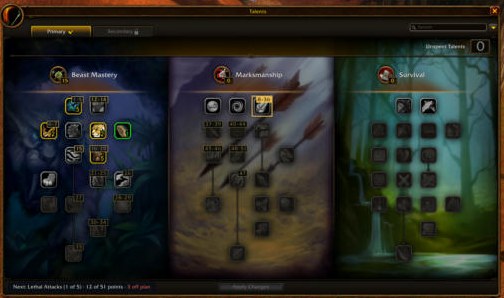
Open the talent window and your build is drawn on it: every talent it takes carries its order number, the next one to take is ringed in gold, and a strip along the bottom counts the points your level allows ("12 of 15 points · 3 off plan").
- Hover a numbered talent for its place in the plan and the level you take it.
- Hover "off plan" for the talents you spent outside the build and the next point to take.
- The marks sit on frames of the addon's own, so the client's talent buttons work exactly as before.
Item tooltips
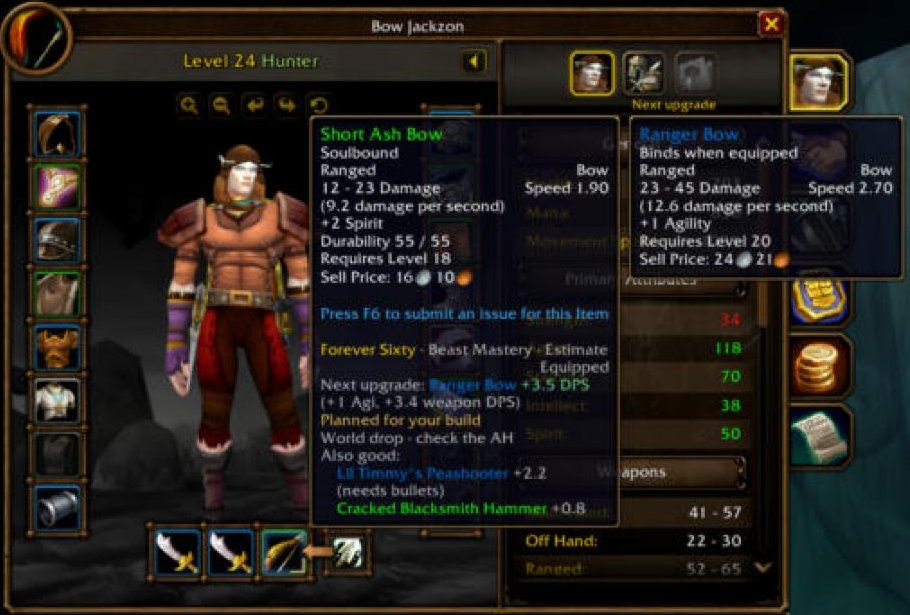
Hover any item, in your bags, at a vendor, in the auction house, on a corpse or linked in chat, and its tooltip gains a Forever Sixty section:
- "Upgrade +4.2 DPS over Cracked Blacksmith Hammer", by the same stat weights the site's simulator uses for your spec. Healers read HPS.
- The next upgrade for that slot and the level it lasts until, then where it drops, with the boss and its chance.
- "Also good:" two runners-up, a thrown weapon tagged "(thrown)", ammunition users "(needs bullets)", and a pair verdict for two one-handers against a two-hander.
- An item the client has not cached yet shows "stats pending" and redraws the moment it arrives.
Paper doll, bags, quest rewards and rolls
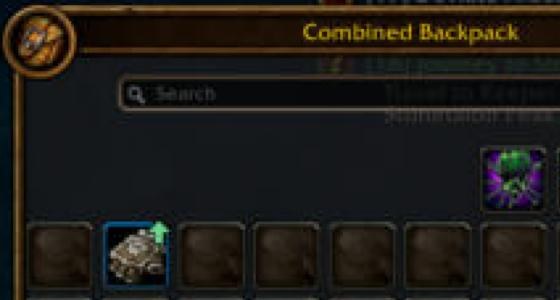
Open your character panel and bags and the upgrades are marked where they are:
- A green arrow on a character slot and on the bag item that beats it, or fills an empty slot. Click the chip to equip it.
- A gold corner on a slot whose next upgrade is worth chasing; hover the slot and it names the pick for your spec, faction and level.
- "Best for Arms" in gold on the quest reward that is an upgrade, or "Vendor" on each when none is.
- Beside the roll frame, the same verdict the item's tooltip gives, so you decide Need before the timer runs out.
Another bag addon's bags are left alone, and /fs diag says so.
The "Forever Sixty" tab on the character panel
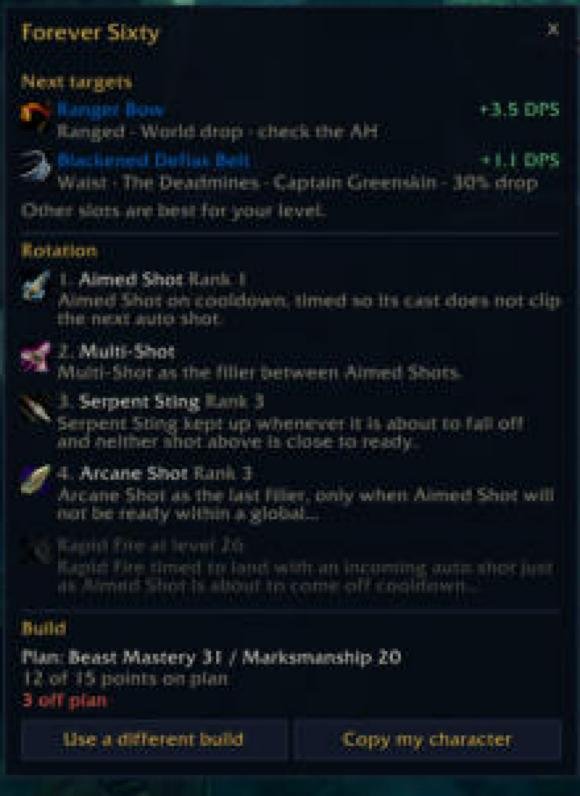
A "Forever Sixty" button on the character panel opens a flyout with three things:
- Your next targets: up to five pieces, each with its source, drop chance and the worn item it replaces.
- Your rotation at your level, with the rank to use, and "Rank N at level M" for what you have not learned yet.
- Your build: the tree split, "12 of 15 points on plan", the off-plan count, a way to use a different build, and "Copy my character".
At 60, with the desktop companion, it adds your simulation (your DPS, your top stat weights in DPS per point, "Sim me again") and your last raid: each boss's parse percentile, biggest loss, deaths, consumables missed and rotation adherence.
The player tooltip and the Forever Score
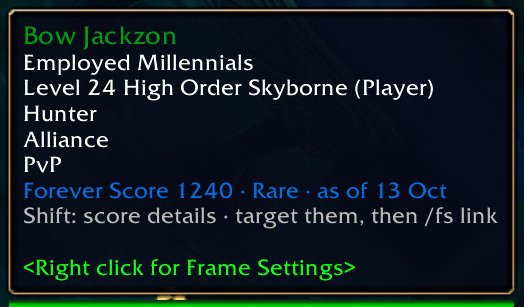
Hover any player and their tooltip carries their Forever Score and tier in the tier's colour, with the date of the record: "Forever Score 1240 · Rare · as of 13 Oct".
- Hold Shift for the five parts behind it: gear, experience, parses, attendance and preparation, and their total.
- A player with no public logs reads "no logs yet", never a zero.
- Guildmates who run the addon also show their level, spec and gear gap live.
- Target them and type
/fs linkto copy the address of their page on the site.
Scores come from the Forever Sixty Data pack, rated every night from public logs on foreversixty.gg. A parse is not a performance; the score says so.
Score badges in chat

In LFG, Trade, guild chat and whispers, a sender with a score gets "FS 1240 ·" before their line, in the tier colour, muted once the record is more than three days old. One switch in Settings turns it off.
The guild tab
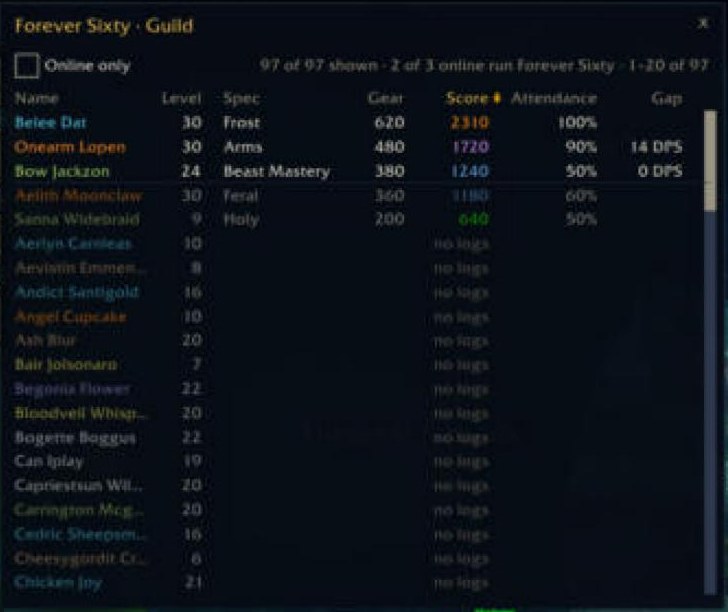
A "Forever Sixty" button on the guild frame lists your roster with level, spec, gear, Forever Score, attendance and gear gap.
- Click a column to sort by it; "Online only" filters the list; the "as of" date tells you how fresh the records are.
- Members who run the addon show their live snapshot; everyone else shows the nightly record.
- Officers see the approvals waiting on the site and can "Push the raid build to guild" behind a confirmation. A pushed build is announced once and listed in
/fswith the officer's name; nobody is made to use it.
Your own row goes live for your guild while "Share my build with my guild" is on in Settings.
The group panel and the ready check

On the Social window's Raid tab, or with /fs group, a Forever Sixty panel shows each member's spec, item level, gear gap, score and buffs before the first pull. Members without the addon are read from inspect, one every two seconds, never in combat.
/fs readyruns the check on demand: who lacks flask, food or a weapon imbue, and inside Molten Core, Onyxia's Lair and Blackwing Lair, which class buffs the bosses need that nobody brings./fs floor Ntags the members scored under N.- It informs the leader. It never kicks, whispers or announces for you.
Loot council
When an epic drops and you are the master looter, the addon asks the group what the item is worth to each member who can wear it, by the simulator, and lists the answers with a 10 second countdown in the title. Nothing is asked about an item no member's class can wear; "Ask the group about rare drops too" in Settings adds rares. For yourself, /fs loot <item link> answers "+6.3 DPS over <worn item>, on your list".
Paste a build from the site
/fs opens the one dialog of the addon's own.
- On foreversixty.gg/planner, build or pick a build and press "Copy for the game".
- In game, type
/fs, paste the code and press Load. The dialog reads "Following: Raid build · 51 points". - From then on the chip, the talent marks and the character panel follow it.
The dialog previews what a paste would replace and never overwrites a raid build with a leveling one. /fs build raid, leveling or pvp switches between the builds you have saved. Builds you save on the site, and builds an officer pushes, arrive here too.
Copy your character to the site
/fs copy, or Ctrl+C in the dialog, copies your character: level, spec, talents, equipped gear, and your bags when that switch is on. Paste it on the site's planner or simulator under "Import from addon" and they start from exactly what you have. With the desktop companion the copy travels by itself at logout, and the tab reads "Seen by the site" with the time.
Settings
Everything lives on the game's own Settings page: Escape, Options, AddOns, Forever Sixty; or /fs options; or right-click the minimap button. Nine switches, each with one line saying what it does:
| Switch | What it does |
|---|---|
| Show the chip | The small icon and line beside the minimap with your next step. |
| Hide the chip in combat | On: the chip hides when combat starts. Off: it stays, faded to 25%. |
| Marks on the talent window | Numbers your build's talents in order, rings the next one and adds a progress strip. |
| Show the minimap button | Left-click pastes or copies a build; right-click opens this page. |
| Gear tips on item tooltips | Adds a line when an item is in your build or beats what you wear. |
| Score badges in chat | Shows a player's Forever Score before their message in LFG, Trade, guild chat and whispers. |
| Ask the group about rare drops too | As the master looter you ask the group about epics. On: rares too. |
| Share my build with my guild | Guildmates with Forever Sixty see your level, spec, build and gear gap. |
| Save my character for the companion app | Written at logout for the companion app on your PC, so the site can read your gear. |
Under them: Reset positions, which puts the chip, the minimap button and the build dialog back, the command list, and a plain line for the data pack ("Player ratings: as of 14 Oct", "too old", "not installed").
The desktop companion, optional
The companion app on foreversixty.gg/setup (Windows) carries what the addon leaves at logout to the site, your character, a "Sim me" request and your guild roster, and brings back what the site has for you: the builds you chose there, your newest sim with its upgrades, and your last raid. Without it everything above still works; the character panel's sim and last-raid drawers are what it adds.
Commands
| Command | What it does |
|---|---|
/fs |
paste or copy a build |
/fs copy |
copy my character for the site |
/fs build |
switch between saved builds |
/fs chip |
show or hide the chip |
/fs inspect |
gear and talents of your target |
/fs link |
copy a player's site page |
/fs group |
your group's specs, gear and buffs |
/fs ready |
check flasks, food and buffs now |
/fs loot |
what an item is worth to you |
/fs floor N |
tag members scored under N |
/fs options |
open the settings page |
/fs diag |
what is not working |
/fs help |
every command |
If something looks wrong
/fs diagsays what is not working and why, one line per surface.- "Player ratings: not installed" means Forever Sixty Data is missing; install it beside the addon. "too old" means your addon manager has not updated it for a while.
- No chip: right-click hid it until your next level;
/fs chipbrings it back. - No marks in your bags: another bag addon owns them, and the chip's hover legend still names the upgrade.
- Anything else: open an issue with the
/fs diagoutput, or ask on Discord.
What it never does
It never connects to the internet, never reads your account, never sends a message or a kick on your behalf, and does nothing in combat. It reads what the game client already shows you, and the data pack your addon manager updates. Every surface has a switch on the game's Settings page.
foreversixty.gg · Get set up · Discord · Source and changelog
Forever Sixty Team