


Brute Force Rendering Culling Revived
- By
A performance mod that speeds up Minecraft by aggressively culling hidden chunks and entities, reducing lag without trying to change any visuals.


Brute Force Culling Revived brings back RogoShum's Brute Force Rendering Culling, rewritten to be more performant and more stable, and to work better in modpacks.
Whatever you don't see doesn't get drawn by GPU. Improving FPS.
Forge 1.20.1 | Client-side only | Works with Embeddium & Oculus
What does it do?
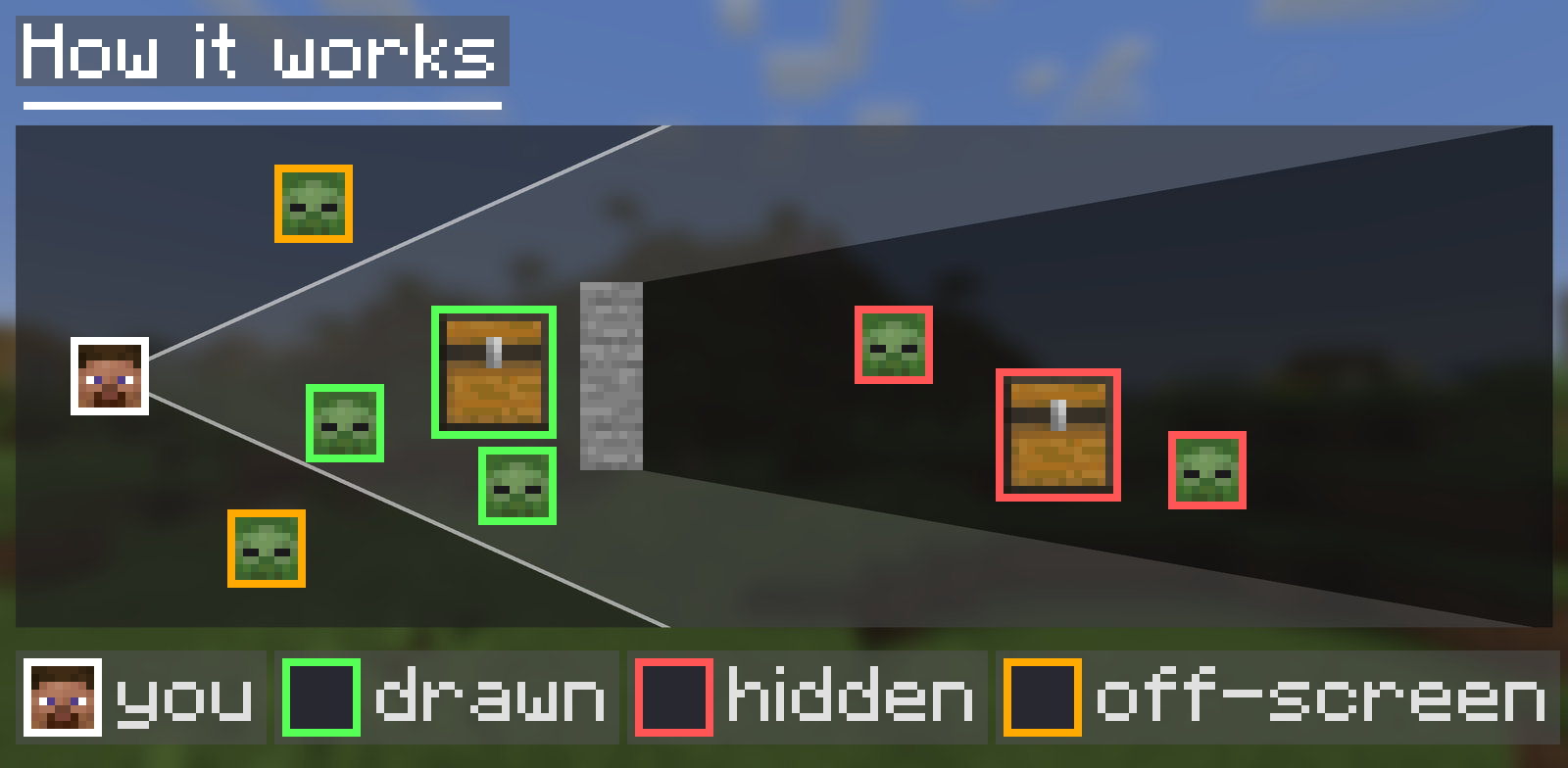
Minecraft already skips things things you don't see. It does not skip things that are in front of you but hidden though. Behind a hill, a wall or the floor of your base. Those mobs, chests and chunks still get drawn every frame.
This mod fixes that. Each frame (configurable) it uses the GPU to work out what is actually visible, then removes anything that is fully hidden before it gets drawn.
Features

- Entities: mobs, animals, item frames and more stop rendering while they are hidden behind terrain. Players and glowing entities are always drawn.
- Block entities: chests, signs, furnaces, modded machines and anything else with a special renderer.
- Big farms, mob grinders and large storage rooms stop sucking on FPS when you're not looking at them.

- Chunk sections that are fully hidden, like caves under your feet or valleys behind a mountain, are skipped.
- Works with vanilla rendering and with Embeddium. (which I recommend you use)

- Hides half of the grass, flowers and small plants in chunks far from the camera, where you can't tell the difference anyway.
- Starts at 50% of your render distance by default (you can change this).
- Also covers modded plants. Crops, saplings, sugar cane, vines and nether wart are never hidden.
- Needs Embeddium. (which.. again I recommend you use)

- Off by default. When on, hidden entities also stop running their client-side updates, which saves more CPU than GPU.
- Hidden entities pause their animations and particles. Mob sounds still play.
- Entities within 16 blocks, glowing entities, anything you're riding and anything on the skip lists always keep updating.

- Rebuilds visible chunks on a separate thread, which helps frame rate while you move.
- Turns itself off when shaders are active. Because some GPU's crash on this..
- Needs Embeddium.
- Quite Experimental: if you crash while chunks load, turn this off.

- Press
Xto turn on the debug overlay, then pressRand click Run Benchmark to measure the mod on your PC. - It spawns 400 zombies and 150 chests around you, puts u in a rock or some and switches culling on and off over three rounds while slowly turning the camera.
- Reports median and average FPS, 1% and 0.1% lows, and how much was culled. Everything is put back when it finishes.
- The same debug menu has Show Culled Objects, which flips culling around so you see only what was removed. Anything you can still see there is being culled when it shouldn't be.

- Embeddium and Oculus are supported, and shader packs work.
- If a mod's blocks or mobs flicker, add them to a skip list in the config (see below). You can skip single entities, single block entities, or a whole mod by its namespace.
Benchmark
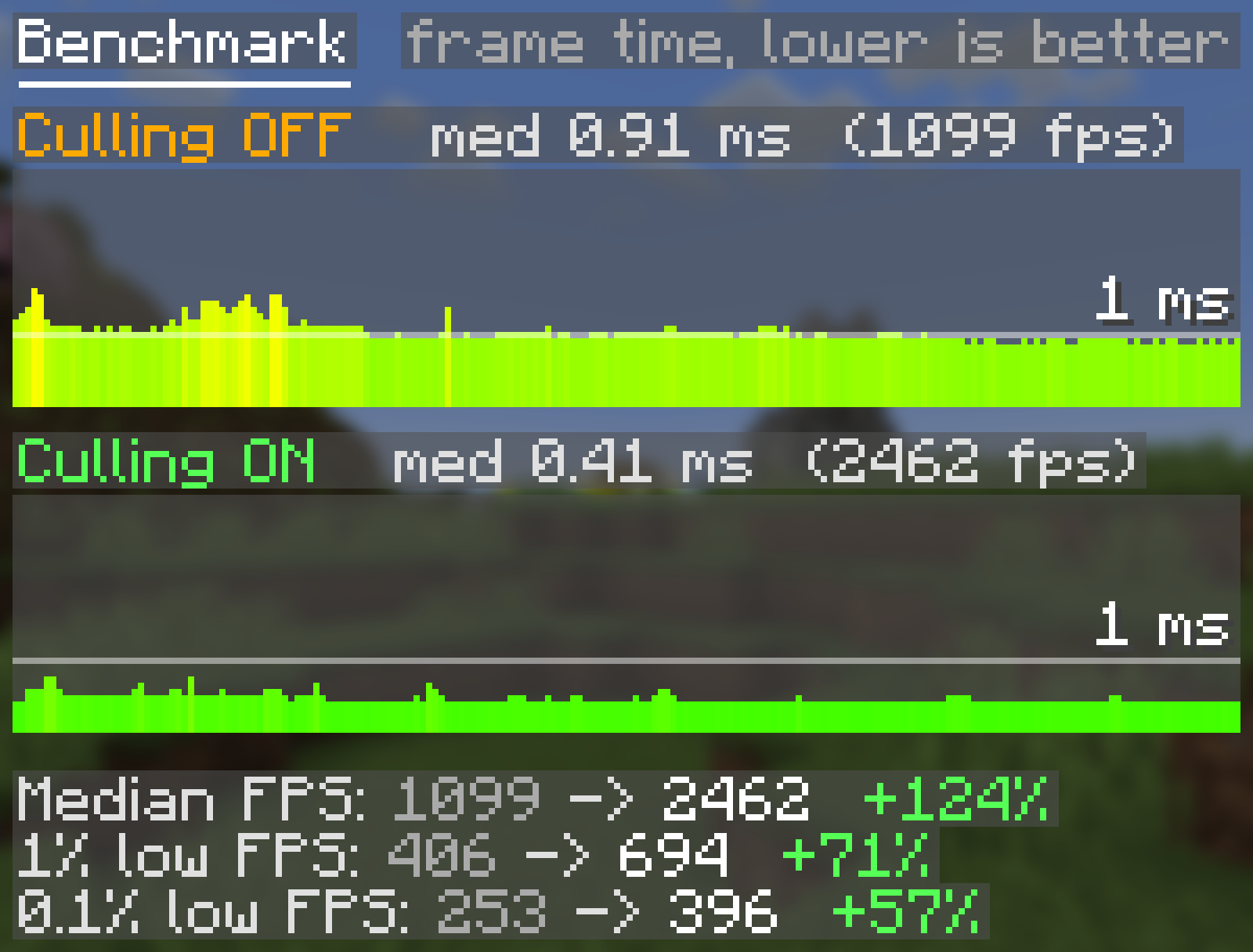
Tested with the built-in benchmark on a Ryzen 7 7800X3D and Radeon RX 9070 XT, at 3440x1440 with render distance 12 and Embeddium. This is a worst-case stress scene where almost everything is hidden. In normal play the gain depends on how much is behind walls and terrain around you.
It's biggest in bases, caves, villages and mob farms, and smallest out in open fields. Run the benchmark yourself (X, then R) to see what you get.
FAQ
Do I need it on my server?
- No.
Something flickers or disappears when it shouldn't.
- Add its ID to the entity or block entity skip list. If a whole mod misbehaves, add the mod's namespace (the part before the :) to the mod skip list. Please also report it so it can be fixed properly as well.
I crash while chunks are loading.
- Turn off Asynchronous Chunk Rebuild in the config menu.
Can I use it with other culling mods?
- Depends on which mod it is. Entity culling is redundant though, this mod is better.
Credits
- Original mod, Brute Force Rendering Culling, by RogoShum. All credit for the original idea and code goes to them.
Brute Force Rendering Culling Revived Team
Owner




![Linggango [6.6.6 - Goety Update] project image](https://media.forgecdn.net/avatars/1898/308/639186447652047298.webp)