Recursive AE2 Pattern Provider
- By
Automatically generate dependency patterns for complex AE2 recipes
pattern_rework_tooltip.png
pattern_terminal_1.png
Description
Recursive AE2 Pattern Provider
🔄 Overview
Recursive AE2 Pattern Provider revolutionizes Applied Energistics 2 automation by automatically generating dependency patterns for complex recipes. Say goodbye to tedious manual pattern creation and hello to effortless multi-tier crafting automation!
https://streamable.com/fgzitu
https://streamable.com/fgzitu
✨ Features
🎯 Automatic Pattern Generation
- Smart Dependencies: Automatically creates patterns for missing crafting ingredients
- Recursive Logic: Generates patterns for ingredients of ingredients, as deep as you configure
- Recipe Discovery: Only creates patterns for items that have valid crafting recipes
- If you set a non-crafting pattern as Recursive, you need to put it in a Pattern Provider attached to a Molecular Assembler
🖥️ Seamless Terminal GUI Integration & Per-Pattern Control
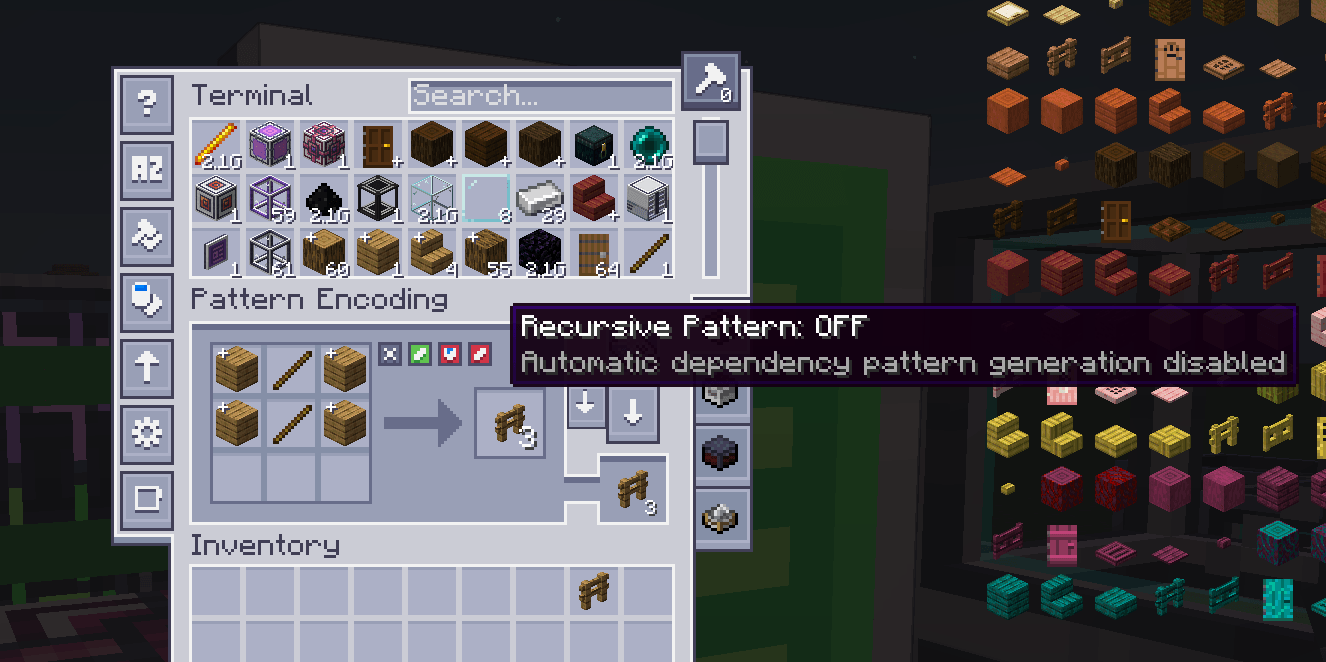
- Direct GUI Toggle: Easily turn recursion ON/OFF directly inside the Pattern Encoding Terminal (Crafting Patterns tab) next to the fluid substitution buttons
- Crafting Recipe Conversion: Alternatively, craft any AE2 pattern with the configured recipe item (default: iron ingot) in a crafting table
- Automatic Persistence: Re-encoding an existing recursive pattern in the terminal automatically preserves its recursive status
- Universal Support: Works with ALL AE2 pattern types:
• Crafting Patterns
• Processing Patterns
• Smithing Table Patterns
• Stonecutting Patterns
- Remove Recursion: Craft a recursive pattern alone (without the recipe ingot) in a crafting table to make it normal again
🎨 Visual Feedback
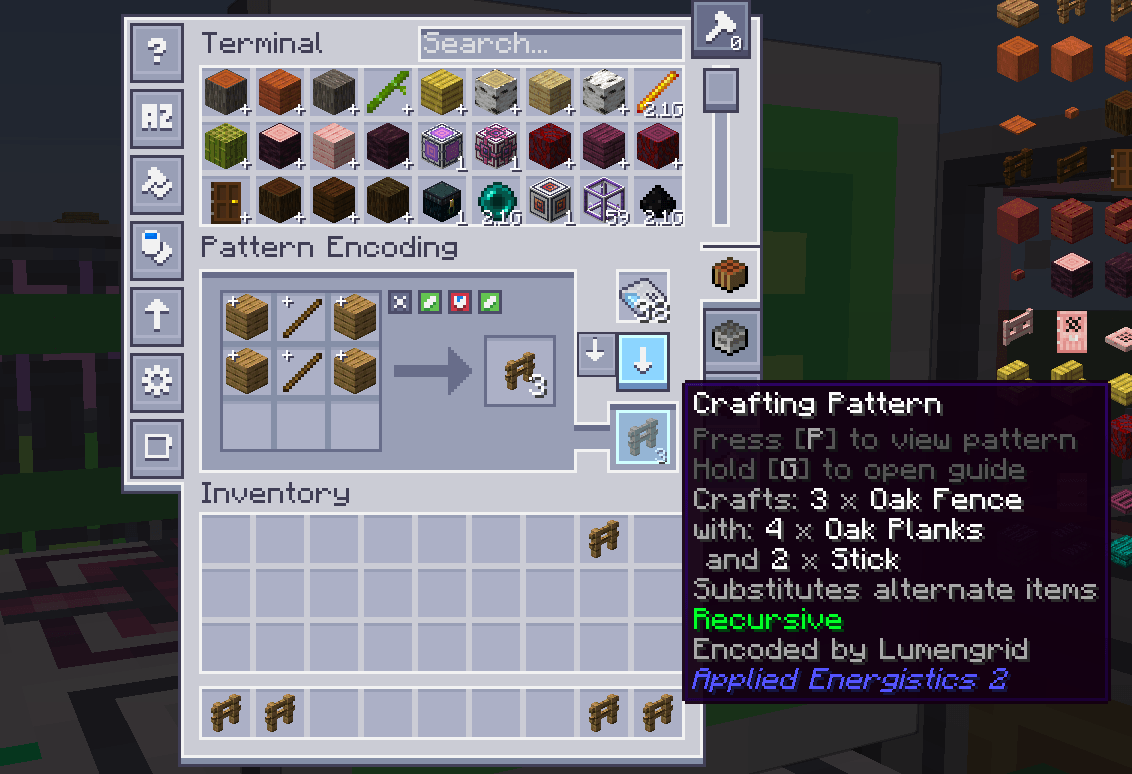
- Clean & Native Tooltips: Displays a subtle, highlighted Recursive tag placed right above the "Encoded by" line for Crafting Patterns
⚙️ Configuration Options
- Terminal GUI Toggle: Enable or disable the recursive button in the Pattern Encoding Terminal (`enableEncodingGuiToggle`)
- Recursion Depth: Control how deep pattern generation goes (-1 = unlimited, 0 = disabled, 1+ = limited)
- Recipe Item: Customize which item is required to craft recursive patterns (default: `minecraft:iron_ingot`)
- Substitute Inheritance: Auto-generated patterns inherit substitute settings from parent patterns
- Default Settings: Configure default substitute behavior for patterns without parent context
🎮 How to Use
Method A: Pattern Encoding Terminal (Recommended)
1. Open the Pattern Encoding Terminal
2. Select the Crafting Pattern mode
3. Toggle the Recursive Pattern button to ON (green checkmark)
4. Insert your recipe and click Encode Pattern
Method B: Crafting Table Recipe
[AE2 Pattern] + [Recipe Item] → [Recursive Pattern]
Craft the pattern with the configured recipe item (default: iron ingot) in any crafting table
Remove Recursion
[Recursive Pattern] → [Normal Pattern]
Craft the recursive pattern alone (without the recipe item) to make it normal again
Craft the recursive pattern alone (without the recipe item) to make it normal again
💡 Customizing the Recipe Item
To change which item is required for crafting recursive patterns, edit your mod configuration:
```toml
[recursiveae2patternprovider-common.toml]
recipeItem = "minecraft:diamond" # Use diamond instead of iron
# Or use any other item:
# recipeItem = "minecraft:gold_ingot"
# recipeItem = "minecraft:emerald"
# recipeItem = "ae2:calculation_processor"
```
```toml
[recursiveae2patternprovider-common.toml]
recipeItem = "minecraft:diamond" # Use diamond instead of iron
# Or use any other item:
# recipeItem = "minecraft:gold_ingot"
# recipeItem = "minecraft:emerald"
# recipeItem = "ae2:calculation_processor"
```
Step 3: Install in Pattern Provider
Place the recursive pattern in your Pattern Provider connected to a Molecular Assembler
Step 4: Automatic Magic
The mod automatically generates dependency patterns for missing components in real time:
- Sticks (if Iron Pickaxe needs them)
- Iron Ingots (if you're using raw iron)
- Any other missing intermediate crafting dependencies
Example Scenario
Traditional AE2: To autocraft Iron Pickaxes, you manually create:
- Iron Pickaxe pattern
- Stick pattern
- Iron Ingot smelting pattern (if using raw iron)
- Wood plank pattern (if making sticks from logs)
- ... and so on
With This Mod: Create ONE recursive Iron Pickaxe pattern → All dependencies auto-generated!
📋 Configuration
The mod includes several configuration options in config/recursiveae2patternprovider-common.toml:
```toml
# Enable/disable the entire mod
enableRecursiveAE2PatternProvider = true
# Show/hide the toggle button in the Pattern Encoding Terminal GUI
enableEncodingGuiToggle = true
# Maximum recursion depth (-1 = unlimited, 0 = disabled, 1+ = limited depth)
recursionDepth = -1
# Default substitute settings for auto-generated patterns
defaultAllowSubstitutes = false
defaultAllowFluidSubstitutes = false
```
🔧 Technical Details
Compatibility
- Minecraft: 1.21.1 ( 26.1.2 from 1.1.0 )
- NeoForge: 21.1.205+
- Applied Energistics 2: Required
- Extended AE: Compatible (Assembler from 1.0.5)
- Extended AEPlus: Compatible (Super Assembler from 1.0.9)
- Advanced AE: Compatible from 1.0.6 (Not their Advanced Processing Pattern)
- AE2 WCWT: Compatible from 1.0.11
- Server/Client: Works on both dedicated servers and single-player
Performance
- Smart Caching: Prevents duplicate pattern generation
- Efficient Processing: Only generates patterns when actually needed
- AE2 Integration: Uses AE2's existing pattern system for maximum compatibility
Transform your AE2 experience from tedious pattern management to effortless automation mastery!
Recursive AE2 Pattern Provider Team

Owner