
Patternium


Patternium
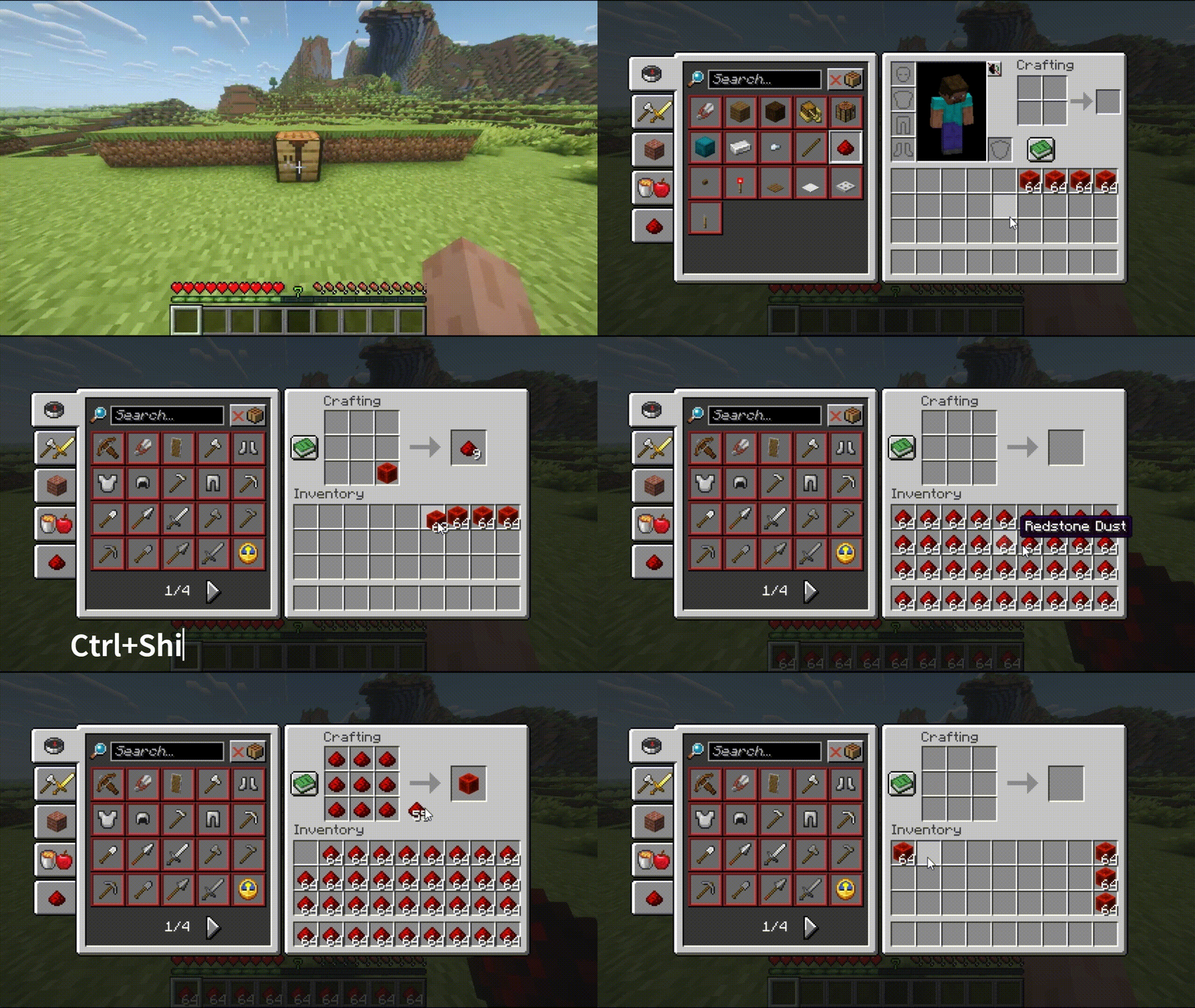
Ctrl+Shift+Click on the crafting result to auto-craft the current recipe until materials run out — even when inventory fills up.
Patternium is a 100% client-side Fabric mod that automates bulk crafting. Place items in your crafting grid (2x2 or 3x3), hold Ctrl + Shift, and left-click the result. The mod crafts continuously until your inventory is empty of matching materials or you close the screen.
What It Does
- Bulk Craft — Hold
Ctrl+Shiftand left-click the crafting result slot. The mod shift-clicks the result, refills the grid evenly from your inventory, and repeats. - Even Distribution — Items are split equally across grid slots. 64 oak planks in a 2×2 recipe? 16 planks per slot.
- Overflow Dropping — When inventory fills, the remaining output is picked up and dropped on the ground, so crafting never stalls.
Why Patternium?
The vanilla recipe book is fine for crafting one stack. But for bulk processing — converting stacks of raw materials into their crafted forms — doing it manually is absurd repetition.
Example: You have 9 stacks of iron blocks from a farm. Place blocks in the 2×2 or 3×3 grid, hold
Ctrl+Shift, click the result. The mod crafts all 576 ingots automatically. Overflow drops at your feet. Total: 1 click.
Works with any item and any recipe — vanilla, modded, shaped, or shapeless. If CraftingRecipe.matches() accepts it, Patternium can auto-craft it.
How It Works
Patternium uses the same approach as Mouse Tweaks: it simulates normal inventory clicks (clickSlot() via ClientPlayerInteractionManager). The server sees exactly what a fast, precise player doing it manually would produce. No special packets, no modified world state, no server-side code.
- No configuration needed — just hold <kbd>Ctrl+Shift</kbd> and click
- Uses
RecipeManagerandCraftingRecipe.matches()— works with modded recipes - Works on vanilla, Fabric, Paper, Spigot — any server that allows vanilla clients
- Always read the server rules first. Some servers ban inventory modification mods or other macro's.
Overflow Handling
When the inventory fills up mid-batch:
- Patternium shift-clicks the result into your inventory normally.
- If there's no room, the remaining output stays in the result slot.
- Patternium picks it up and drops it on the ground, then keeps crafting.
This means you never stall on a full inventory. Stand under a mob farm with a crafting table — bones land in your inventory, Patternium turns them into bonemeal, and the excess bonemeal drops at your feet while fresh bones keep falling in.
Controls
| Key | Action |
|---|---|
Ctrl+Shift+Left Click on result slot |
Start auto-crafting the current recipe |
| Close the crafting screen | Stop auto-crafting |
Requirements
- Minecraft 1.21.11, 26.1, 26.1.2 or 26.2
- Fabric Loader 0.16.10+
- Fabric API 0.100.0+
- Java 21 or higher.
The Patternium Team
