
It's the little things
- By


Curse Maven Snippet
What's new
https://github.com/zlepper/itlt/blob/1.13/CHANGELOG.md
Changelog
v2.0.0
With v2 of itlt, everything has been written from the ground-up with a goal on being the best at the specific little things it does.
MC 1.13.2-specific
- itlt v2 is now available for MC 1.13.2!
- Branding customisation features such as custom window title and icon are unavailable, please use MC 1.14.x or newer if you want those features
Breaking changes
Everything's changed so this release is not compatible with existing v1 configs. The default behaviour of auto-detecting the modpack's icon and title is still in place.
New features
Full multi-lingual support
All features in itlt v2 should support different languages, allowing it to be localised to your desired language rather than being forced to read English. This includes features outside of the game, such as the warning and requirements system
Improved launcher integration
itlt now uses a more modular system for launcher detection and integration and supports many different launchers. While v1 supported the Technic Launcher, v2 also supports MultiMC, Curse Client, FTB App and the Forge Dev Env.
Warning and requirements system
You can now let people know when they haven't allocated enough RAM at launch with a helpful pop-up. Or if they're using the wrong Java version or architecture. Or if they're allocating waaaay too much RAM, or a combination of the above.
These things can be set multiple times separately as warnings and requirements - where warnings are considered recommendations, requirements are considered "this modpack won't start or will crash if not met".
Using the new launcher integration features, the guides are tailored to the launcher your players are using, making it easier to find what settings to change to get your pack running.
There's also now the ability for your users to "Don't ask again" for specific warnings. This remembers a user's preference to ignore a specific warning but still have warnings they haven't seen before to be shown.
Here's a couple of examples of what your users could see, depending on how you configure it:

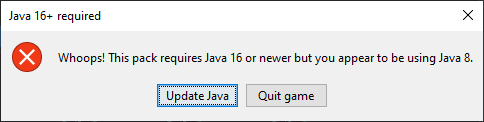
Here's a list of supported warnings (shown as "Wants") and requirements (shown as "Needs") in v2.0.0:
- NeedsJava64bit
- WantsJava64bit
- NeedsMoreMemory
- WantsMoreMemory
- NeedsLessMemory
- WantsLessMemory
- NeedsNewerJava
- WantsNewerJava
- NeedsOlderJava
- WantsOlderJava
Multiple entries in custom server list
You can now pre-install more than one server entry to the Multiplayer menu without overwriting or removing player-added ones when updating the modpack. You can now also force the use of a server-provided resourcepack for specific preloaded server entries.
Explicit GC
For advanced users looking to squeeze the most performance out of their game and have a reasonably good understanding of garbage collection, this feature allows you to explicitly request a GC during known points of gameplay that do not require immediate responsiveness when opened, such as pausing the game or sleeping in a bed.
This feature requires both Xms and Xmx to be set the same for it to be beneficial, ideally with the -XX:+AlwaysPreTouch JVM arg. You must not use the -XX:+DisableExplicitGC otherwise this feature will not work at all. Due to these important requirements that have to be manually added by users, the explicit GC feature is off by default.
Update checker support
itlt now supports the Forge update checker and will show available updates on the Mods button if enabled.
Categorised, detailed config
All config options are categorised and have detailed comments to group similar settings together and to help you understand what every setting does. The wiki fills in additional information you may need that the config doesn't cover in enough depth.
Miscellaneous improvements
- Pop-up windows now attempt to use a more system-native design, with custom code for handling showing native Windows iconography rather than Swing's bundled Windows 7 icons
- Pop-up windows are ran in a separate process so that they can persist after a game crash and to avoid causing crash-on-launch issues on older Mac OSX
-
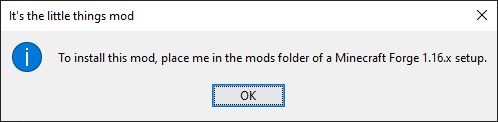
If you run the itlt jar directly, you'll now get this message both in the console output and as a GUI dialogue box:
Other changes
New logo
Heavily inspired by the old logo, the new one uses the same fontface but with more visually consistent sizing and spacing. The new logo also supports transparency and different variations.
You can see the old logo here: https://github.com/zlepper/itlt/blob/gh-pages/docs/logo/old-logo.jpeg

And the new logo and all of its variations here: https://github.com/zlepper/itlt/tree/gh-pages/docs/logo
Technical documentation
For developers, a document providing a technical overview, Q&A, todo lists and more is now available.
You can view it by going to the branch you want to work on and looking at the TechnicalDocumentation.md file.
Issue templates
Pre-filled templates to choose from when filing a new issue that automatically labels your issue for you.
This mod has no additional files