Cool Functions (Packaged as a mod)
Add fun, powerful, and useful features to your Minecraft world — all packed into one datapack!

📖 Description
CoolFunctions is a Minecraft Data Pack that adds several fun mechanics and useful functions to the game, including:
- 🏹 Ender Bow — A custom bow that allows you to teleport to your arrows
- 🚀 Jet Packs — Five tiers of Jet Packs with increasing fuel capacity, speed, and altitude, plus adjustable flight modes
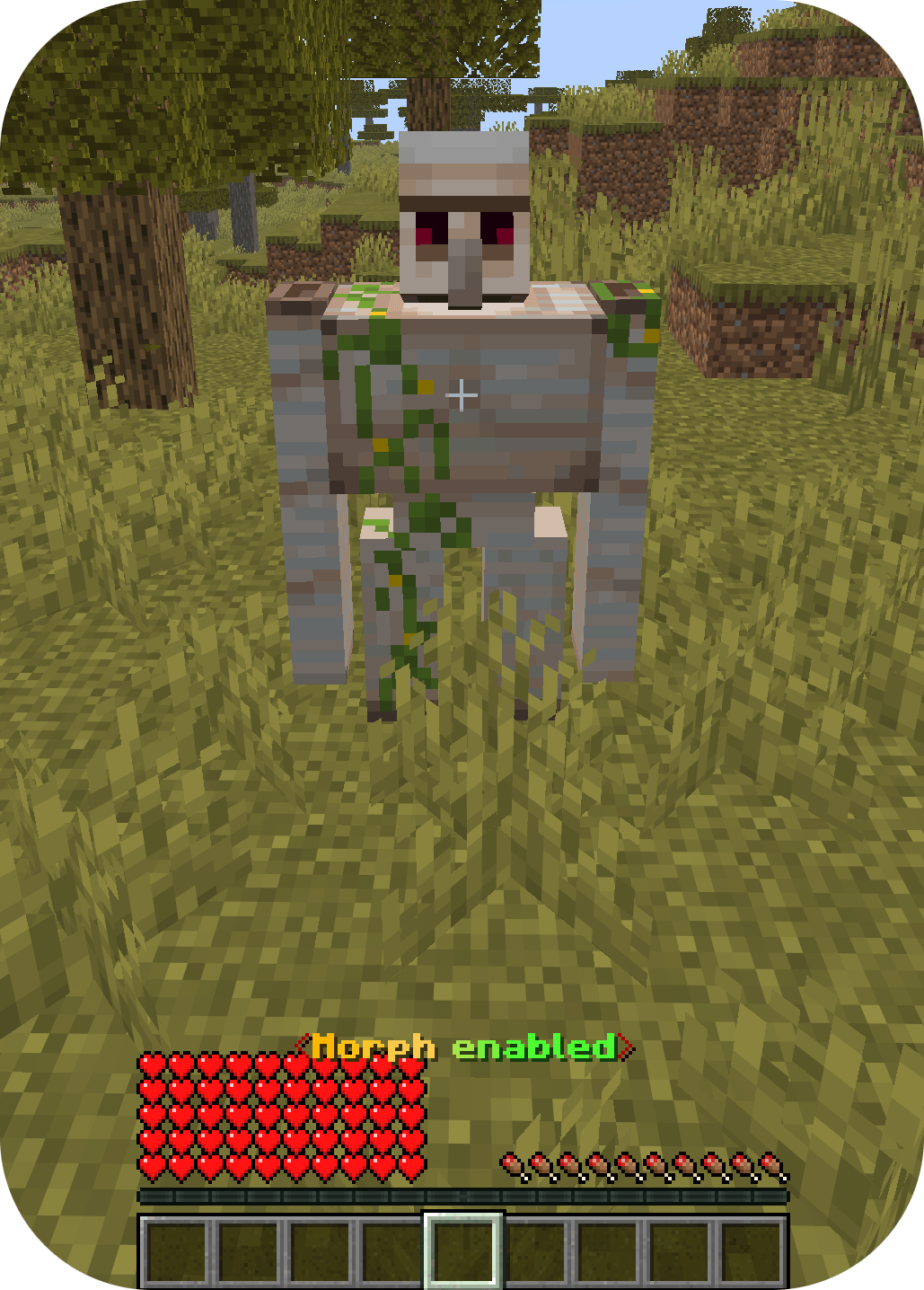
- 👤 Morph System (experimental) — Transform into different mobs
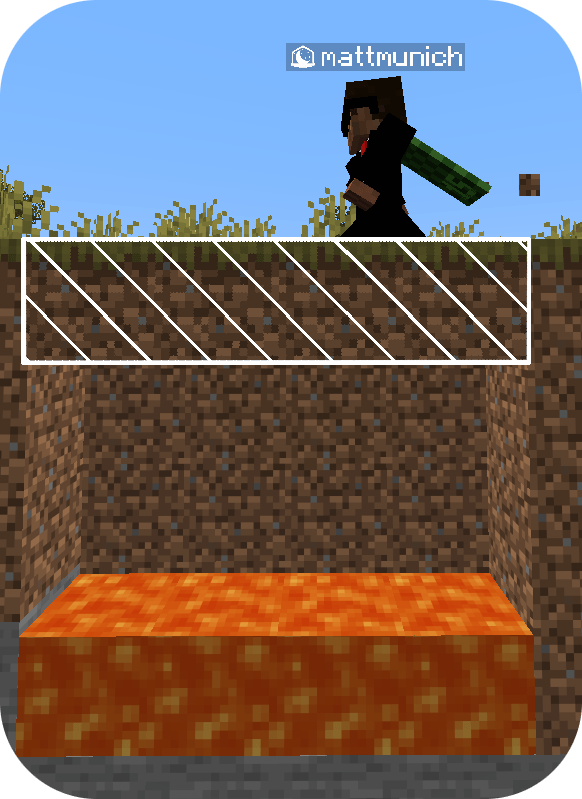
- 👻 Ghost Blocks — Place phase-through blocks
- 🧹 Utility Functions — Useful utilities such as ClearLag or give (only for administrators)
📢 Content & Usage Notice
You are free to use this datapack in videos, streams, or showcases, as long as you clearly credit me (for example in the description).
⚠️ Reuploading or redistributing this datapack without permission is not allowed.
Project is licensed under the MIT License
📥 Installation
CoolFunctions is available in two forms:
| Format |
Where |
What you need |
| Datapack + Resource Pack |
Modrinth or the original CurseForge project |
Two files: the datapack and the resource pack |
| Mod |
Modrinth or this CurseForge project |
One single file — the datapack and the resource pack combined |
💡 The mod version has the advantage that you only need to download and install one file, since it combines the datapack and the texture pack in one mod.
🖥️ Singleplayer
Choose one of the following:
- Install the datapack + resource pack, or
- Install just the mod.
🌐 Server
Choose one of the following:
- Datapack on the server only: install the datapack on the server. Players only have to download the resource pack/mod (not the datapack).
- Mod on the server: install the mod on the server. Players only have to download the resource pack/mod.
🏹 Ender Bow
📦 Obtaining
Option 1 - Crafting table:

Option 2 - Drop Crafting:
Drop the following items on the ground:
The Ender Bow recipe will also automatically unlock when you obtain the required materials.
🎯 Usage
- Hold right-click, just like a normal bow.
- You'll follow the arrow until it lands.
- While shooting, the Ender Bow temporarily uses your offhand slot. The item you were holding there (e.g. a shield) is stored and given back to you afterwards.
🚀 Jet Packs
The Jet Pack comes in five tiers, each providing increased fuel capacity, speed, and maximum altitude.
Each tier also has its own custom color, making it easy to distinguish between them.
💡 The altitude limit is measured as the height above the ground directly below the player(*). Once the maximum altitude is reached, the Jet Pack will no longer provide upward thrust and you will hover around the max altitude.
*Leaves are not counted as ground.
🔋 The remaining fuel is shown as the durability bar of the Jet Pack, and in the action bar together with the current flight mode.
Tier 1
- ⛽ Fuel: 2 minutes
- ⚡ Speed: Low
- 📏 Maximum altitude: 15 blocks above ground
Craft:

Tier 2
- ⛽ Fuel: 5 minutes
- ⚡ Speed: Medium-low
- 📏 Maximum altitude: 30 blocks above ground
Craft:

Tier 3
- ⛽ Fuel: 10 minutes
- ⚡ Speed: Medium
- 📏 Maximum altitude: 40 blocks above ground
Craft:

Tier 4
- ⛽ Fuel: 20 minutes
- ⚡ Speed: Medium-high
- 📏 Maximum altitude: 70 blocks above ground
Craft:

Tier 5
- ⛽ Fuel: 40 minutes
- ⚡ Speed: High
- 📏 Maximum altitude: 100 blocks above ground
Craft:
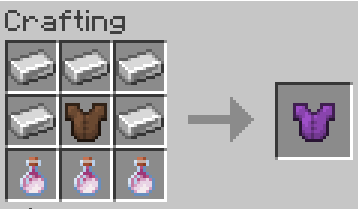
Recipe Update: The Tier 5 Jet Pack recipe now requires 3 Dragon's Breath.
ℹ️ Fuel durations above are for continuous use. Fuel is consumed depending on the selected flight mode (see below), so higher modes burn fuel faster.
Creative Jet Pack
A special Jet Pack intended for creative use.
- ⛽ Fuel: Infinite
- ⚡ Speed: Very high
- 📏 Altitude: Unlimited
Give:
/function coolfunctions:give/jetpack
🕹️ Usage
- Equip the Jet Pack in your chestplate slot.
- Hold jump to ascend.
- Sneak to cycle through the flight modes.
- Stop thrusting to descend with Slow Falling.
Tip: if Slow Falling is too slow for you, consider switching to your normal chestplate to descend faster and switch back just before hitting the ground (-> no fall damage, but normal fall speed!)
⚙️ Flight Modes
Sneaking cycles through five flight modes. The current mode is displayed in the fuel action bar.
| Mode |
Ascend power |
Notes |
| 0 |
Hover |
Hold your altitude, lowest fuel consumption |
| 1 |
25% |
|
| 2 |
50% |
|
| 3 |
75% |
|
| 4 |
100% |
Fastest ascent, highest fuel consumption |
💡 The higher the mode, the more fuel you burn. Pick a lower mode to make your fuel last longer.
👤 Morph System
⚠️ Experimental: The Morph System is still experimental and may not work perfectly with every mob (especially big mobs like the Iron Golem).
🪄 Morph into a Mob
/function coolfunctions:morph/<MobName>
Replace <MobName> with the name of the mob you want to morph into.
🔙 Unmorph
/function coolfunctions:unmorph
👻 Ghost Blocks
Ghost Blocks appear as normal blocks, but you can phase through them.
📦 Obtaining
/function coolfunctions:ghostblocks/<BlockName>
Replace <BlockName> with the block you want to get the Ghost Block spawn egg for.
🧱 Usage
Just spawn it wherever you want
🗑️ Removal
Remove one Ghost Block (the nearest one):
/function coolfunctions:ghostblocks/remove
Remove all Ghost Blocks in a 10×10×10 area:
/function coolfunctions:ghostblocks/removemr
Remove all Ghost Blocks in the world(*):
/function coolfunctions:ghostblocks/ra
*In all the loaded chunks of the world
⚙️ Utility Functions
Cool Functions also provides various utility functions that can be accessed directly through Minecraft's /function command.
🧹 ClearLag
ClearLag allows you to manually remove dropped items from the world. This can help performance when there's a lot of items on the ground.
🗑️ Clear All Ground Items
/function coolfunctions:clearlag
This removes dropped item entities from the world(*).
*In all the loaded chunks of the world
💎 Give Functions
Give an Ender Bow:
/function coolfunctions:give/enderbow
Give a Creative Jet Pack:
/function coolfunctions:give/jetpack
💡 The give functions have been organized under coolfunctions:give/ to make them easier to find and use.
📜 Credits & Usage
Project is licensed under the MIT license
Cool Functions is created by mattmunich.
You are welcome to showcase and use this datapack in your videos, streams, and other Minecraft content, but you have to make sure proper credit is given.
⚠️ Do not reupload or redistribute the datapack without permission.