


Modpack Configuration Checker
- By


A mod that allows modpack creators to display modpack credits and verify the modpack has been setup correctly.
Curse Maven Snippet
What's new
- Chat Greeting Messages can now be colour customised!
- First Launch Message Featured Added
- - Approved Modlist
-
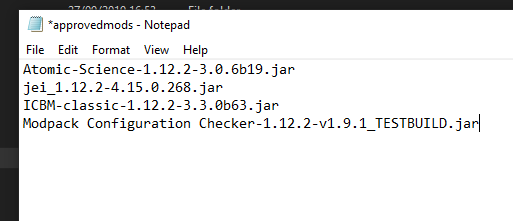
- To use this feature, create a file called 'approvedmods' in the game folder with no file extension. (Not in the Config Folder!)

- Within this file, list all the mods which the modpack is allowed to use, one per line. Example:
Securing Mods List from Tampering
To prevent players from just adding a new mod to the approved list, once you have got the normal 'approvedmods' setup working above, follow these steps.
Visit website: https://www.base64encode.org/. Paste the contents of your 'approvedmods' file into the first box. Then press the encode button
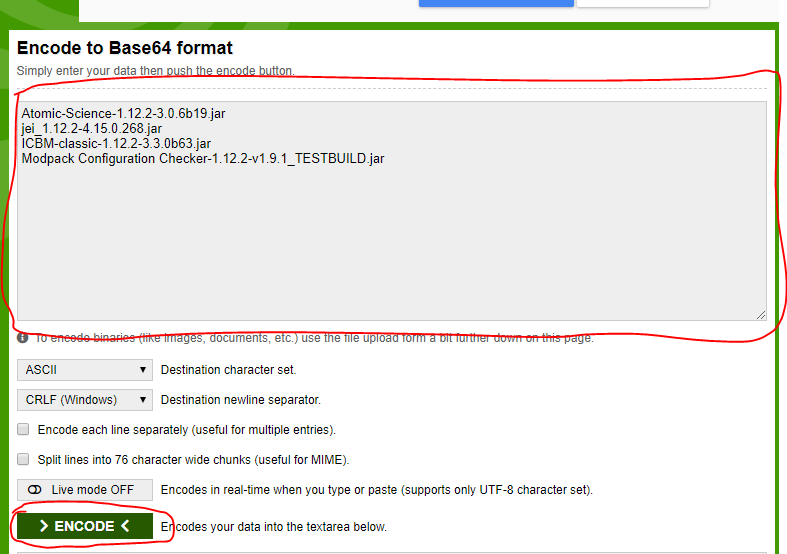
Create a new file in the game folder called 'approvedmods.locked'. Then paste the generated text from the website into this file.

This mod has no additional files