



Curse Maven Snippet
What's new
During Minecraft Live 2020 Mojang announced that in 1.17 a new item will be introduced to the game: the Bundle!
This is like an early game version of the Shulker Box, allowing you to save some inventory space.
# ⚙ How to get a Bundle?
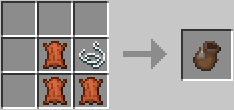
Getting a Bundle is really easy, as it doesn't require too much materials. All you need are just 3 pieces of leather and 1 piece of string to create a Bundle!

# 🤔 How does it work?
Select the Bundle from your inventory, then left click on a stack to put it inside the Bundle.
But be careful, as you can't put a full stack of items inside the Bundle! Infact you can only put half the maximum stack of
an item inside the Bundle, unless is a non stackable item. When you are done, left click the Bundle on an empty slot in your Inventory.
If you want to take out the Items from the Bundle, right click it and all Items inside the Bundle will be added to your Inventory.
# 👀 Can I put anything inside the Bundle?
No, there are certain blocks/items that you can't put inside a Bundle.
Which blocks or items you ask? Well, you can decide them! By default the mods comes with two tags,
**bundle\_ignored\_blocks** and **bundle\_ignored\_items**. These two tags contains all the blocks and the items that can't
be put inside a Bundle. By default you can't put another Bundle, a Chest, a Trapped Chest, an Ender Chest and
any Shulker Box inside a Bundle. But if you wish you can always modify those tags to allow those blocks to be
put inside the Bundle and create some black holes! Or even do the opposite and add other blocks or items
that you don't want to be put inside the Bundle. Just make sure you put the right thing in the right tag (so blocks
inside the **bundle\_ignored\_blocks** tag and items inside the **bundle\_ignored\_items** tag). The only limit is
your creativity!
# 🛍 How many items can fit inside a Bundle?
You can put up to 64 items inside a Bundle. But as I mentioned above, you can only put half the maximum stack of the same item,
as replacing a stack of items with another item won't save you any inventory space.
# 😁 Conclusion
Minecraft 1.17 is looking forward to be one of the greatest update, full of many new content that we asked for so long!
This mod aims to introduce one of these new mechanics in 1.16.3, however note that all of this is based purely on
what has been shown during Minecraft Live 2020, so there might be some apsects that may change or differ entirely
from what is inside this mod. That being said, I hope you enjoy it! Let me know if there are any issues on the issue tracker, have a nice day! 😁
This mod has no additional files