littleneko_254 | Biome-Tinted Blocks
Create your game server with 

Description
Terms of Use (click on the spoiler)
You MAY:
- Use the modification in your singleplayer/multiplayer worlds
- Include the modification in modpacks hosted on Curseforge and/or Modrinth
- Use the modification in non-commercial or commercial videos, so long as you give credit in the description with a link back to the mod's CurseForge and/or Modrinth page.
You MAY NOT:
- Redistribute the modification (modified or unmodified)
- Reupload the modification to any website or launcher
- Use the the modification's textures and/or code for your own projects
- Fork the modification to another version
Report bugs here: https://forms.gle/tL58GMvoNBYUQEFU8
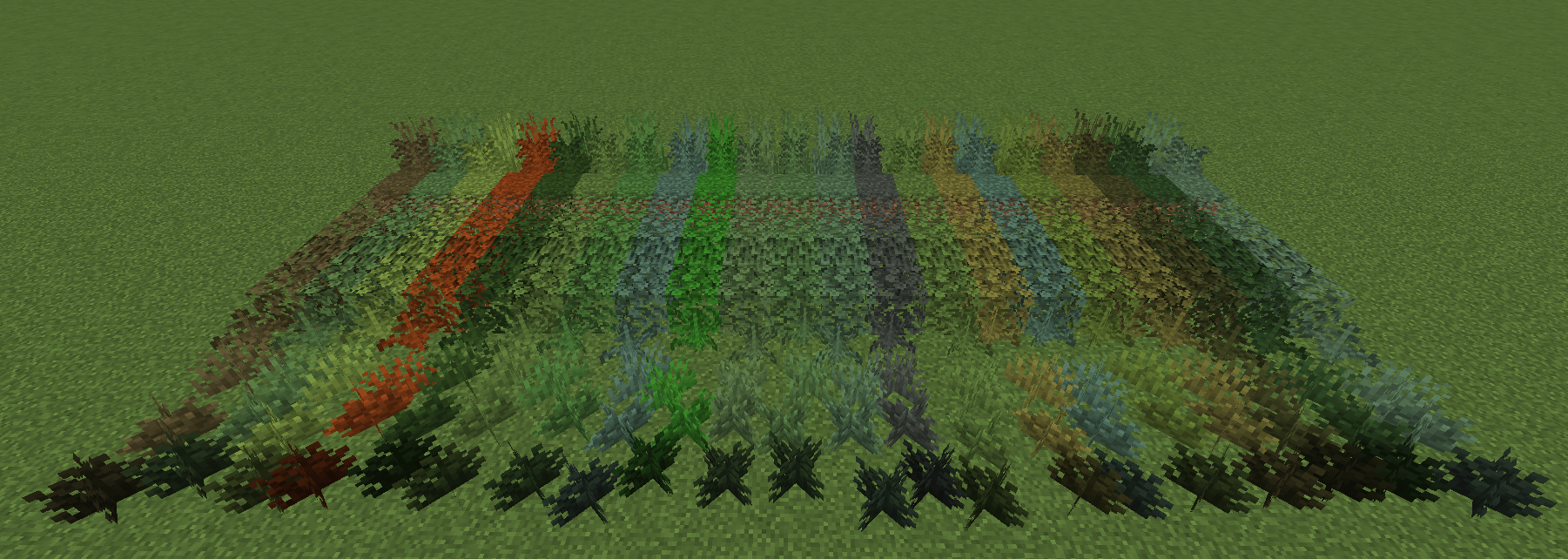
Simple mod that adds biome-tinted blocks for building with.
Contains the following biome-tinted blocks: Grass Block, Oak Leaves, Acacia Leaves, Dark Oak Leaves, Mangrove Leaves, Fern, Large Fern, Short Grass, Tall Grass, Bush, and Shrub.
To craft bushes/shrubs, use Dead Bushes in a Stonecutter. For the others, use the appropriate block (i.e. Grass Block, Fern) in a Stonecutter.
To Work with BetterGrassify Mod:
Go to profiles -> instance_name -> config -> bettergrass.json5 and copy and paste the following below under the following:
"moreBlocks": ["minecraft:sculk_catalyst", ^ ADD THE OTHER ENTRIES UNDER THIS IN THE FILE ^COPY AND PASTE THIS:
"biome_tinted_blocks:badlands_grass_block","biome_tinted_blocks:birch_forest_grass_block","biome_tinted_blocks:cherry_grove_grass_block","biome_tinted_blocks:dappled_forest_grass_block","biome_tinted_blocks:dark_forest_grass_block","biome_tinted_blocks:dripstone_cave_grass_block","biome_tinted_blocks:forest_grass_block","biome_tinted_blocks:icy_grass_block","biome_tinted_blocks:jungle_grass_block","biome_tinted_blocks:lush_cave_grass_block","biome_tinted_blocks:meadow_grass_block","biome_tinted_blocks:lush_cave_grass_block","biome_tinted_blocks:old_growth_taiga_grass_block","biome_tinted_blocks:pale_garden_grass_block","biome_tinted_blocks:plains_grass_block","biome_tinted_blocks:savanna_grass_block","biome_tinted_blocks:snowy_beach_grass_block","biome_tinted_blocks:stony_peaks_grass_block","biome_tinted_blocks:sulfur_cave_grass_block","biome_tinted_blocks:swamp_grass_block","biome_tinted_blocks:alt_swamp_grass_block","biome_tinted_blocks:windswept_grass_block"Addons
- Biome-Tinted Blocks x Bare Bones: https://curseforge.com/minecraft/texture-packs/biome-tinted-blocks-x-bare-bones
Notes on AI Usage:
I used AI to make python scripts to help me with repetitive tasks such as making all the Leaves blocks (which, simply put, is just replacing Oak with Spruce, or Acacia, etc.) or multiplying the solid Minecraft colors onto grayscaled images. Nothing in this was AI generated.
All creative content, designs, and assets are my own (barring code generated by MCreator). I'm no modder—I just want to share my creations that add more blocks to build with. Doing the bulk tasks by hand would've taken a lot longer than I wanted to spend on it (as I'd like to spend my time doing other things).
Biome-Tinted Blocks Team