BetterNews - Server News in Minecraft GUI
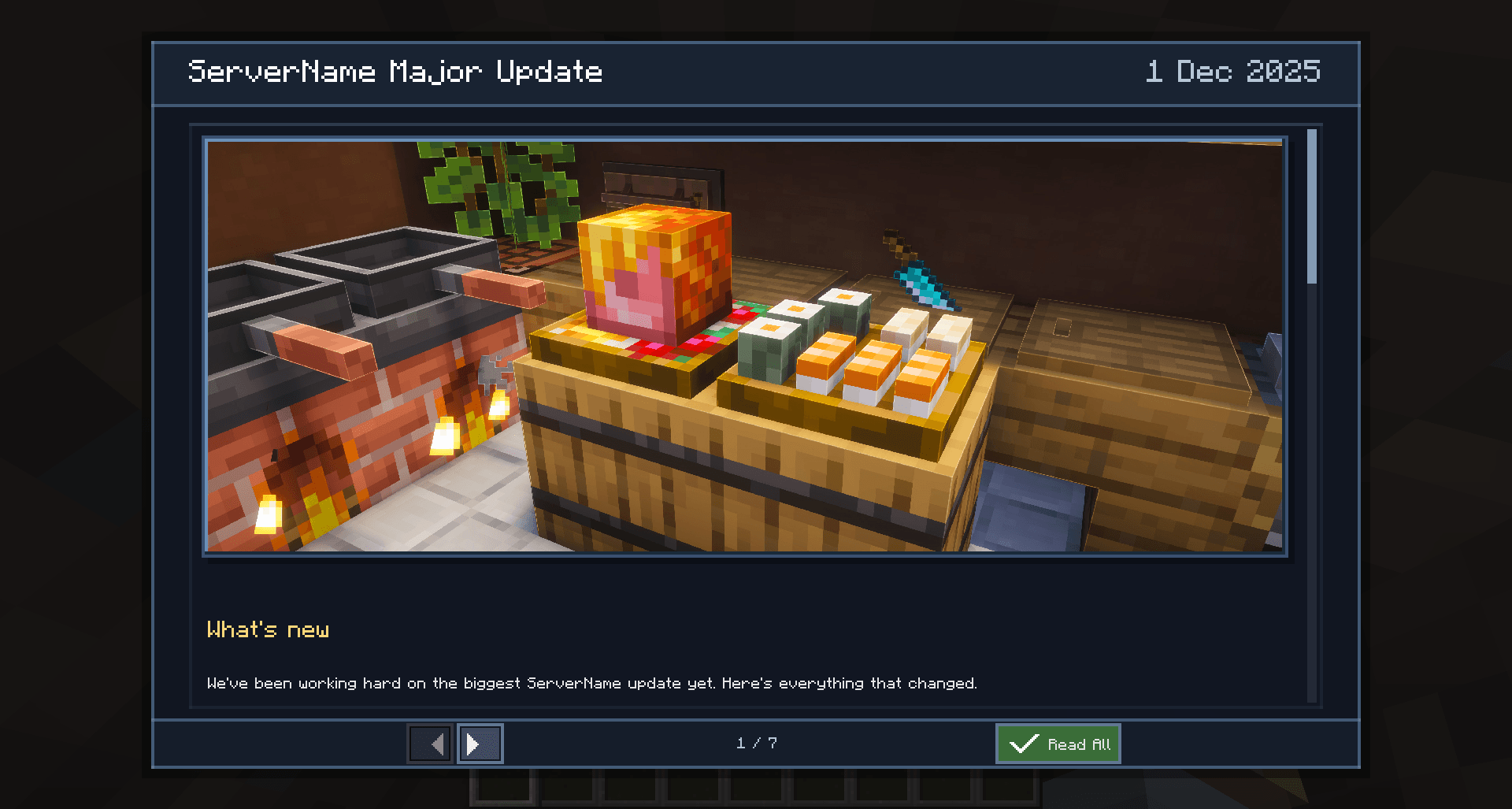
BetterNews is a client-side mod for Minecraft Forge 1.20.1 that displays server news directly in the game - right after joining the world, in a beautiful built-in interface.
🔍 What problem does this mod solve?
Server administrators have no good way to inform players about updates, announcements, and events inside Minecraft. Usually they resort to Discord messages, forum posts, or in-game chat spam - all of which are easy to miss.
BetterNews solves this: the news is loaded from your website, rendered in a polished GUI window with image support, and shown automatically on every login - but only once, until there is something new to read.
✨ Features
📰 Automatic news display on join
- After joining a world or server, the mod waits briefly and then opens the news window automatically
- The window opens only if there is at least one unread news entry
- The timer starts after the player moves their mouse - so it never interrupts the loading screen
- The delay is configurable (
showDelaySeconds, default: 10 seconds)
🖥️ Built-in news reader GUI
- A clean, styled panel (80% width × 90% height of the screen by default)
- Header - article title on the left, formatted date on the right
- Hovering the article title shows a tooltip with the full title text
- Cover image - full-width banner below the header (loaded from the server, if provided)
- Scrollable content area - rendered Markdown with inline images
- Footer - navigation buttons, article counter, unread marker (
●)
📄 Markdown rendering
The mod renders Markdown content fetched from your website. Supported elements:
| Element |
Syntax |
| Headings (3 levels) |
# ## ### |
| Bold |
**text** |
| Italic |
*text* |
| Strikethrough |
~~text~~ |
| Inline code |
`code` |
| Code block |
``` |
| Bullet list (nested) |
- item |
| Numbered list (nested) |
1. item |
| Link |
[text](url) |
| Inline image |
 |
| Table |
standard Markdown syntax |
| Horizontal rule |
--- |
| Blockquote |
> text |
| Colored text |
<span style="color:#RRGGBB">text</span> |
🗂️ Navigation between articles
- ← / → buttons navigate through all articles (both read and unread - for history browsing)
- On open, the window jumps automatically to the first unread article
- The → button is always active (no mandatory read timer)
- Read All button marks all articles as read and closes the window
- Pressing
ESC closes the window without marking anything as read
- On close, the mod can show a configurable chat hint with the command to reopen news
✅ Smart read tracking
- An article is marked as read automatically when the player scrolls to the bottom and has had it open for at least
minReadSeconds
- Read state is stored in
config/betternews/unreadnews.toml and persists between sessions
- On first unread-list initialization, only the latest article is marked as unread - so returning players aren't flooded with old news
⚡ Smart preloading
- When a news article is opened, the mod preloads the current, next, and previous articles in the background
- Switching between adjacent articles is nearly instant (served from cache)
- If an article is not yet loaded, the content area shows an animated loading spinner and navigation buttons are temporarily disabled
🖼️ Async image loading with fallback
- All images (cover + inline) are loaded asynchronously in background threads
- Loading spinner is shown until the article text and all images are fully loaded
- Images are registered as
DynamicTexture and displayed using Minecraft's texture engine
- Supports a Range-request fallback for servers that do not respond correctly to full GET requests
- Retries up to 3 times on failure
🧹 Session cache
- All loaded data (text, images) is kept in memory until the player leaves the world
- On disconnect, all
DynamicTexture resources are released via TextureManager.release()
- The JSON index is cached for a configurable cooldown (
newsCheckCooldown) to reduce repeated HTTP requests
🌐 Internationalisation
- Interface language follows the Minecraft client locale
- Dates are formatted according to the active locale (e.g., "19 Mar 2026" in English, "19 мар. 2026" in Russian)
- Built-in translations: English (
en_us), Russian (ru_ru)
⌨️ Commands
- Main open command is configurable via
newsCommand (default: /news)
- Type the configured command in chat to open the news window at any time, even if there are no unread articles
/beternews reload reloads client BetterNews config files in-game
⚙️ Configuration
Files:
config/betternews/betternews.tomlconfig/betternews/unreadnews.toml
Main config (config/betternews/betternews.toml)
| Parameter |
Default |
Description |
newsIndexUrl |
"" |
Direct URL to the JSON news index, e.g. https://mysite.com/news.json |
newsCommand |
"news" |
Main command name to open the news screen (supports value with or without leading /) |
showDelaySeconds |
10 |
Delay in seconds after joining before the window appears |
httpTimeoutSeconds |
30 |
HTTP request timeout in seconds |
newsCheckCooldown |
"1h" |
Cooldown between index JSON requests (s, m, h, d suffixes are supported) |
minReadSeconds |
5 |
Minimum time the window must be open before an article can be auto-marked as read |
newsCloseHint |
"&bYou can open news with /news" |
Chat hint shown when news screen is closed (empty disables the hint; supports legacy color codes) |
Unread state (config/betternews/unreadnews.toml)
| Parameter |
Default |
Description |
unreadNews |
[] |
Auto-managed list of unread article keys (do not edit manually) |
unreadInitialized |
false |
Internal marker for unread-state initialization |
📡 Server-side setup (no server mod required!)
The mod is 100% client-side. You only need a static website (or any HTTP file server) with the following structure:
JSON index (news.json)
[
  {
    "title": "Major Update 2.0",
    "date": "2026-03-19",
    "url": "/news/major-update/index.md"
  },
  {
    "title": "Server Launch",
    "date": "2026-01-01",
    "url": "/news/server-launch/index.md"
  }
]
- Articles are listed newest first
- The
url field must be a relative path - the domain is taken from newsIndexUrl in the config
- Absolute URLs in article entries are rejected for security
Article folder structure
news/
└── major-update/
    ├── index.md       ← article body (Markdown with YAML frontmatter)
    ├── cover.jpg      ← optional cover image (full-width banner)
    └── img/
        └── screenshot.jpg
Article file (index.md)
---
title: Major Update 2.0
date: 2026-03-19
description: Reworked progression, new dungeons and dozens of fixes.
cover: cover.jpg
server: MyServer
---
## What's new
Some **bold** text, *italic*, and an image:

Frontmatter fields
| Field |
Required |
Description |
title |
✅ |
Article title shown in the header |
date |
✅ |
Publication date (yyyy-MM-dd), shown in the header |
If title or date are present in frontmatter, they take priority over the values in the JSON index.
🔗 Links
- Clicking any
[link](url) in an article opens the system browser directly - no confirmation dialog
📦 Requirements
- Minecraft: 1.20.1
- Forge: 47.4.16 or newer (loader version ≥ 47)
- Side: Client-only (no server mod needed)
- Java: 17+