


Orbital Strike Cannon Wemmbu
- By
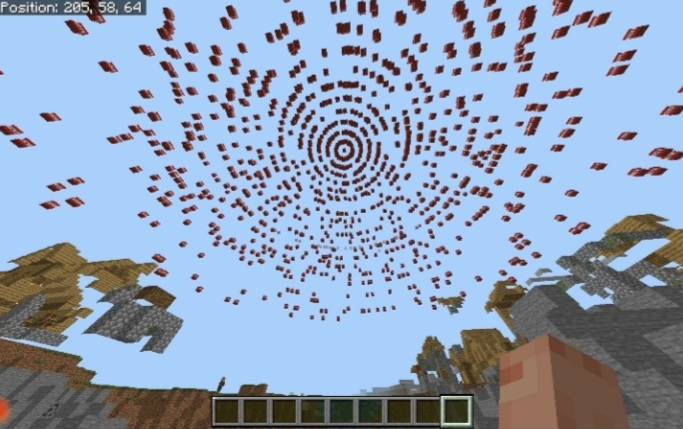
Showcase
Description
🔐 Administrator Tag
Orbital Strike Cannon commands are protected by an administrator tag.
By default, the required tag is:
"administrator"
Players without the required tag cannot use protected OSC commands.
Change the Administrator Tag
"/osc:changeadmintag <tag>"
Example:
"/osc:changeadmintag oscadmin"
The player changing the tag is automatically given the new administrator tag.
View the Current Administrator Tag
"/osc:showadmintag"
Type this in the chat to get the default tag "/tag @s add administrator"
NOTE: To get the tutorial on how to get the rods, its somewhere around the end of this description
☢️ Orbital Strike Cannon
An Orbital Strike Cannon addon for Minecraft Bedrock that turns fishing rods into powerful payload launchers. Inspired by creators such as Wemmbu and FlameFrags (dogs), the addon includes multiple destructive weapons, customizable orbital strikes, utility rods, special payloads, and a large collection of configurable settings.
«⚠️ Beta APIs are required! Make sure Beta APIs are enabled in your world before using the addon.»
💥 Main Weapons & Payloads
The Orbital Strike Cannon uses fishing rods to launch different types of payloads.
Available Rods
☢️ Nuke Shot Rod — TNT-based orbital strike
🗡️ Stab Shot Rod — Stab-style payload
🔵💀 Skull Rod — Blue Wither Skull payload
🟨 Chaos Cube Rod — Sulfur TNT payload
🐺 Wolf Rod — Wolf-based payload
🏹 Railgun Rod — High-speed flaming arrow weapon
🌀 Stasis Rod — Saves a location and teleports the user back to it
☢️ Nuke Shot
The Nuke Shot launches an orbital TNT strike centered on the location you target.
The strike can contain up to 20 rings, with individually configurable:
- Ring radius
- TNT count
- Perfect-ring spacing
- Payload height
- Fuse time
The Nuke Shot supports both Random and Perfect variants.
🎯 Random & Perfect Nukes
☢️ Random Nuke
"/osc:payload nuke"
Spawns the standard randomized Nuke Shot.
🎯 Perfect Nuke
"/osc:payload nukeperfect"
Spawns a Perfect Nuke using the consistent/perfect ring pattern.
You can also specify coordinates:
"/osc:payload nukeperfect 100 64 -200"
This spawns the Perfect Nuke at the specified coordinates.
🗡️ Stab Shot
The Stab Shot is a realistic stab-style payload inspired by Wemmbu.
The number of Stab Shot payloads spawned can be configured with:
"/osc:oscsettings stabs <amount>"
The setting supports values from 0–640, while individual activations are limited to the supported active payload amount.
🐺 Wolf Rod
The Wolf Rod is inspired by the type of payload used by FlameFrags.
It launches a configurable number of wolves using a saved structure.
Setup
You'll need:
- A Structure Block
- A wolf
- Wolf armor
- A bone
- Potions/effects if desired
- Get a Structure Block
"/give @s structure_block"
Place the Structure Block and open it.
- Configure the Structure Block
Set:
- Offset: "1 0 0"
- Size: "1 1 1"
- Structure Name: "wolftamed"
- Prepare the Wolf
Place a wolf inside the Structure Block's bounding box.
You can customize the wolf with:
- Wolf armor
- Potion effects
- Other effects
Make sure the bounding box is covered so the wolf doesn't wander away.
- Save the Structure
Open the Structure Block and press Save.
«⚠️ The Wolf Rod relies on the "wolftamed" structure. If the structure has not been created in your world, the rod cannot spawn its wolves correctly.»
🐺 Dog Amount
The number of wolves spawned can be changed with:
"/osc:oscsettings dogs <amount>"
Supported range: 0–640
Default: 50
🟨 Chaos Cube / Sulfur Nuke
The addon includes a Chaos Cube / Sulfur Nuke payload.
The Sulfur payload creates a large pattern of TNT structures around the target.
Its size can be configured with:
"/osc:oscsettings sulfursize <1-4>"
Available sizes:
- 1 → 4
- 2 → 8
- 3 → 16
- 4 → 32
The size determines the dimensions of the sulfur payload pattern.
🔵💀 Skull Rod
The Skull Rod launches the blue Wither Skull orbital payload.
The Skull payload creates a large spread of blue Wither Skulls around the target.
The Skull Cannon can also be configured to repeatedly spawn skull payloads.
Skull Cannon Delay
"/osc:oscsettings skullcannondelay <ticks>"
Controls the delay between repeating Skull Cannon payloads.
Default: 60 ticks
🏹 Railgun
The Railgun fires extremely fast flaming arrows toward the location you're aiming at.
The Railgun uses three arrow speed groups and can be customized extensively.
Fire the Railgun
Aim at your target and use the Railgun.
The weapon fires high-speed flaming arrows toward the location you're aiming at.
«⚠️ The Railgun has a limited practical range. Extremely distant targets may fail to receive the arrows correctly.»
Railgun Settings
Arrow Spread
"/osc:oscsettings spreadwidth <value>"
Controls the spread width of the arrows.
Arrow Fire Duration
"/osc:oscsettings arrowfire <value>"
Controls how long the arrow fire lasts.
Number of Arrows
"/osc:oscsettings arrows <amount>"
Controls how many arrows are fired.
Arrow Group Speeds
"/osc:oscsettings arrowspeedg1 <speed>"
"/osc:oscsettings arrowspeedg2 <speed>"
"/osc:oscsettings arrowspeedg3 <speed>"
Controls the speed of the three different arrow groups.
🌀 Stasis Rod
The Stasis Rod lets you save a specific location directly onto a fishing rod.
Create one with:
"/osc:stasisrod <X> <Y> <Z>"
For example:
"/osc:stasisrod 100 64 -200"
The command creates a Stasis Rod linked to those coordinates.
After setting the location, using the rod teleports its owner back to the saved position.
☠️ Totem of Null
The Totem of Null is a special cosmetic item.
It is a totem enchanted with Curse of Vanishing and named:
«Totem of Null»
It is primarily cosmetic and does not provide a special gameplay ability.
🕳️ Void Stasis
Void Stasis allows entities with the "voidstasis" tag to be sent to Y -70.
Select a Target
Give an entity the tag:
"/tag @e add voidstasis"
For example, to tag every entity within 10 blocks:
"/tag @e[r=10] add voidstasis"
Then use:
"/osc:voidstasis"
Every matching entity in the supported dimensions is moved to Y -70.
☠️ Unstable Death
The addon includes an optional Unstable Death effect.
Enable
"/osc:unstabledeath on"
Disable
"/osc:unstabledeath off"
Reset
"/osc:unstabledeath reset"
When a configured entity dies, the addon:
- Sends a yellow "left the game" style message using that entity's name.
- Plays the Wither spawn sound at the entity's death location.
💀 Death Entity
You can configure which entity types activate Unstable Death.
Examples:
"/osc:deathentity @a"
"/osc:deathentity @e"
"/osc:deathentity @p"
"/osc:deathentity @s"
Selectors can also contain filters:
"/osc:deathentity @e[type=wolf]"
The selected entity types are remembered, so the setting applies to entities of those types.
⚙️ OSC Settings
The Orbital Strike Cannon can be heavily customized using:
"/osc:oscsettings <setting> <value>"
It can also be a ui using: "/oscsettings ui" or, using the remote ui item simply type "osc" into the creative inventory and you will see the item, and other orbital strike cannon fishing rods.
🔢 Ring Settings
Ring Amount
"/osc:oscsettings rings 10"
Controls the number of orbital rings.
Valid values: 1–20
Individual Ring Radius
"/osc:oscsettings ringradius <ring> <radius>"
Example:
"/osc:oscsettings ringradius 5 30"
Changes the radius of Ring 5.
Individual Ring TNT Count
"/osc:oscsettings ringcount <ring> <amount>"
Example:
"/osc:oscsettings ringcount 5 100"
Changes the TNT count of Ring 5.
Individual Perfect-Ring Spacing
"/osc:oscsettings ringcountperfect <ring> <spacing>"
Example:
"/osc:oscsettings ringcountperfect 5 3.8"
Controls the perfect-ring spacing for the selected ring.
🎯 Perfect Ring Settings
You can control the spacing of all perfect rings at once:
"/osc:oscsettings ringcountperfectall 5"
This applies the selected perfect-ring spacing across the rings.
📏 Change All Ring Radii
"/osc:oscsettings ringradiusall 5"
The value becomes the radius step for every ring.
For example:
"/osc:oscsettings ringradiusall 5"
produces:
- Ring 1 = 5
- Ring 2 = 10
- Ring 3 = 15
- Ring 4 = 20
- Ring 5 = 25
- …
Using:
"/osc:oscsettings ringradiusall 10"
produces:
- Ring 1 = 10
- Ring 2 = 20
- Ring 3 = 30
- Ring 4 = 40
- Ring 5 = 50
- …
💣 Change All Ring Counts
"/osc:oscsettings ringcountall 64"
Sets every ring's TNT count to the specified amount.
Supported range: 1–640
📏 Ring Payload Heights
Each ring can have its own payload height.
Individual Ring Height
"/osc:oscsettings ringpayloadheight <ring> <value>"
Example:
"/osc:oscsettings ringpayloadheight 5 20"
Sets Ring 5's payload height to 20.
Change All Ring Heights
"/osc:oscsettings ringpayloadheightall <value>"
The value is used as the height step for every ring.
For example:
"/osc:oscsettings ringpayloadheightall 1"
produces:
- Ring 1 = 1
- Ring 2 = 2
- Ring 3 = 3
- Ring 4 = 4
- Ring 5 = 5
- Ring 6 = 6
- …
Using:
"/osc:oscsettings ringpayloadheightall 10"
produces:
- Ring 1 = 10
- Ring 2 = 20
- Ring 3 = 30
- Ring 4 = 40
- Ring 5 = 50
- …
This makes it easy to create progressively higher or lower payload rings without configuring every ring individually.
⏱️ TNT Fuse Settings
All Ring Fuses
"/osc:oscsettings fuseall 80"
Sets the fuse time for all rings.
Supported range: 0–80 ticks
Individual Ring Fuse
"/osc:oscsettings ringfuse <ring> <fuse>"
Example:
"/osc:oscsettings ringfuse 5 40"
Sets Ring 5's fuse to 40 ticks.
☢️ Nuke Fall & Deceleration
Nuke Fall
"/osc:oscsettings nukefall <value>"
Controls the fall behavior of the nuke payload.
Supported range: 0–20
Default: 1
Nuke Deceleration
"/osc:oscsettings nukedeceleration 0.06"
Controls the spreading deceleration of the TNT.
Default: 0.06
Supported range: 0.0001–1
💥 Middle TNT
Control the TNT spawned in the center of the orbital strike.
Amount
"/osc:oscsettings middletnts <amount>"
Supported range: 1–128
Height
"/osc:oscsettings middletntheight <value>"
Supported range: -640 to 640
Fuse
"/osc:oscsettings middlefuse <ticks>"
Supported range: 0–80 ticks
🌀 TNT Movement
The addon supports two TNT movement systems.
Motion Movement
"/osc:oscsettings motionmovement"
Uses the motion-based TNT movement system.
Teleport Movement
"/osc:oscsettings tpmovement"
Uses teleport-based TNT movement.
💣 TNT Break Modes
The addon supports two different TNT/rod activation modes.
Manual Break
"/osc:oscsettings manualbreak"
Enables Manual Break mode.
Auto Break
"/osc:oscsettings autobreak"
Enables Auto Break mode.
Only the selected break mode is active at a time.
🔊 Explosion Sounds
"/osc:oscsettings explosionsounds <amount>"
Controls how many explosion sounds are played.
Supported range: 0–640
Default: 10
🗡️ Stab Settings
"/osc:oscsettings stabs <amount>"
Controls how many Stab Shot payloads are spawned.
Supported range: 0–640
🐺 Wolf Settings
"/osc:oscsettings dogs <amount>"
Controls how many wolves the Wolf Rod spawns.
Supported range: 0–640
Default: 50
🟨 Sulfur Settings
"/osc:oscsettings sulfursize <1-4>"
Controls the size of the Chaos Cube/Sulfur payload.
Available levels:
- 1
- 2
- 3
- 4
🏹 Arrow Settings
Spread
"/osc:oscsettings spreadwidth <value>"
Controls arrow spread.
Fire Duration
"/osc:oscsettings arrowfire <value>"
Controls how long arrow fire lasts.
Arrow Count
"/osc:oscsettings arrows <amount>"
Controls the number of arrows fired.
Arrow Speed Groups
"/osc:oscsettings arrowspeedg1 <speed>"
"/osc:oscsettings arrowspeedg2 <speed>"
"/osc:oscsettings arrowspeedg3 <speed>"
Controls the speeds of the three arrow groups.
🎛️ Extra Damage
"/osc:oscsettings extradmg <value>"
Controls the addon’s extra-damage value.
Supported range: 0–640
👁️ View Settings
Show Default Settings
"/osc:oscsettings showdefault"
Shows the default OSC settings.
Show Current Settings
"/osc:oscsettings showcurrent"
Shows your current OSC settings.
The current settings display includes the main settings and individual ring settings.
🔄 Reset Settings
Reset Everything
"/osc:oscsettings resetall"
Resets all OSC settings to their defaults.
Reset Ring Settings
"/osc:oscsettings resetrings"
Resets all individual ring settings.
Reset Individual Ring Settings
Examples:
"/osc:oscsettings resetcount 5"
"/osc:oscsettings resetradius 5"
"/osc:oscsettings resetperfect 5"
"/osc:oscsettings resetringpayloadheight 5"
"/osc:oscsettings resetringfuse 5"
These reset the selected setting for the specified ring.
🎯 Unified Payload Command
The addon provides a unified command for spawning payloads:
"/osc:payload <payload> [coordinates]"
Available Payloads
- "nuke"
- "nukeperfect"
- "skull"
- "sulfurnuke"
- "stab"
- "skullcannon"
- "skullcannonon"
- "skullcannonoff"
Examples
Random Nuke:
"/osc:payload nuke"
Perfect Nuke:
"/osc:payload nukeperfect"
Perfect Nuke at coordinates:
"/osc:payload nukeperfect 100 64 -200"
Skull:
"/osc:payload skull 100 64 -200"
Sulfur Nuke:
"/osc:payload sulfurnuke 100 64 -200"
Stab Shot:
"/osc:payload stab 100 64 -200"
Skull Cannon:
"/osc:payload skullcannon"
Start repeating Skull Cannon:
"/osc:payload skullcannonon"
Stop repeating Skull Cannon:
"/osc:payload skullcannonoff"
📦 Getting OSC Items
The current version uses:
"/osc:giveosc <item> [amount]"
You can specify the amount of items to give.
☢️ Nuke Shot
"/osc:giveosc ns"
🗡️ Stab Shot
"/osc:giveosc ss"
🐺 Wolf Rod
"/osc:giveosc wr". ←←← ⚠️ HERE!!! ⚠️
🔵💀 Skull Rod
"/osc:giveosc skull"
🟨 Chaos Cube
"/osc:giveosc chaoscube"
🏹 Railgun
"/osc:giveosc railgun"
🌀 Stasis Rod
"/osc:giveosc stasisrod"
☠️ Totem of Null
"/osc:giveosc totemofnull"
📦 Filled Shulker Boxes
The addon also provides Shulker Boxes filled with the corresponding rods.
☢️ Nuke Shot Shulker
"/osc:giveosc nsshulker"
Gives a Shulker Box filled with Nuke Shot rods.
🗡️ Stab Shot Shulker
"/osc:giveosc ssshulker"
Gives a Shulker Box filled with Stab Shot rods.
🐺 Wolf Rod Shulker
"/osc:giveosc wrshulker"
Gives a Shulker Box filled with Wolf Rods.
You can specify how many filled Shulker Boxes you want:
"/osc:giveosc nsshulker 5"
"/osc:giveosc ssshulker 5"
"/osc:giveosc wrshulker 5"
The maximum amount per command is 640.
🎯 Entity Selectors
OSC works with Minecraft Bedrock entity selectors.
👤 Yourself
"@s"
🌎 Every Entity
"@e"
👥 All Players
"@a"
📍 Nearest Player
"@p"
📏 Entities Within a Radius
"@e[r=10]"
🐺 Specific Entity Type
"@e[type=wolf]"
🎯 Entity Type + Radius
"@e[type=zombie,r=20]"
🚫 Excluding Entities
"@e[type=!player]"
🚫 Excluding a Tag
"@e[tag=!voidstasis]"
Selectors can be combined to create more precise targets.
📋 Command Permissions
OSC custom commands require the appropriate Minecraft permissions.
Depending on the command, you may need:
- Cheats enabled
- Command permissions
- The configured OSC administrator tag
⚙️ Version Compatibility
Minecraft Bedrock Edition
Compatible with supported Minecraft 1.21+ / 26.x versions where supported by the addon.
«Always use the addon version intended for your installed Minecraft version.»
⚠️ Requirements
- Minecraft Bedrock Edition
- Beta APIs enabled
- Cheats enabled for commands
- A compatible Minecraft version
- For the Wolf Rod: a saved "wolftamed" structure
🆕 What's Included
☢️ Fully customizable multi-ring Nuke Shot
🎯 Perfect Nuke mode
🗡️ Stab Shot
🐺 Configurable Wolf Rod
🔵💀 Skull Rod
🟨 Chaos Cube / Sulfur Nuke
🏹 High-speed Railgun
🌀 Coordinate-linked Stasis Rod
☠️ Unstable Death
🕳️ Void Stasis
☠️ Totem of Null
🎯 Unified payload commands
📦 Unified item-giving system
📦 Filled Shulker Boxes for Nuke, Stab, and Wolf Rods
🔐 Administrator-tag command protection
⚙️ Extensive ring-by-ring customization
🎛️ Random and Perfect nuke modes
📏 Individual and progressive ring payload heights
⏱️ Individual and global fuse controls
🌀 Motion and teleport TNT movement
💣 Manual and automatic break modes
🏹 Extensive Railgun customization
🔄 Comprehensive reset and configuration commands
«⚠️ Beta APIs are required. If the addon is not functioning correctly, check that Beta APIs are enabled and that your Minecraft version matches the addon version.»
Type "/function the_kit" in the chat to get everything you need in a single shulker.
Orbital Strike Cannon Wemmbu Team
