EuForia Debug Screen
- By
A real-time diagnostic HUD overlay for Minecraft Bedrock Edition. Bringing the F3 debug screen experience to Bedrock players and developers. Powered by the stable Scripting API.
Android - EuForia Bedrock Debug V.1.0.0
Description
EuForia Bedrock Debug
A real-time diagnostic HUD overlay for Minecraft Bedrock Edition — the F3 debug screen experience, rebuilt to feel like a native Bedrock feature.
✅ Achievement-friendly — uses product_type: addon metadata; world achievements remain enabled
🔗 Full wiki: [euforiaproject.com]https://www.euforiaproject.com/2026/07/euforia-bedrock-debug.html) If you want to request addons, leave suggestions, or give us direct feedback, feel free to visit our website!
Get the latest updates on our official website first!
About This Addon
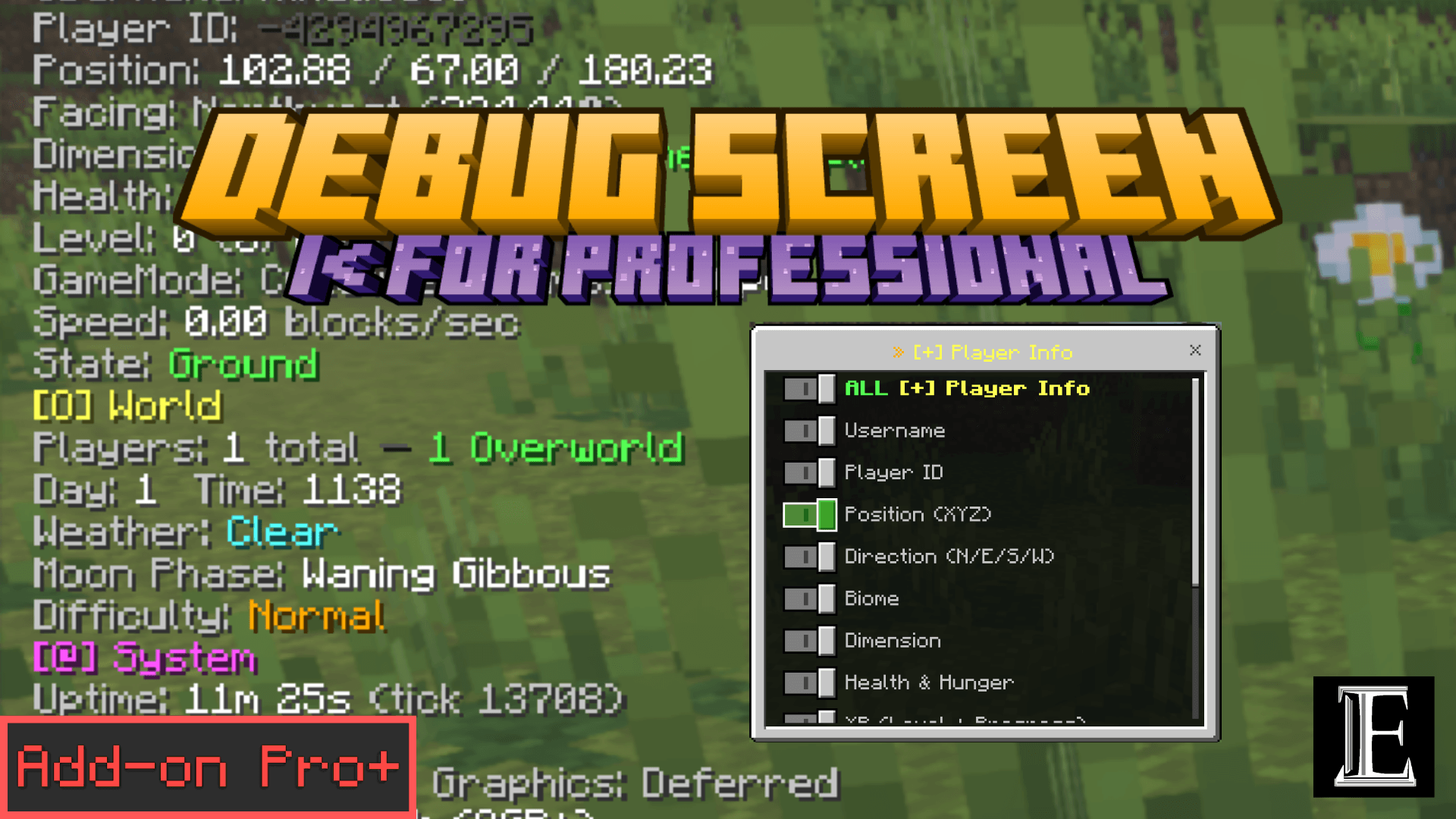
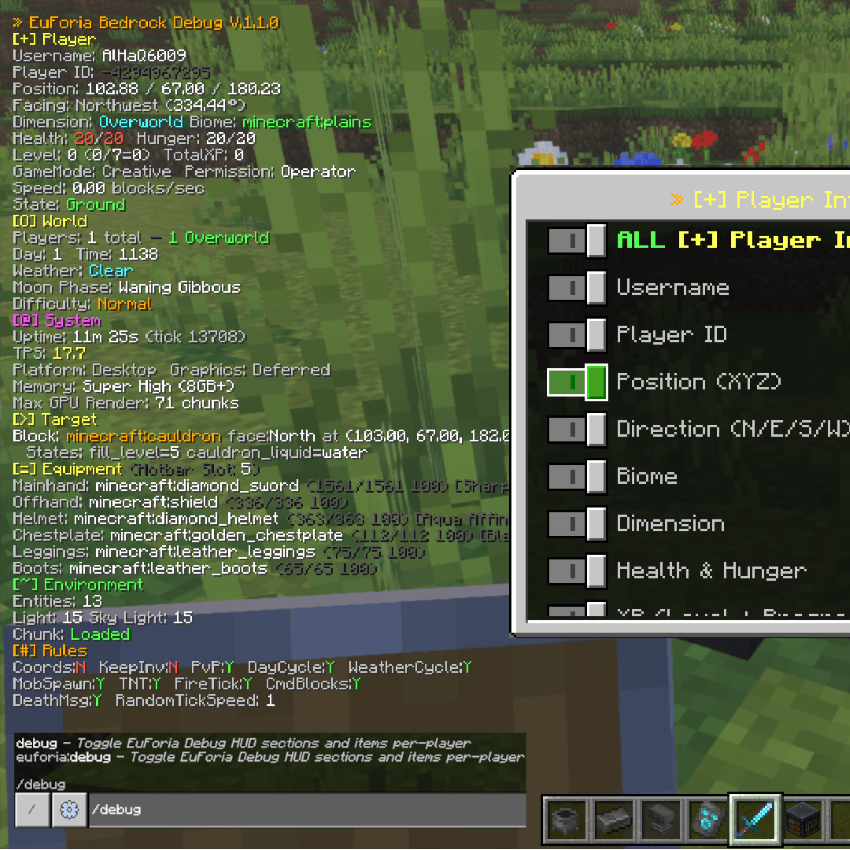
EuForia Bedrock Debug overlays a live stream of diagnostic data directly onto your Minecraft Bedrock screen. If you are familiar with the F3 debug screen from Java Edition, this is its Bedrock counterpart — designed from scratch for the modern Scripting API with an emphasis on feeling like a native, built-in feature rather than a third-party mod.
Every piece of data comes from the stable @minecraft/server module. There are no experimental toggles, no beta APIs, and no third-party dependencies. It runs on Windows, Xbox, PlayStation, Switch, iOS, and Android exactly the same way.
What's new on V.1.2.0? — Major Update
🚀 Major updates:
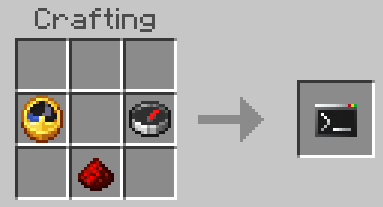
Debug Stick (euforia:debug) — open the debug menu by using the item (right-click, tap, or the on-screen Use button), no command typing needed. 1-second cooldown against double-opens. Craft it with redstone dust + clock + compass (shapeless, unlocks on redstone pickup), or /give @s euforia:debug, or the Creative Equipment tab.
Active Effects HUD item — live status effects with level and remaining time, e.g. Speed II (45s) (∞ for permanent ones like beacons). Toggleable per-player, ON by default.
4 new HUD readouts — Locator Waypoints (Player), Locale (System), Fog Stack (Environment), and Block Parts for multi-part blocks (Target). ✨ Also in this version:
Menu readability overhaul: high-contrast buttons with green ☑ ON / red ☐ OFF states, bold titles, and a live Display Mode + Sections ON summary.
Vanilla item icons on every menu button for faster navigation.
What the HUD Displays
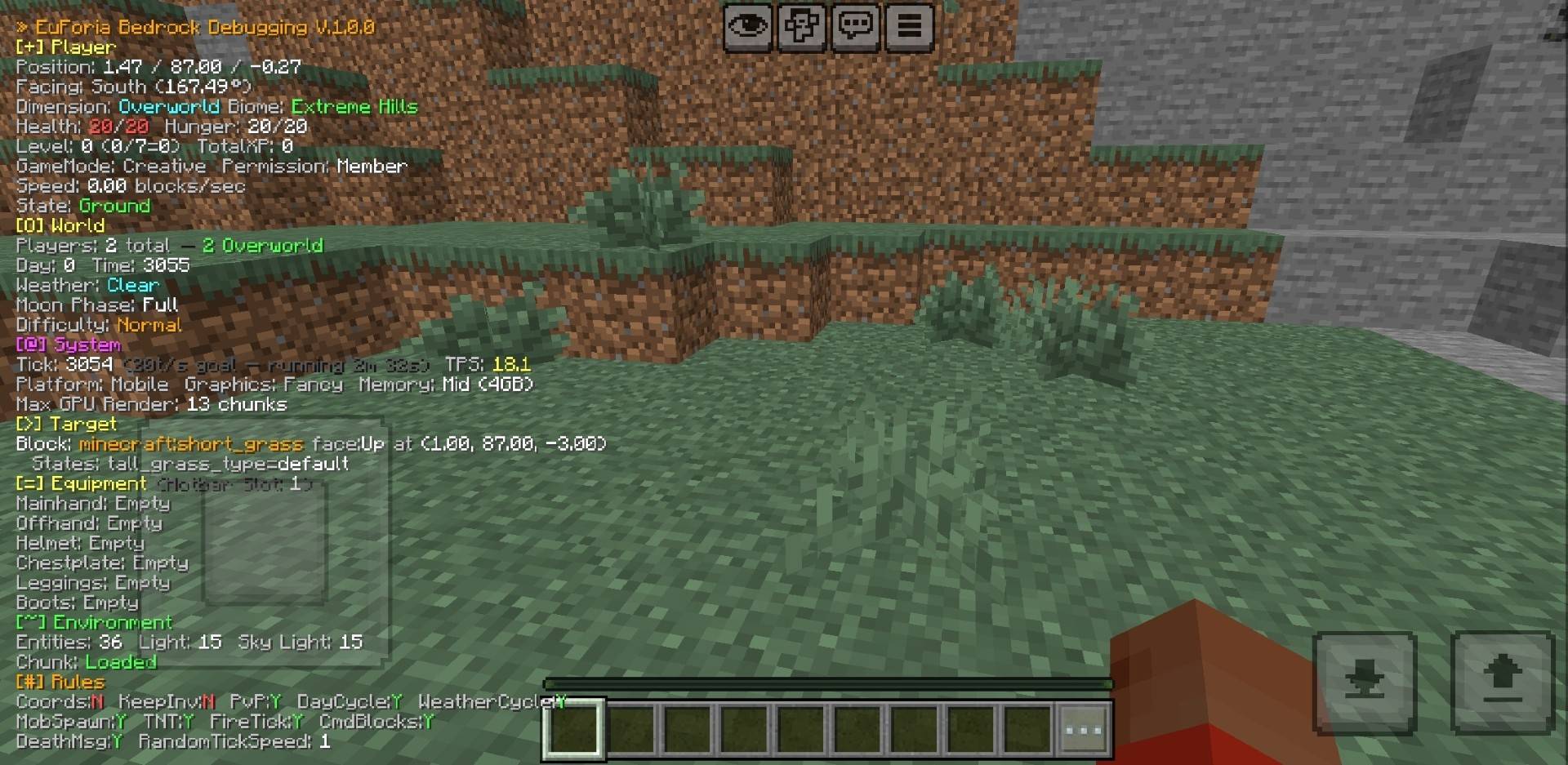
Eight color-coded sections, each refreshed 10 times per second:
[+] Player
Shows your current coordinates (X, Y, Z) with 2-decimal accuracy, the cardinal direction you are facing along with your precise yaw angle, the name of the biome and dimension you currently occupy, your health and hunger as current-versus-maximum bars, your experience level plus progress percentage toward the next level and total lifetime XP earned, your movement speed derived from your velocity in blocks-per-second, and a snapshot of all nine player movement states simultaneously — whether you are on the ground, flying, sprinting, sneaking, swimming, gliding with an elytra, standing in water, mid-jump, or climbing a ladder. It also surfaces which game mode you are in and what permission level you hold.
[O] World
Displays the total number of players currently connected, broken down by which dimension each one is in with per-dimension color coding, the number of in-game days elapsed alongside the current time-of-day tick, the active weather with a visual indicator for clear skies, rain, or thunder, the current phase of the moon from the full 8-phase cycle, and the world's difficulty setting.
[@] System
Surfaces server-side performance metrics: the raw tick counter converted into a human-readable runtime (hours, minutes, seconds since the world started), a real-time TPS measurement taken from wall-clock time and smoothed through exponential moving average — green when the server is healthy, yellow when it dips, red when it struggles — your device's platform type, the active graphics rendering mode, your hardware's memory tier classification, and the maximum render distance your GPU supports measured in chunks.
[>] Target
A raycasting system that fires two independent traces — one for blocks, one for entities — and shows whichever is closest. For blocks, it reveals the full namespaced typeId, which face of the block you are looking at, the exact coordinates, and every single block state without truncation. For entities, it reveals the full typeId, any custom name tag, the precise coordinates plus distance, the contained item and stack count for dropped items, and the current health bar for living mobs. All identifiers appear in raw namespace-prefixed form — essential when you are developing custom addons and need the exact string.
[=] Equipment
Reads all six equipment slots — main hand, offhand, head, chest, legs, feet — and reports the exact typeId in each one. Custom items from your own addons show up correctly as your_namespace:your_item, not as a generic label. The currently selected hotbar slot is displayed as well.
[~] Environment
Counts every entity in your current dimension, measures the block light and sky light levels right at your feet for spawn-proofing checks, and tells you whether the chunk you are standing in is fully loaded and accessible to the scripting engine.
[#] Rules
Lists eleven game rules in a clean Y/N format: showCoordinates, keepInventory, PvP, doDayLightCycle, doWeatherCycle, doMobSpawning, tntExplodes, doFireTick, commandBlocksEnabled, showDeathMessages, and randomTickSpeed — all at a glance.
Requirements
| Minimum | |
|---|---|
| Minecraft Bedrock | 1.26.0 or newer |
| Behavior Pack | Required (contains the script) |
| Resource Pack | Required (binds automatically with the BP) |
| Experimental features | None — everything used is stable |
| Script API version | @minecraft/server 2.8.0 |
| Platform | Windows, Xbox, PlayStation, Switch, iOS, Android |
How to Install
- Download the Addons
.mcaddonfrom the Files tab. - Open the file — Minecraft Bedrock imports them automatically into your library.
- Open or create a world, navigate to World Settings → Add-Ons, and activate EuForia Bedrock Debug [BP] under Behavior Packs.
- Activate EuForia Bedrock Debug [RP] under Resource Packs.
- Load the world — the HUD appears immediately.
To remove, deactivate the Behavior Pack from the same Add-Ons menu.
Known Limitation: Actionbar Overlap
This addon writes to the built-in actionbar — the same text area at the bottom of the screen that some other addons use for their own messages. If you run another pack that calls the actionbar (quest instructions, RPG combat text, scoreboard fallback notifications, or any other hud_screen.json override), the two will compete for the same space. The symptom is flickering text or one side's data silently disappearing.
Workarounds:
- Temporarily disable other actionbar-heavy addons while using the debug HUD.
- A future update will introduce an independent JSON UI panel, decoupling the debug display from the actionbar entirely.
Who Benefits from This Addon
- Mapmakers — confirm light levels prevent mob spawning where intended, check chunk alignment, inspect block states while building redstone contraptions.
- Administrators — watch TPS in real-time, see where players are distributed across dimensions, audit game rules without pausing the session.
- Addon Developers — inspect any block's full state table, verify your custom items appear in the right equipment slots, read exact entity typeIds for your scripts, and check whether a chunk is loaded before your code touches it.
- Technical Survival Players — get the depth of information Java players have enjoyed since alpha, now on Bedrock.
- Streamers and Content Creators — display clean diagnostic data on-screen without setting up command-block chains or scoreboard overlays.
Developed by EuForia Project
EuForia Bedrock Debug is built and maintained by the EuForia Project team — An experimental developer team; who dreams of providing products that everyone around the world uses! Every product we ship targets the stable Scripting API so your addons survive Minecraft updates without rewrites.
🌐 Website & Full Documentation: euforiaproject.com
Feedback & Community
Found a bug? Have a feature request or an idea to make this addon better? We would love to hear from you.
💬 Join our Discord: euforiaproject.com/discord
Drop your suggestions, bug reports, or just say hello — the EuForia community is always open.
License
Creative Commons Attribution-NonCommercial 4.0 International (CC BY-NC 4.0)
What you can do:
- Use this addon in your own worlds, servers, and content
- Modify, remix, and build upon it for personal or community projects
- Share it with friends, communities, and players
What you cannot do:
- Sell it, bundle it in paid products, or use it for commercial monetization
- Re-upload it as-is (direct rehost) on CurseForge, MCPEDL, or any other platform — substantial modification and added value are required before redistribution
Attribution policy: By downloading and using EuForia Bedrock Debug, you are automatically considered to have given appropriate credit. You do not need to write out attribution text or include a credit line — using the addon is credit enough.
Full license terms: creativecommons.org/licenses/by-nc/4.0/
"Every Bedrock player deserves the tools to understand their world."
— EuForia Project
Minecraft Bedrock 1.26.0+ · Stable API · Native Feel · No Experiments · Achievement Friendly · All Platforms | euforiaproject.com
EuForia Debug Screen Team