



Custom UI Teleport Manager. Create teleport points and warps with a modern interface
Description
🌍 TeleportMenu (Clean UI)
Elevate your Hytale server experience with a modern, fully interactive Teleportation Interface.
Stop remembering complex chat commands or coordinates. TeleportMenu provides a sleek, dark-themed GUI that allows players to save, search, and teleport to their favorite locations with a single click.

✨ Key Features
- 🖥️ Modern Interface: A "Clean UI" design with a dark theme that fits perfectly with Hytale's aesthetic.
- 🔍 Instant Search: Too many homes? Use the real-time search bar to find exactly what you are looking for.
- ⚡ Quick Creation: Create new waypoints directly from the UI. Just type the name and click Create.
- 🛡️ Safe Deletion: Includes a safety mechanism to prevent accidents. The delete button turns Orange (?) requiring a second click to confirm.
🎮 How to Use
Opening the Menu
You can open the menu:
- Type the command:
/tpmenuor/tpm.
Managing Points
- Create: Type a name in the bottom input field and press Enter (or click the Blue button).
- Teleport: Click the Green [GO] button on any card.
- Delete: Click the Red <input disabled="disabled" type="checkbox" checked="checked" /> button. It will turn Orange [?]. Click again to confirm.
📸 Screenshots
- Clean Footer Design

- Search Functionality
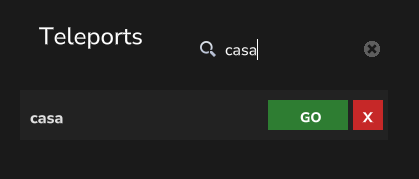
- Safety Delete Confirmation

Created by MARVEG