

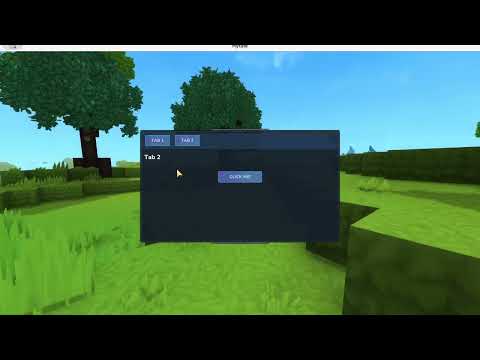
Description
Hytale ReactiveUI
A modern, reactive UI framework for Hytale server-side modding that simplifies UI management through automatic data binding, declarative event handling, and reusable components.
Join our Discord to get support & stay updated with new additions!


Features
- Automatic Data Binding - UI updates automatically when values change
- Declarative Event Handling - Clean, fluent API for handling UI events
- Reusable Components - Build modular UI elements with proper lifecycle management
- Type-Safe - Generic elements with typed parent page references
- Array/List Support - Easy creation of dynamic lists and repeated elements
- Event-Driven Architecture - Efficient event routing and parameter decoding
Installation
Gradle (Kotlin DSL)
repositories {
    mavenCentral()
}

dependencies {
    implementation("dev.jonrapp:hytale-reactiveui:1.0")
}
Gradle (Groovy)
repositories {
    mavenCentral()
}

dependencies {
    implementation 'dev.jonrapp:hytale-reactiveui:1.0'
}
Maven
<dependency>
    <groupId>dev.jonrapp</groupId>
    <artifactId>hytale-reactiveui</artifactId>
    <version>1.0</version>
</dependency>
Core Concepts
1. Pages
Pages are the primary entry point for UI in Hytale. ReactiveUI provides ReactiveUiPage, an enhanced page implementation that simplifies event handling, data binding, and element management. It includes built-in support for managing a "primary element", a single element that can be easily swapped out, making it perfect for tabbed interfaces or wizard-style UIs.
public class MyPage extends ReactiveUiPage {

    public MyPage(@Nonnull PlayerRef playerRef) {
        super(playerRef, CustomPageLifetime.CanDismiss);
    }

    @Override
    public void build(@Nonnull Ref<EntityStore> ref,
                      @Nonnull UICommandBuilder commands,
                      @Nonnull UIEventBuilder events,
                      @Nonnull Store<EntityStore> store) {
        // Load your UI file
        commands.append("MyPage.ui");

        // Bind events
        bindEvent(
            CustomUIEventBindingType.Activating,
            "#TabButton",
            events,
            EventBinding.action("tab-clicked")
                .onEvent(context -> showPrimaryElement(new MyTab(this)))
        );

        // Show initial element
        showPrimaryElement(new MyTab(this));
    }

    @Override
    public String getRootContentSelector() {
        return "#Content";  // Where primary elements are displayed
    }
}
2. Elements
Elements are reusable UI components that manage their own lifecycle, events, and data bindings.
public class MyElement extends Element<MyPage> {

    public MyElement(MyPage pageRef) {
        super(pageRef);
    }

    @Override
    protected void onCreate(String root, UICommandBuilder commands, UIEventBuilder events) {
        // Load element UI
        commands.append(root, "MyElement.ui");

        // Bind button click event
        bindEvent(
            CustomUIEventBindingType.Activating,
            "#SubmitButton",
            events,
            EventBinding.action("submit-clicked")
                .onEvent(context -> handleSubmit())
        );
    }

    private void handleSubmit() {
        // Handle the event
    }
}
3. Event Binding
ReactiveUI provides a fluent API for binding events to UI elements with automatic cleanup.
// Simple event binding
bindEvent(
    CustomUIEventBindingType.Activating,
    "#Button",
    events,
    EventBinding.action("button-clicked")
        .onEvent(context -> {
            // Handle click
        })
);

// Event with parameters
bindEvent(
    CustomUIEventBindingType.Activating,
    "#ItemButton",
    events,
    EventBinding.action("item-selected")
        .withEventData("itemId", Codec.STRING, "item_123")
        .onEvent(context -> {
            String itemId = context.getParameter("itemId");
            // Use the parameter
        })
);

// Conditional event handling (return true if handled)
bindEvent(
    CustomUIEventBindingType.Activating,
    "#ConditionalButton",
    events,
    EventBinding.action("conditional-action")
        .onEventConditional(context -> {
            if (someCondition()) {
                // Handle event
                return true;  // Event consumed
            }
            return false;  // Continue to next handler
        })
);
4. Automatic Data Binding
Use @UIBinding annotations for automatic UI updates when values change.
public class PlayerCard extends Element<MyPage> {

    @UIBinding(selector = "#PlayerName.TextSpans")
    private UIBindable<String> playerName;

    @UIBinding(selector = "#PlayerScore.TextSpans")
    private UIBindable<String> score;

    public PlayerCard(MyPage pageRef) {
        super(pageRef);
    }

    @Override
    protected void onCreate(String root, UICommandBuilder commands, UIEventBuilder events) {
        commands.append(root, "PlayerCard.ui");

        // Set initial values
        playerName.set("Steve");
        score.set("100");
    }

    public void updateScore(int newScore) {
        // UI automatically updates when you call set()
        score.set(String.valueOf(newScore));
    }
}
Key Points:
- Fields are automatically initialized by the framework
- Calling
set()immediately updates the UI - Use
set(value, commands)to batch multiple updates together - Supports
String,Message, or any type (converted viatoString())
5. Array/List Elements
Create multiple instances of elements for lists, inventories, or repeated patterns.
public class ItemList extends Element<MyPage> {

    public ItemList(MyPage pageRef) {
        super(pageRef);
    }

    @Override
    protected void onCreate(String root, UICommandBuilder commands, UIEventBuilder events) {
        commands.append(root, "ItemList.ui");

        // Create 10 item elements
        for (int i = 0; i < 10; i++) {
            ItemElement item = new ItemElement(pageRef, i);
            item.create("#ItemContainer", i, commands, events);
        }
    }
}

public class ItemElement extends Element<MyPage> {

    private final int index;

    @UIBinding(selector = "#ItemIndex.TextSpans")
    private UIBindable<String> itemIndex;

    public ItemElement(MyPage pageRef, int index) {
        super(pageRef);
        this.index = index;
    }

    @Override
    protected void onCreate(String root, UICommandBuilder commands, UIEventBuilder events) {
        commands.append(root, "ItemElement.ui");

        // Set the index value (batched with creation)
        itemIndex.set(String.valueOf(index), commands);
    }
}
How it works:
create(root, index, commands, events)creates a container with an indexed selector- Each instance gets a unique selector like
#ItemElement0,#ItemElement1, etc. - Data bindings are scoped to each instance automatically
Advanced Usage
Type-Safe Page References
Elements are generic and provide type-safe access to their parent page:
public class MyElement extends Element<MySpecificPage> {

    public MyElement(MySpecificPage pageRef) {
        super(pageRef);
    }

    @Override
    protected void onCreate(String root, UICommandBuilder commands, UIEventBuilder events) {
        // Access page-specific methods with full type safety
        pageRef.someCustomMethod();
    }
}
Manual Event Registration
For more control, register event handlers directly:
registerEventHandler("my-action", EventHandlerBuilder.create()
    .withParameter("playerId", Codec.STRING)
    .build(context -> {
        String playerId = context.getParameter("playerId");
        // Handle event
    })
);
Lifecycle Management
Elements automatically clean up their event handlers when unloaded:
@Override
public void onUnload() {
    super.onUnload();  // Cleans up all registered events
    // Add custom cleanup here
}
Examples
Check out the examples directory for complete working examples including:
- Tabbed interface with primary element switching
- Dynamic lists with iterated elements
- Data binding with automatic UI updates
- Event handling with parameters
License
This project is licensed under the MIT License - see the LICENSE file for details.
Contributing
Contributions are welcome! Please feel free to submit a Pull Request.
Migrating From Old Version (HyUI)
If you're migrating from the previous iteration of this project (HyUI), the only thing that has changed is naming of the Page class and packages:
HyUiPage -> ReactiveUiPage

import dev.jonrapp.hyui. -> import dev.jonrapp.hytaleReactiveUi.
Links
The ReactiveUI Team
