


FantasticQuickSleep
- By

File Details
FantasticQuickSleep.jar
- R
- Jun 9, 2026
- 27.45 KB
- 37
- 0.5
File Name
FantasticQuickSleep.jar
Supported Versions
- 0.5

🌙 FantasticQuickSleep
FantasticQuickSleep is a lightweight and configurable sleep system for Hytale servers.
This mod allows your players to skip the night when enough players are sleeping. It is designed for modern Hytale servers and updated for newer Java versions.
FantasticQuickSleep was created because older sleep mods are no longer maintained and many servers still need a clean, working sleep solution.
✨ Features
- ✔️ Skip the night when enough players are sleeping
- ✔️ Configurable required sleep percentage
- ✔️ Configurable skip delay
- ✔️ Customizable messages in the config
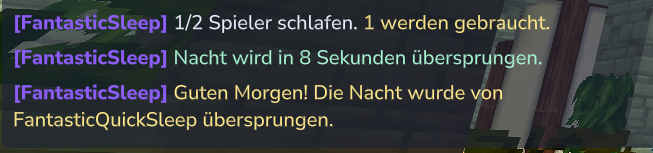
- ✔️ Server messages for sleep progress
- ✔️ Admin commands
- ✔️ Reload command without restarting the server
- ✔️ Lightweight and server-friendly
- ✔️ Built for modern Hytale server setups
- ✔️ Java 25 compatible source structure
🌙 How it works
When night starts, players can sleep in beds as usual.
If enough players are sleeping, FantasticQuickSleep starts a short countdown. After the countdown, the night will be skipped and all players wake up again.
By default, 50% of online players need to sleep.
Example:
- 1 player online → 1 player must sleep
- 2 players online → 1 player must sleep
- 4 players online → 2 players must sleep
- 10 players online → 5 players must sleep
⚙️ Configuration
The config is created automatically after the first server start.
Config path:
```txt id="9bclaz" plugins/FantasticQuickSleep/fantastic-quick-sleep.json
You can change:

* Required sleeping percentage
* Countdown delay
* Enable or disable the system
* All server messages shown by the mod

This means you can change the default German messages to English or any other language directly in the config.

Example:
json id="lcf2gg" "nightSkipped": "<color:#FFD966>[FantasticQuickSleep]</color> <color:#FFFFFF>The night has been skipped. Good morning!</color>"
After changing the config, use:txt id="0matwg" /fqs reload
No server restart is required.

---

## 📝 Custom Messages

FantasticQuickSleep allows you to customize the messages in the config file.

You can edit the text, colors and wording to match your own server style.

For example, you can change German messages like:
txt id="r243j3" Die Nacht wurde übersprungen. Guten Morgen!
to English:txt id="75ccqz" The night has been skipped. Good morning!
or to your own custom server message:txt id="cpce0v" The night fades away… a new day begins!
Message changes can be applied ingame with:txt id="y16tx0" /fqs reload
---

## 🧾 Commands
txt id="3r2c5l" /fqs status
Shows the current FantasticQuickSleep status.txt id="m54y86" /fqs reload
Reloads the config.txt id="f0fh50" /fqs skip
Forces the night skip.txt id="x4dm8e" /fqs percent <1-100>
Changes the required sleeping percentage.txt id="5w699z" /fqs delay <seconds>
Changes the skip countdown delay.txt id="4rxmse" /fqs enabled <true|false>
Enables or disables FantasticQuickSleep.

---

## 🔐 Permissions
txt id="l709nx" fantasticquicksleep.command.use
Allows access to basic FantasticQuickSleep commands.txt id="m98h3w" fantasticquicksleep.command.admin
Allows access to admin commands like reload, skip, percent, delay and enabled.

---

## 🛠️ LuckPerms Examples

Give all players access to the basic command:
txt id="c6z6vp" /lp group default permission set fantasticquicksleep.command.use true
Give admins full access:txt id="jlj7qk" /lp group admin permission set fantasticquicksleep.command.use true /lp group admin permission set fantasticquicksleep.command.admin true ```
📦 Installation
- Stop your server
- Remove any old sleep mod
- Put
FantasticQuickSleep.jarinto your mods folder - Start your server
- Edit the config if needed
- Use
/fqs reloadafter config changes
⚠️ Important
Please remove older sleep mods before installing FantasticQuickSleep.
Running multiple sleep systems at the same time can cause conflicts.
💬 Support
Need help, found a bug or want to follow my Hytale projects?
Join my Discord:
❤️ Credits
Created by DerFriesn Arts for modern Hytale community servers.
This is an independent sleep system and not an official Hytale mod.