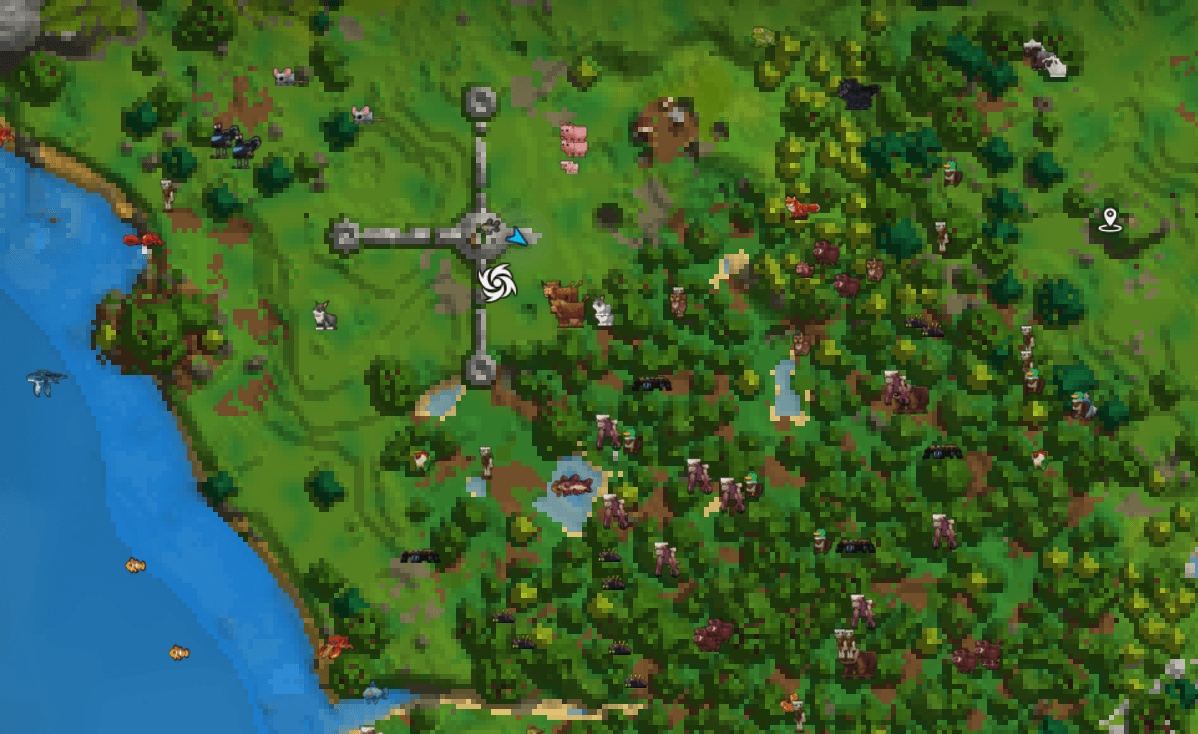
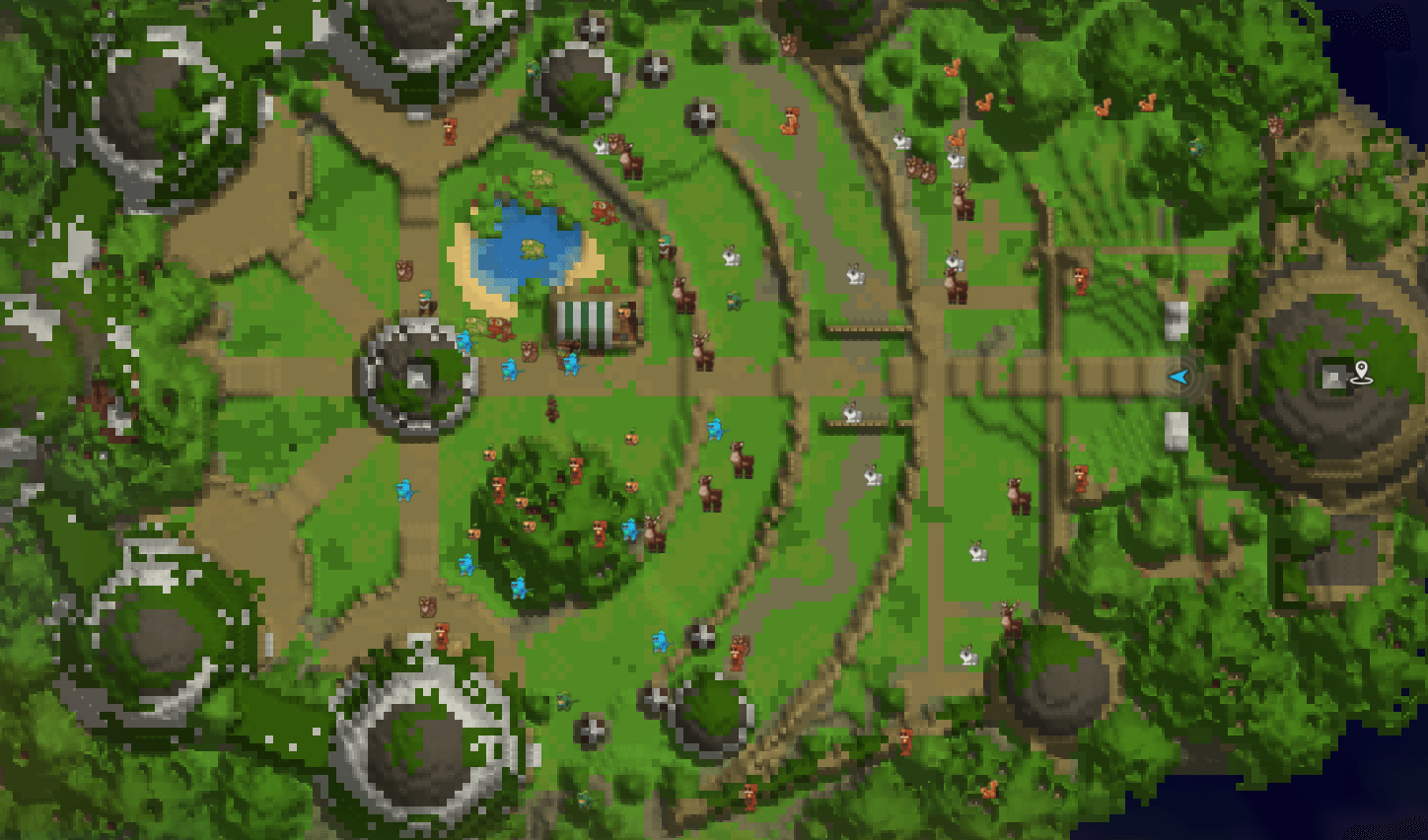
Real-time creature tracking on world map and compass. Track 250+ creatures with unique icons!
Hytale Mod by vadim_emoji
Description
Animal Tracker displays creature markers on the world map and compass in real-time. Track animals, predators, and monsters within a configurable radius around the player. Almost every creature has its own unique icon on the map.
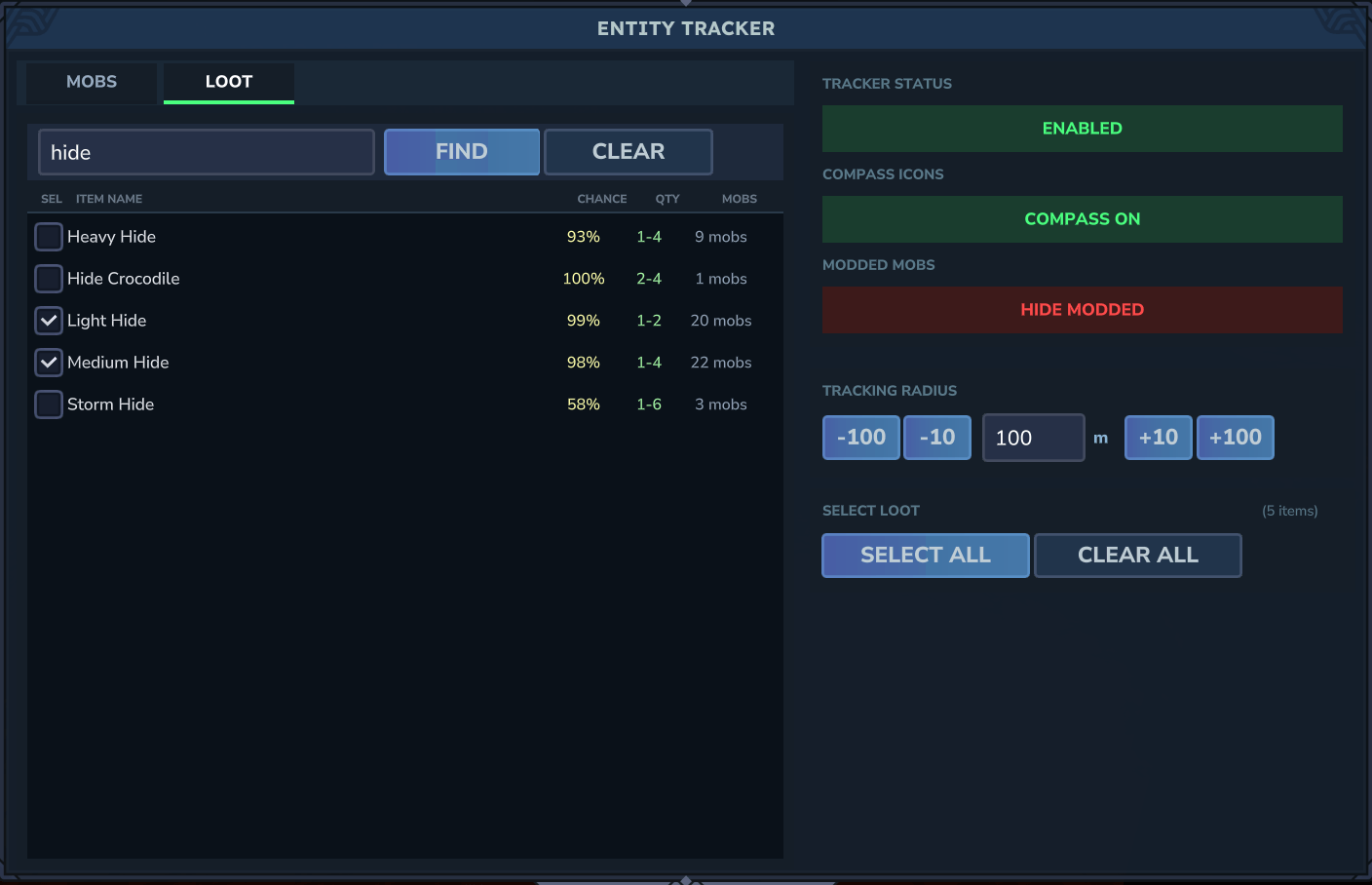
Select a loot item in the menu (e.g. Light Hide) and the map will show all mobs that drop it on death.
PS: You won't be able to find Poop — the devs haven't decided which mob should drop it yet.
Note: The Hytale engine only loads mobs within ~500 blocks of the player. Setting radius above 500 won't show additional mobs — they simply don't exist on the server beyond that distance. I tried increasing the limit to 2000 but confirmed this is an engine-level restriction.
|
by Nicholas_LionRider
We work together — our mods complement each other. Animal Tracker supports all WildTale animals with unique map icons, loot tracking, and category filters. Enable "Show Modded Mobs" in the settings to see them on the map.
|

|
by ReignInBlood
We work together — our mods complement each other. Animal Tracker supports all TaleMon creatures with map tracking and quick-select filters. Enable "Show Modded Mobs" to see them on the map.
|
Features

|
Track 250+ creature types — all animals, predators, and monsters from Hytale |

|
Unique mob icons — almost every creature has its own icon on the map and compass |

|
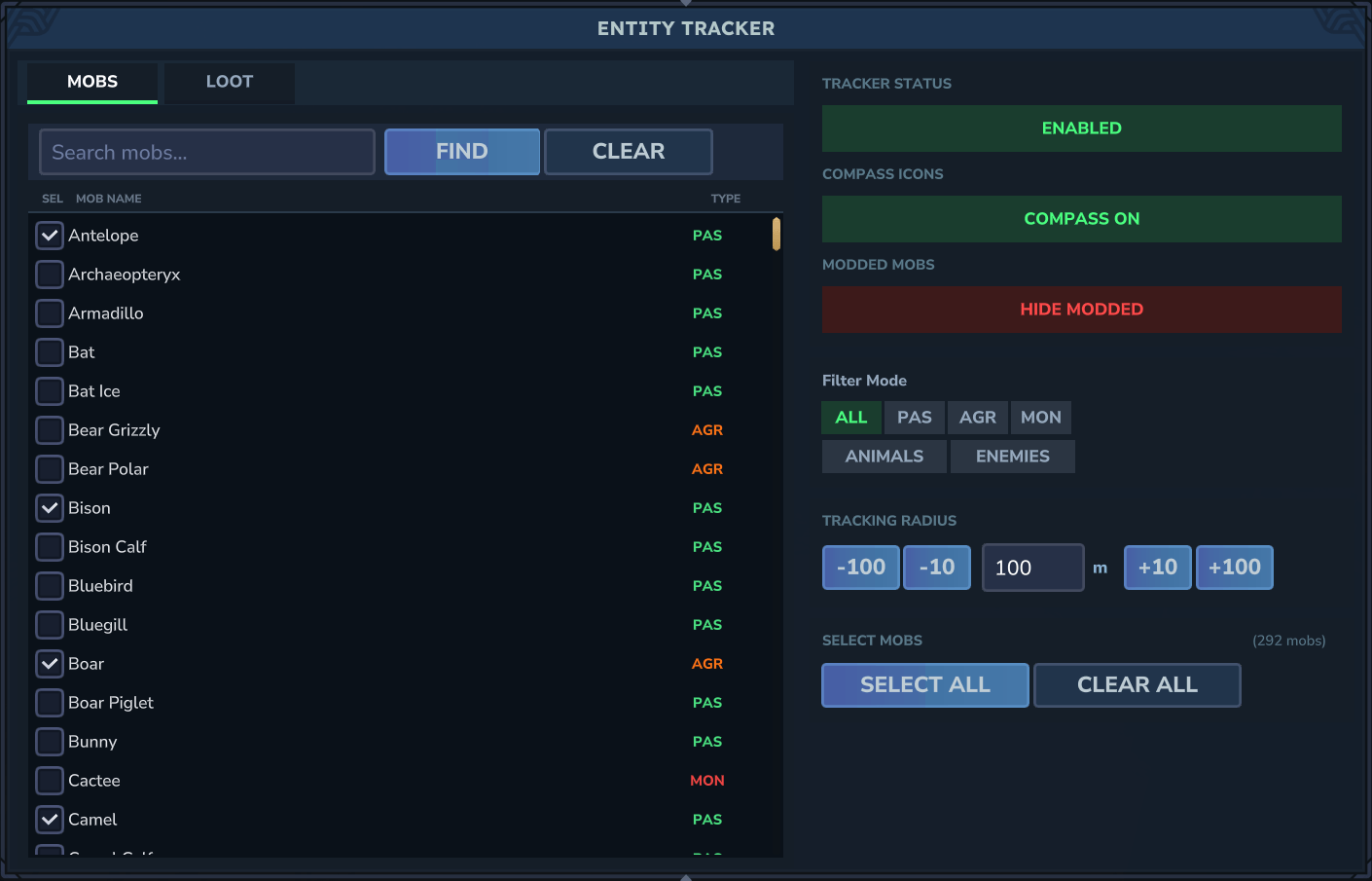
MOBS tab — browse and toggle individual creatures by name |

|
LOOT tab — select a loot item and the map shows all mobs that drop it on death
69+ loot items with drop chance %, quantity, and source mob count |
Category Filters
| Filter |
Description |
ALL |
All creatures |
PASSIVE |
Passive (deer, rabbits, birds, fish) |
AGGRESSIVE |
Aggressive animals (wolves, bears, dinosaurs) |
MONSTER |
Monsters (skeletons, zombies, golems, void creatures) |
ANIMALS |
All animals (passive + aggressive) |
ENEMIES |
All enemies (aggressive + monster) |
Additional Features
|
|
| Radius configuration |
From 10 to 1000 blocks with +10/+100/-10/-100 buttons |
| Direct radius input |
Enter radius value directly in the text field |
| Compass toggle |
Show/hide mob icons on the compass |
| Modded mobs toggle |
Hide modded creatures from the tracker |
| Mob search |
Search mobs by name with FIND/CLEAR buttons |
| Individual selection |
Enable/disable each creature type separately |
| Select All / Clear All |
Quickly toggle all creatures |
| Per-player settings |
Each player has their own persistent settings |
Commands
| Command |
Description |
/animaltracker or /at |
Open settings window |
/at toggle |
Enable/disable tracker |
/at radius <10-1000> |
Set tracking radius |
/at filter <name|all> |
Filter by creature name |
/at compass |
Toggle compass icons on/off |
/at list |
Show list of tracked types |
/at settings |
Open settings window |
Tracked Creatures
 70+ types
| Group |
Creatures |
| Farm |
Cow, Cow Calf, Pig, Pig Piglet, Sheep, Sheep Lamb, Goat, Goat Kid, Chicken, Chick, Turkey, Duck |
| Wildlife |
Deer Doe, Deer Stag, Horse, Foal, Rabbit, Bunny, Ram, Camel, Bison, Mouflon, Warthog, Skrill, Antelope, Moose Cow, Moose Bull |
| Small |
Armadillo, Mouse, Meerkat, Gecko, Squirrel, Frog Blue, Frog Green, Tortoise |
| Birds |
Sparrow, Parrot, Finch Green, Bluebird, Owl Snow, Owl Brown, Crow, Raven, Pigeon, Hawk, Tetrabird, Vulture, Woodpecker, Flamingo, Penguin |
| Flying |
Bat, Pterodactyl, Archaeopteryx |
| Fish |
Trout Rainbow, Pike, Bluegill, Salmon, Catfish, Minnow, Frostgill, Clownfish, Pufferfish, Tang Sailfin, Tang Blue |
| Sea |
Crab, Lobster, Trilobite, Whale Humpback, Jellyfish Red, Jellyfish Green, Jellyfish Blue |
 25+ types
| Group |
Creatures |
| Predators |
Wolf Black, Wolf White, Bear Grizzly, Bear Polar, Leopard Snow, Tiger Sabertooth, Boar, Fox, Hyena |
| Reptiles |
Crocodile, Snake Marsh, Lizard Sand, Toad Rhino, Snapdragon |
| Prehistoric |
Mosshorn, Rex Cave, Raptor Cave, Trillodon |
| Special |
Fen Stalker, Emberwulf, Yeti |
| Aquatic |
Shark Hammerhead, Piranha, Piranha Black, Snapjaw, Eel Moray, Jellyfish Man Of War |
 150+ types
| Group |
Creatures |
| Skeletons |
Skeleton, Fighter, Archer, Scout, Soldier, Knight, Ranger, Mage, Archmage
+ Frost, Sand, Pirate, Burnt, Incandescent variants |
| Zombies |
Zombie, Zombie Sand, Zombie Frost, Zombie Burnt, Zombie Aberrant (Small, Big) |
| Undead |
Ghoul, Wraith, Wraith Lantern, Shadow Knight, Hound Bleached, Werewolf
Horse Skeleton, Horse Skeleton Armored, Cow Undead, Pig Undead, Chicken Undead |
| Void |
Larva Void, Crawler Void, Eye Void, Spawn Void |
| Golems |
Golem Firesteel, Golem Crystal Earth, Golem Crystal Frost, Golem Crystal Flame, Golem Crystal Sand, Golem Crystal Thunder |
| Spirits |
Spirit Frost, Spirit Thunder, Spirit Root, Spirit Ember |
| Humanoids |
Trork, Goblin, Outlander, Scarak — all variants |
| Other |
Spider, Larva Silk, Hatworm, Cactee, Spark Living, Toad Rhino Magma, Slug Magma, Shellfish Lava |
Feedback & Ideas
Have a bug report, feature idea, or want me to add compatibility with another mod?

Installation
- Download
AnimalTracker-1.5.5.jar
- Place in
%AppData%\Hytale\UserData\Mods\
- Launch the game
Important: This mod is built and tested for the release version of Hytale. If you switch to pre-release, the mod may behave unpredictably — I can't update the mod for all versions at the same time.
Author
vadim_emoji
More mods by vadim_emoji

|
Ultimate Boots
8 unique boots with speed, teleportation, elemental walking and more!
|
Support & Donate

Your support helps me:
- Fix bugs faster
- Develop new features
- Maintain and update mods regularly
Thank you for using Animal Tracker!
Version History
1.5.5 — TaleMon mod integration, collaboration quick-select buttons (WildTale/TaleMon), bug fixes
1.5.0 — WildTale mod integration: 64 new animals with custom icons, loot tab support, graceful degradation
1.4.2 — Fixed tracker freeze: stale markers auto-clear, watchdog logging, silent exceptions now logged
1.4.1 — Fixed /at list command, improved debug logging
1.4.0 — Native checkboxes in mob/loot lists, restyled radius buttons, 25 new mob icons, UI polish
1.3.5 — Fixed mob filter not working (category filters and loot selection)
1.3.4 — Compass toggle — hide mob icons from compass, keep only on map
1.3.3 — More mob icons, icon fallback for Dungeon/Fledgling/Patrol variants, category-based fallback for unknown mob variants
1.3.2 — Fixed loot tab not loading items on some servers
1.3.1 — Persistent player settings, fixed mob filtering bug, Loot Tab, unique mob icons, redesigned two-pane UI
1.1.0 — Mob search, direct radius input, max radius 1000
1.0.0 — Initial release
How to Send Logs
If you're reporting a bug, please include your game logs — they help me find and fix the issue much faster.
| Log |
What it contains |
| Client log |
UI errors, visual glitches, mod loading issues |
| Server log |
Gameplay logic, mob tracking, commands, crashes |
Ideally, send both files. If you're not sure which one is relevant, just send both.
Step 1: Enable debug mode
Debug mode makes Animal Tracker write detailed information to the logs — this makes it much easier to find the problem.
- Press
Win + R on your keyboard
- Paste this path and press Enter:
%AppData%\Hytale\UserData\Saves
- Open the folder with your world name (e.g.
World, Test, etc.)
- Open
mods → AnimalTracker folder
- Open
config.json in any text editor (Notepad works fine)
- Find
"Debug": false and change it to "Debug": true
- Save the file and close it
Now launch the game and reproduce the bug — play until the issue happens again. Then quit the game and continue to the next step.
Note: You can set "Debug": false after sending the logs to go back to normal.
Step 2: Find the log files
Client logs:
- Press
Win + R
- Paste:
%AppData%\Hytale\UserData\Logs
- Look for files like
2026-02-21_15-30-00_client.log
Server logs:
- Press
Win + R
- Paste:
%AppData%\Hytale\UserData\Saves
- Open your world name folder →
logs
- Look for files like
2026-02-21_15-30-00_server.log
Pick the most recent file — it matches your last play session.
Step 3: Send the logs

- Click the button above to open the feedback form
- Select Bug Report as the feedback type
- Describe what happened
- Attach your log file(s)
| What |
Where |
| Client log |
%AppData%\Hytale\UserData\Logs\*_client.log |
| Server log |
%AppData%\Hytale\UserData\Saves<your_world>\logs\*_server.log |
Thank you for helping me improve Animal Tracker!