


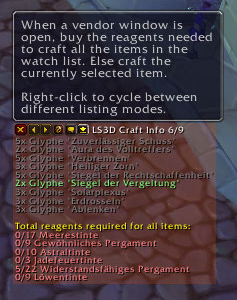
This window shows all watched recipes and the required reagents.
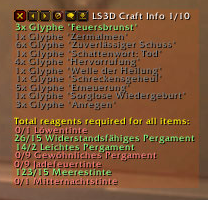
Here some reagents are already in the characters bags and so marked green.
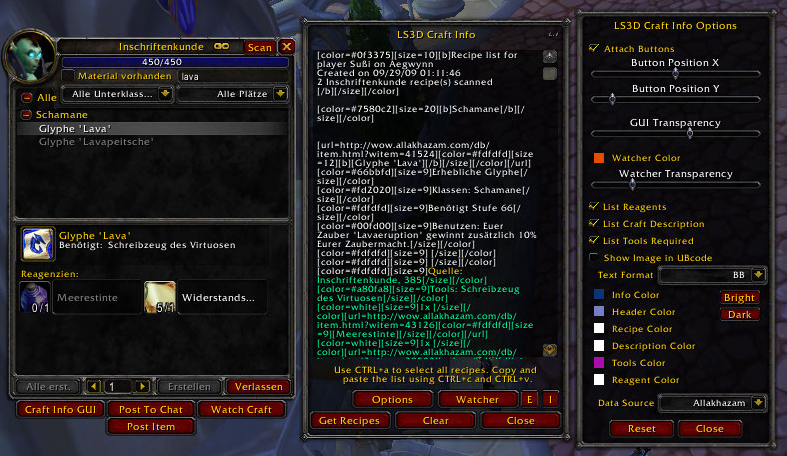
This image shows the craft window with LS3D Craft Info buttons attached, the main window which contains BB-code for the two selected recipes and the options dialog.
Description
This addon provides two major functions:
- Craft helping
The "Craft Info" window allows you to build a wish list of items you want to craft and helps you with crafting. Simply select the item to craft in the blizzard craft window, enter the desired amount if available and press "Watch Craft". The recipe is now listet in the "LS3D Craft Info" box. Pressing the "Craft Helper" button (the rightmost) with an opened merchant window will automatically buy the reagents you need for all the items. If no merchant window was opened, this addon will automatically craft the selected recipe.
- Forum information sharing
It provides a method to read out all recipes and their respective reagents of a specific craft and show them in a text box so you can share this information with other people. The text can be plain ascii code or UBB/BB formatted, with or without the items icons.
More Details:
- When posting a list of recipes to websites you have options to include links to Allakhazam or Blasc item databases.
- Post recipe information and reagents to chat
- Craft Info window with craft helping functions
- The Craft Info window provides a head up display to keep track of an unlimited number of recipes without having the trade skill or craft window open.
- The content of your bags is checked automatically and the number of available reagents shown in the Craft Info window window.
- There is a function to scan all Altoholic containers (AH, bags, bank, mail, ...) for a character and queue up the missing items of the current visible receipes.
- e.g. you filter from the inscription skill all items containing "Glyph" via the standard skill frame, scan all filtered receipes and LS3D queues all receipes until you have 5 of every item.
- Three different listing modes in the Craft Info window: Single recipe, Single recipe w/ number of reagents required for all recipes and a Wishlist w/ all required reagents where the last one is my favourite ;) (cycle by right clicking craft helper button)
- You can post item and reagent links of one single recipe to the current channel to inform other players about the items you can produce and let them know what it takes to manufactor or apply that recipe. This is a lot easier to read than the blizzard popup dialog.
- Slash Commands: To open the interface you can use /ls3d_craftinfo or /ls3d_ci
Notes:
I am not sure why and since when this happens, but the recipe list displayed in the text field is truncated after about 4000 letters. The lower part of the text field appears to be empty, but in fact it does contain text. So just make sure to select everything using CTRL+a before you copy the content with CTRL+c.
Too many recipes in the text window will cause your game to get laggy, so just filter out the recipes you want to dump and clear it afterwards.
Experimental Stuff:
Since i needed this for crafting glyphs on a different account, i implemented a simple export/import function for the watcher window.
Just open the "Craft Info GUI" and press the "E" button next to the one named "Watcher". This will dump the watched crafts into the text box.
Now just copy&paste this text into the character/account that shall craft the recipes and press the "I" button.
The watched recipes will now be available (and craftable) on the other account.
Original Copyright 2005, Lightstorm3D
All rights reserved.
Updated by g3gg0 in 2007-2011
Maintainership (for curseforge) granted by Lightstorm3D to g3gg0 on 03.07.2009
Thanks to the authors of ReagentRestocker, SlashCraft and WoWLUA.
Their code was a excellent reference for implementing the latest functions.
The LS3D CraftInfo Team

