


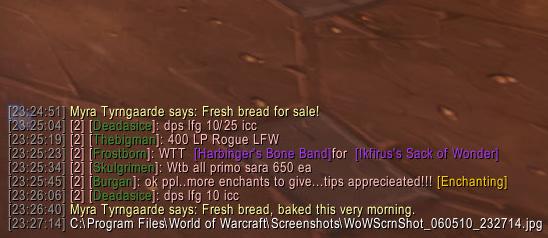
Bonus points for identifying the backdrop.
Description
Admittedly, this AddOn will appeal to a small crowd. My friend asked that I make it for him, so I figured I'd upload it here for other people who might want to use it. It simply prints the filepath of every screenshot you take to your chat box (e.g. C:\Program Files\World of Warcraft\Screenshots\wowscrnsht_123007_001730.jpeg ). If you have a chat mod, simply copy and paste the filepath from your chatbox to your favorite image upload site (photobucket/tinypic/etc.) instead of going through the hassle of Browse -> C:\ -> Program Files -> World of Warcraft -> Screenshots -> then, worst of all, hunting down which screenshot is the one you just took.
Usage and Commands:
/eu <filepath to Screenshots> to configure (This must be done only once)
/eu enable - Enables EU (Enabled by default)
/eu disable - Disables EU
Before you start using EU, you need to input the filepath to the screenshot folder in your WoW directory.
You can do this by typing: /eu <filepath to your screenshot folder>
For example, XP users with WoW installed to the default directory would type: "/eu C:\Program Files\World of Warcraft\Screenshots"
As always, please leave any thoughts or suggestions about this AddOn as a comment!
The EasyUpload Team

