ElvUI Location Plus
- By
a plugin for ElvUI, that adds location, coords, 2 Datatexts and a tooltip full of info.
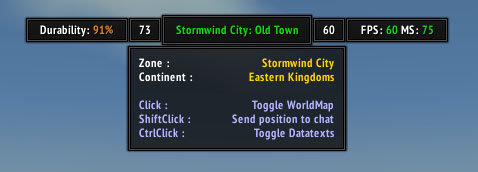
Larger location panel with shadows and tooltip

Bigger location panel and shadows enabled

Larger location panel with datatexts and shadows enabled

Simple style with DataTexts enabled
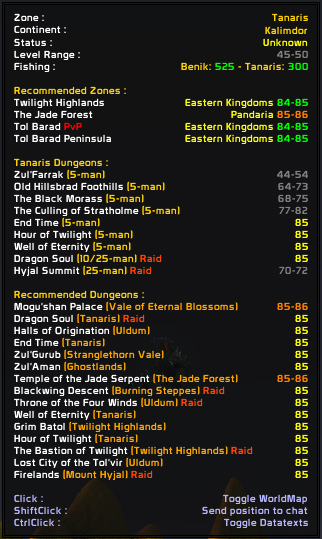
Tooltip shown for a lvl 85

Full size, transparent and shadows enabled
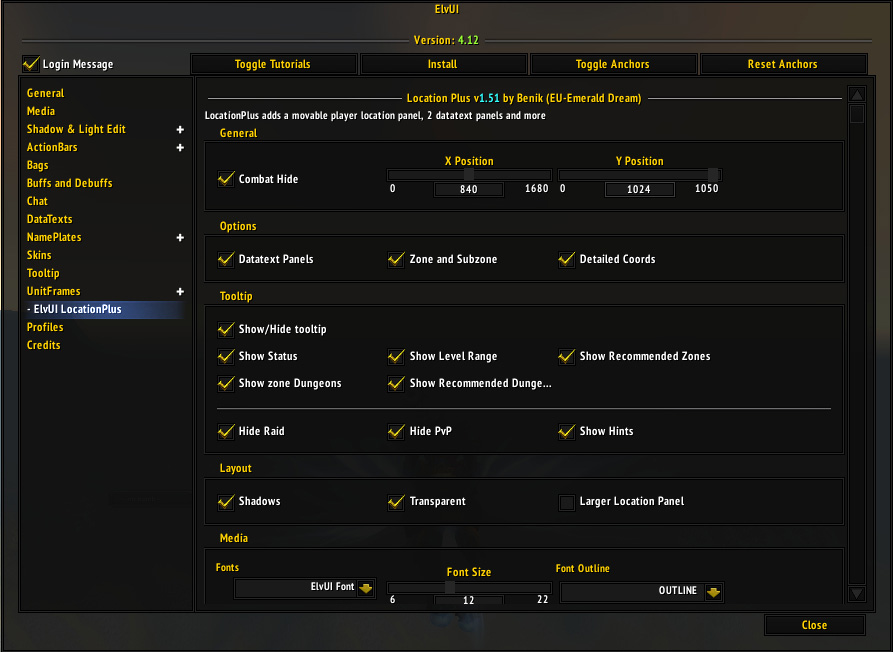
Location Plus Options

Simple ElvUI style

Full size, transparent, no shadows
Description
ElvUI Location Plus
Plugin for ElvUI, that adds player location, coords + 2 Datatexts. Also, the highly configurable tooltip, can show Continent, ZoneLevel, Raids, PvP areas, Dungeons in the zone, recommended zones and dungeons based on player level and many more.
Requires ElvUI 13+ installed. Get it here.
Installation: Install as any addon
Usage:
- Click to Toggle WorldMap
- ShiftClick to send your location in chat
- CtrlClick to toggle left/right datatext panels
- RightClick toggles ElvUI configuration
Contains options in ElvUI configuration:
- Auto, custom or class color on the text
- Moveable through ElvUI Toggle Anchors
- Detailed Coords
- All panels sizable
- Hide in combat/pet battle
- Show/Hide Tooltips
- 4 layouts to play with: simple, with shadows, transparent, no backdrop
- Change font, size, flags
Tooltip can Show:
- Currencies NEW
- Professions NEW
- Zone and subzone
- inZone dungeons, raids, pvp
- Recommended zones by char level
- Recommended dungeons by char level
- Dungeon entrances coords
- Location's Fishing level and player's fishing skill
- Battle Pet level in the area
Credits:
- Elv, Blazeflack, for showing me the best way to do this
- Sinaris (idea from his TukUI edit)
- iceeagle, grdn, for digging their great code and making this possible.
- Tukui and Elvui forum community.
I need help localizing it :)
The ElvUI Location Plus Team