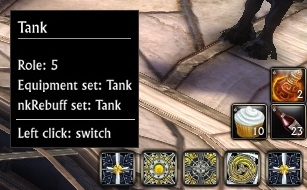
action bar for switching gears

Gear Set Management
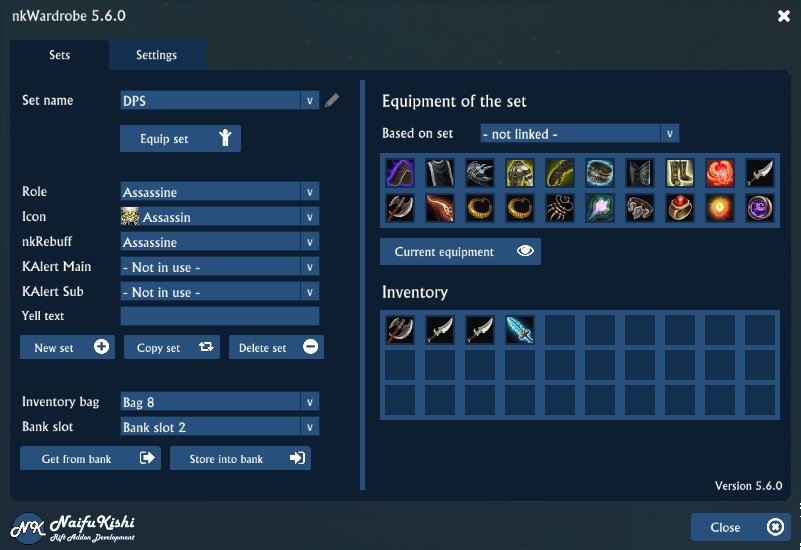
This is the user interface
Description
nkWardrobe helps you in maintaining and changing your equipment sets.
Addon button
The addon will display a 'nk' Button which allows for quick configuration of all of my addons. So all my addons (if you installed more than one) will use that button. By Left-Clicking on the button you'll get a menu where you can select 'nkWardrobe'. Then again a new menu will show up allowing you to activate 'sets'.
Set button
You'll find a new 'set button' below the minimap. Using this button you can switch very easy from one set (role / equipment / nkRebuff Set) with two simple mouse clicks.
LeftCick will show the sets which are configured (icons) RightClick + Drag will allow you to move the button around CenterClick will open the configuration
Equipment sets
When displaying your character screen an additional frame will be displayed where you can maintain your equipment sets. You can set up as many equipment sets as you like.
Configuration
You can access configuration either through the 'nk Button', 'nk Panel Plugin' (if installed) or by simply typing /nkw.
In the configuration you setup the addon (mostly the set button) and maintain the various sets. You can set up the switch buttons with options like roles and nkRebuff sets. You can specify:
- a name of the set
- a role which you want to switch to when activating the set
- an icon for the set to be used on the set button
- if nkRebuff is also installed there'll be another option to specify which nkRebuff Set should be activated
On the right hand side you'll see a button for each item slot available. By right clicking on one below there will be all items shown you own and which fit into that slot. Simply select one to add it to the set.
By right clicking you can clear a slot.
Linking sets
There is no need to store the equipment for each and every soul combination you got. What you would do is create a basic set and then base all other sets on this one. The other sets could only be used to change the role and nkRebuff / KarulAlert setup.
OR you could override specific slots for that set. For example you could only change the synergy crystal. For this keep all slots you'd want from the base set empty (grey) and only specify the slots you'd want to override.
The nkWardrobe Team