


qUserKey - bind a key to any spell, item or macro
- By
qUserKey - bind a key to any spell, item or macro
menu
Untitled
Description
Abstract
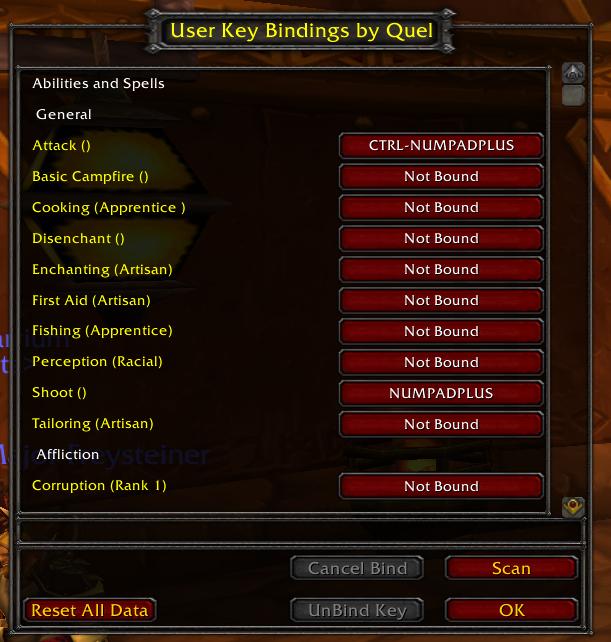
Begining with The Burning Crusade, the user interface may bind keys directly to spells, abilities, macros and usable inventory items; however, the game does not provide a gui for making such key assignments. UserKey scans you spellbook, your macros, your inventory (including your bank) and provides a gui for assigning keys to those actions/items.
Also includes a mini-API to allow other Add-On authors to add entries to the UserKey table, allowing custom bindings to their own buttons built using the new secure templates.
Updated for WoW 3.0.2 patch; added options panel in Game Menu | Interface | AddOns.
MAJOR FEATURE ADDITION: In 3.0.2, all pets and mounts are converted to spells stored on the Companions interface and are no longer inventory items. Unfortunately, the companions don't honor the normal function for binding keys. As a (hopefully temporary) workaround, qUserKey has the ability to scan your mounts/pets, create macros to call each of them, and let you bind keys to those macros. On the upside, this is nice and simple. On the downside, it can potentially consume a ton of macro slots. This macro generation is disabled by default. You may enable it via the aforementioned options panel.
Usage
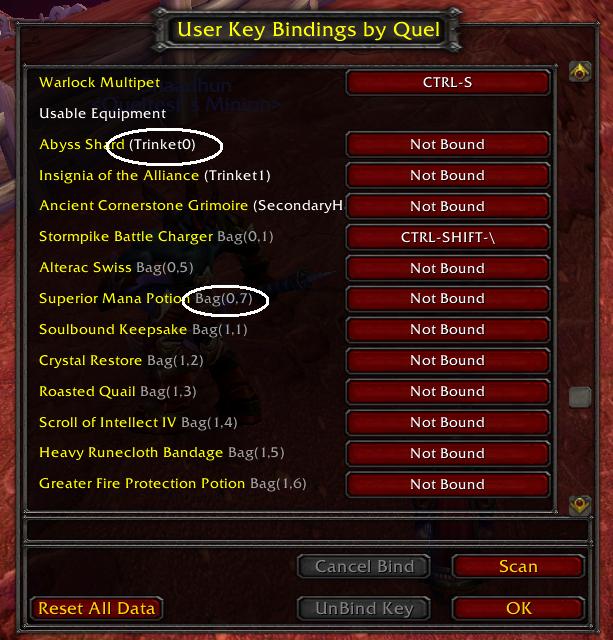
UserKey adds a new entry to the main game menu called "User Key Bindings" directly below the original "Key Bindings" button. Click the button and scroll through the available items. Items from the spellbook are displayed first (with tabs/schools indicated), then macros, then usable items. Then click the item you want to bind, press the key you want (including CTRL, ALT, and/or SHFT) just like the official Key Binding interface.
AddOn Authors:
To add your own buttons to the UserKey table, simply call:
UserKey_AddButton(addon, section_name, button_table);
where:
addon = "your addon name";
section_name = "My Clever Title for My buttons";
button_table = { { " name button1", "mybutton1" }, {"name button2","mybutton2"} };
This will add entries to a section titled "My Clever Title for My buttons". When you bind a eky to "name button1," UserKey will perform a SetBindingClick(key,"mybutton1"). Subsequently pressing the key will "click" your button.
If your addon fails to load, the binding will no longer be displayed.
To remove a binding button from the list dynamically, call UserKey_RemoveButton(addon, section_name, button_table). Notes Regarding Inventory Changes The inventory scan checks your bags anytime your inventory is updated. It also checks your bank whenever you open the bank interface. It then labels which bag/bank slot contains the item to make it a little easier to find in your bags. If you consume an item, sell an item or destroy an item, UserKey can't readily tell why the item left your inventory. So, it assumes that any
items that suddenly go "missing" must have been stored in your bank slot. They will be displayed with the tag (bank?) indicating the UserKey isn't really sure where the item is. The next time you open your bank, UserKey will have access to your full inventory. Any (bank?) items that aren't truly in your bank will be removed.
Technically, UserKey could assume that any item that goes "missing" must have been sold/destroyed/lost if you don't have your bank frame open. it's a little safer, though, for UserKey to assume it missed some event firing and therefore assume your item is in the bank. As soon as you open your bank again, UserKey will be able to resynch.
The "reset data" button ONLY clears the text displayed by UserKey. It does NOT undo all of your keybinds. This is primarily a debugging tool that I've left in the mod to facilitate future additions.
The "scan" button rescans your spellbook, macros and inventory. UserKey triggers off many events and should automatically detect any changes to bindable actions. If, however, you find an item doesn't automatically appear in your list, try clicking the Scan button. You can reclick scan as often as you want, it will not create duplicate entries in the display.
The qUserKey - bind a key to any spell, item or macro Team

