This is the single bar configuration showing skills on CD

Two bar configuration with no skill on CD so the bar is made transparent
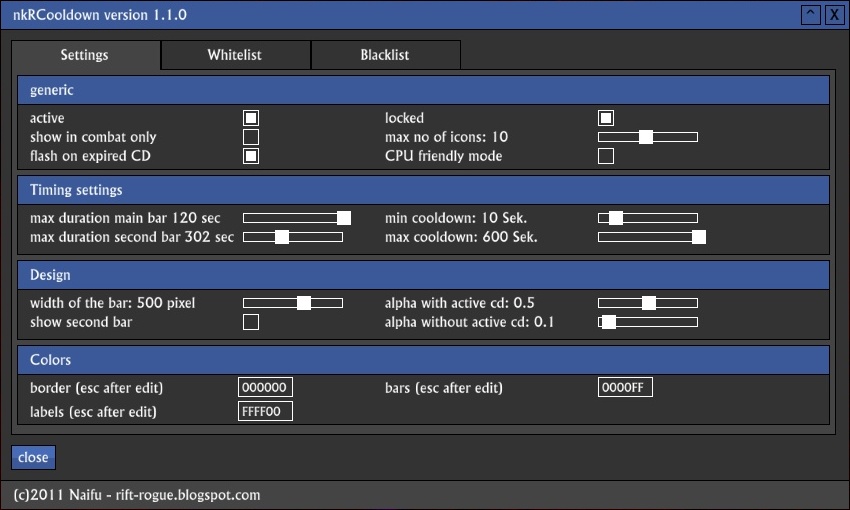
This is the configuration screen of version 1.1.0
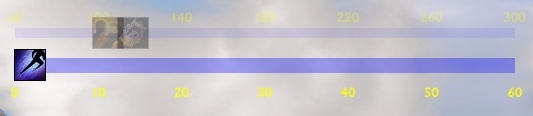
This image shows the two bar configuration with some skills on CD being shown

This is an example of the CD bar Version 1.1.0
Description
Features
nkRCooldown is a port of my nKCooldown Addon I did for another game.
nkRCooldown shows all currently active skill cooldowns of your char on a bar. This allows you to get an visual view of all your cooldowns. Especially in PvP or Raid situations this will allow you to fire your skills much more consistent.
New cooldowns start at the right side of the bar and will move to the left. Only CD less than 60 seconds (or whatever you'll select as maximum duration for the short CD bar) will move on the bar. As soon as a a CD of a skill the icon will be removed from the bar.
Configuration
You can access configuration by either /nkRCD config or /nkRCooldown config.
The configuration lets you manage many aspects of the addon and customize it to quite some extend:
- active: activate / deactivate the addon from within the game
- show in combat only: does what it says
- flash on expired CD: flashes the icon for 2 seconds as soon as an ability is ready again
- locked: Allows you to move the bar around the screen
- max no of icons: How many CDs the addon should track (actually per bar main / second)
- CPU friendly mode: if activated will check for updates and update bar only once per second. CPU usage goes down from around 6% to 0.2% if activated
- max duration main bar: sets how low a remaining CD has to be for the icon to show up on the main bar
- max duration second bar: sets how low a remaining CD has to be for the icon to show up on the main bar
- min cooldown: Used for recognizing and adding CDs to whiteliste. Only buffs with CD longer than this are handled by the addon
- max cooldown: Max cooldown of buffs handled - recommended to leave at standard setting
- width of the bar: Sets what it says
- show second bar: if activated a second bar is shown handling the CDs > max duration main bar
- alpha with active cd: The alpha level used if a CD is currently handled by the addon
- alpha without active cd: The alpha level used if no CD is currently handled by the addon (set to 0 if you want to hide the addon in this case)
- color border: The color used for drawing the 1 pixel border around the bar
- color bars: The color used for drawing the bars
- color labels: The color used for the labes
Please note that the colors have to be specified in HEX format. If you don't know what that is, leave the standard values.
Whitelist
This pane shows all CDs with were recognized by the system so far. Only CDs > min cooldown and < max cooldown settings are shown.
You can move CDs to blacklist by selecting them and click on the button at the bottom.
Blacklist
This pane shows all CDs which were actually recognized by the system and which would be shown on the bar. However if you decided that a particular CD should not be tracked by the addon you can move it from whitelist to blacklist. These CDs will be listed here.
You can move CDs back to the whitelist by selecting them and click on the button at the bottom.
Know Issues
- Some cooldowns don't work correctly. This is an issue with the Trion API as the cooldowns are not submitted correctly by the system
- The alpha level settings do not apply to the labels
The nkRCooldown Team