
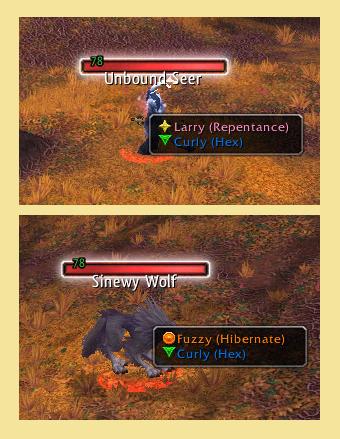
Sample
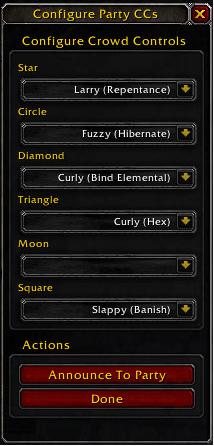
This is the screen that will be show upon forming a group or entering a dungeon
Description
CC Mate is designed to assist players with marking for Crowd Control. It will show, upon selecting a target (with a modifier key) which members of your party or raid are capable of Crowd Controling the target. It will also allow you to select a party or raid memeber CC to use and mark the target accordingly.
Using the minimap icon or /ccmate config, you may setup marks for each party member and announce the configuration to the group/raid.
LOCALIZATION has been setup but no translations have occured. If anyone wants to provide some translations, please feel free!
To use CC Mate:
1. Install the Addon
2. Upon entering World of Warcraft, make sure you have selected the addon in the Addon Control Panel at Character Select
3. After entering the game world, select any NPC while holding the Shift key.
4. A menu will popup showing you the crowd control options for the target type.
5. Select the party member that you wish to CC the target
6. To configure options for CC Mate use the minimap icon
7. Additional CC types are available but not enabled by default,
8. Configure marks for your party or raid using the minimap icon.
PLEASE REPORT any ISSUES found
The CC Mate Team
