<big>Quickly and easily remove unwanted buffs by using keybindings.</big>
 Unerwünschte Stärkungszauber mit Tastenbelegungen abbrechen.
 Rápidamente cancelar los beneficios no deseados mediante las asignaciones de teclas.
 Быстрое удаление ненужных баффов с помощью сочетания клавиш.
 使用绑定的快捷键快速移除不想要的buff。
 使用綁定的快捷鍵快速移除不想要的buff。
Description
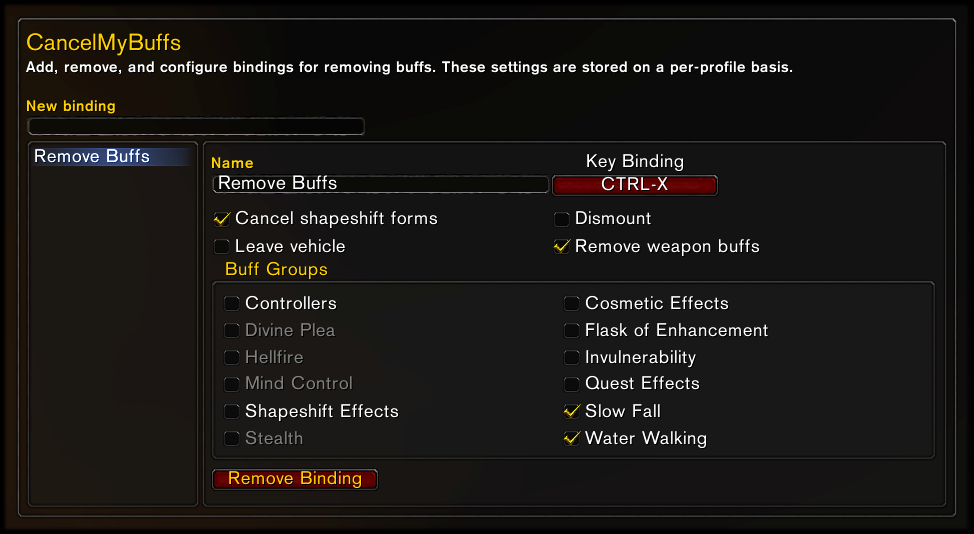
Cancel My Buffs lets you bind keys to cancel buffs without hunting for tiny icons to click on. You simply choose (ahead of time) which buffs you want to cancel, add them to a group, and bind a key to the group. When you press that key, all of the buffs in the group are cancelled. Dismounting, leaving vehicles, leaving shapeshift forms, and removing weapon buffs are also supported.
Usage
Type "/cmb" for options, or find them in the Interface Options window.
Key bindings are saved on a per-profile basis. Buffs and buff groups are saved globally, so you don't have to set them up all over again for every different character you play.
Limitations
Due to Blizzard restrictions, it is not possible to remove a buff only when certain conditions are met. For example, you cannot remove Aspect of the Cheetah only if you’re Dazed. When you activate your key binding, all of the buffs you have assigned to that binding will be removed, and the list of buffs cannot be edited while in combat.
Language Support
- Works in all languages.
- Translated into English, Deutsch, español, русский, 简体中文 and 繁體中文.
- Add or update translations for any language on the CurseForge project page.
Feedback
If you are reporting a bug, please make sure you have the latest version of the addon from this page, and then include detailed instructions I can follow to reproduce the bug myself, which Broker display you are using, whether the bug still happens when all other addons are disabled, and the exact text of the accompanying error message (if any).